
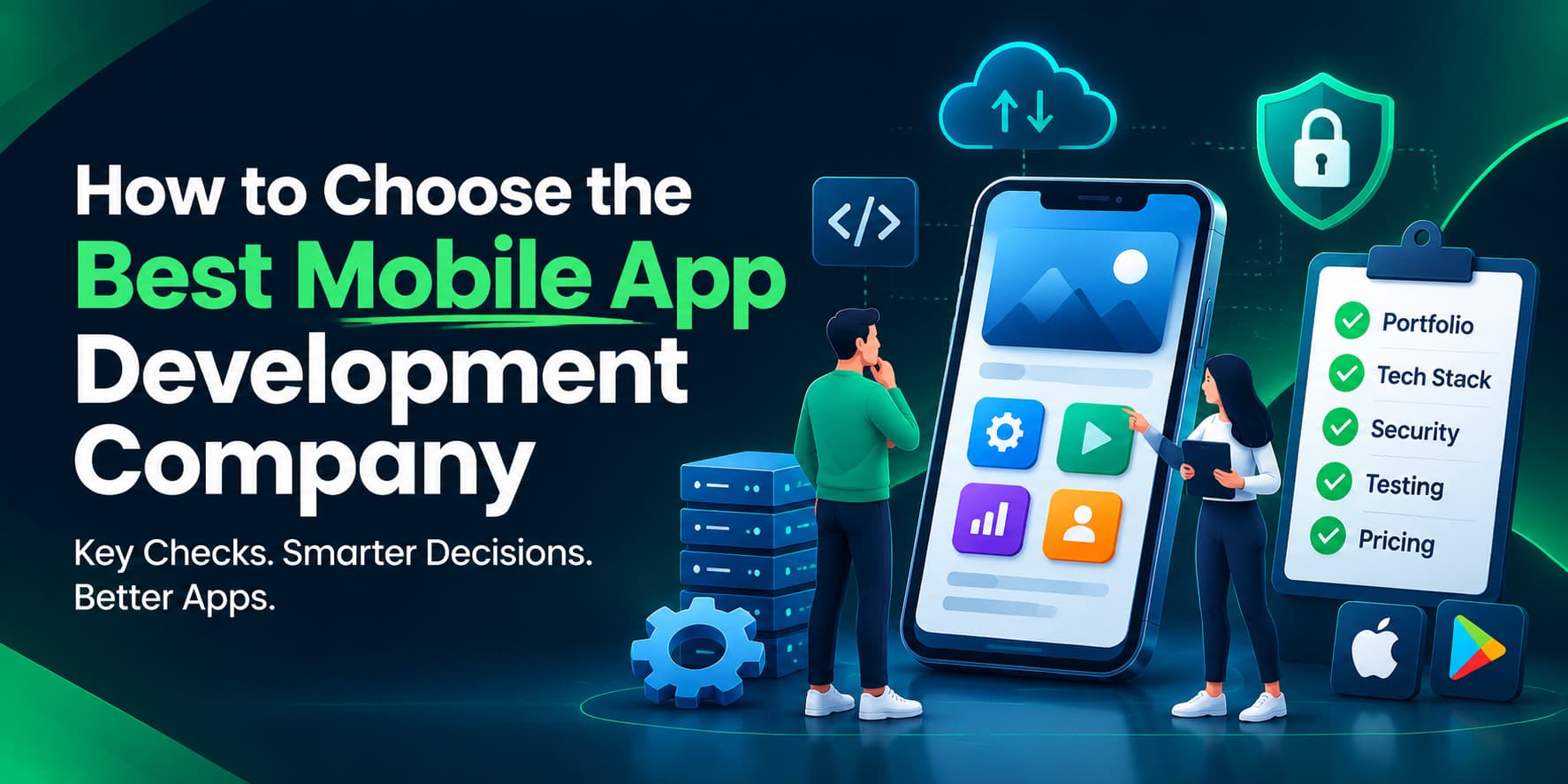
How to Choose the Best Mobile App Development Company
Last updated: 27 November 2026
You’ve got an app idea, a budget and a spreadsheet with ten agencies in it. Every proposal is polished. Every portfolio is full of clean screens and glowing reviews. And they all promise roughly the same thing: a scalable iOS and Android app in twelve weeks.
So how do you tell them apart?
Not by the prettiest screens. Pretty is the easy part. What decides whether your app survives is what happens when the network drops in a lift, when thousands of people tap the same notification at once, or when Apple rejects your build three days before launch. That’s what to check before you sign.
We build mobile apps at Toadster, so we’ve been on both sides of this conversation: pitching, and being compared. This is the checklist we’d want a buyer to use on us. Yes, that includes us.
Quick answer: To choose a good mobile app development company, write a one-page brief first, then test two or three of their live apps on a real phone, ask which tech stack they’d use for your app and why, make sure App Store and Google Play submission is in scope, insist the code sits in a repository you own from day one, and get post-launch support in writing. Be wary of any quote that doesn’t spell out what’s included.
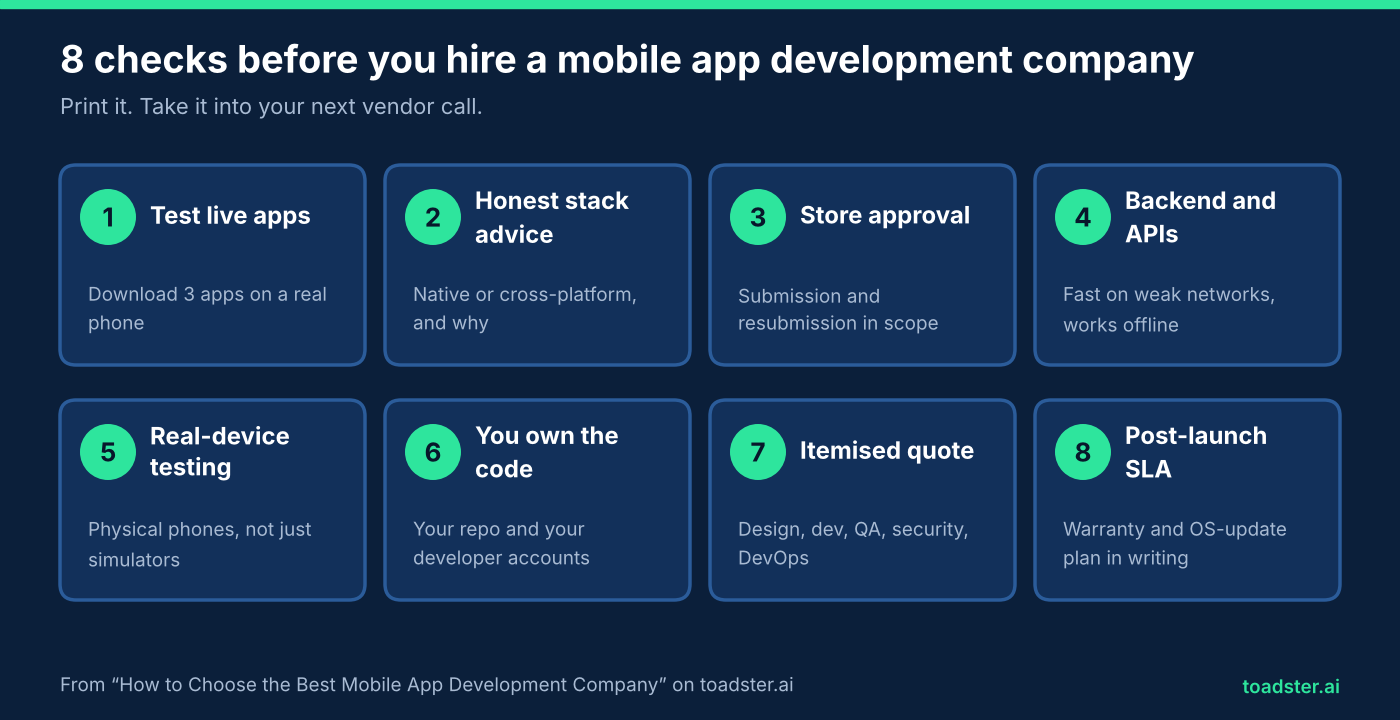
Figure 1: The eight checks at a glance. Each one is explained below.
Before You Talk to Any Agency: Write a One-Page Brief
Agencies can only give you comparable quotes if they’re all answering the same question. So spend an hour on a one-page brief first: who the app is for, which platforms you need, the five or six must-have features, any systems it has to connect to (payments, CRM, ERP), your budget range and the date you’re aiming for. Rough is fine. Blank isn’t.
You’ll learn something about the agencies, too. The good ones will poke holes in your brief. The bad ones will just say yes.
1. Check Their Portfolio: Download the Live Apps and Test Them
Do this before you read a single case study. Anyone can hire a designer to make beautiful Figma prototypes. What shows whether an agency can actually engineer is how its published apps behave when real people use them on real networks.
Ask every agency on your shortlist for links to three live apps they built, currently on the Apple App Store and Google Play. Download them, then spend ten minutes being a slightly annoying user:
- Scroll like you mean it. Does a long list stutter or freeze?
- Kill the connection. Turn off Wi‑Fi and mobile data. Does the app crash, show a blank screen, or fall back gracefully to cached content?
- Watch the phone. After five minutes, is it warm? Has the battery dropped more than it should?
- Check the store page. When was the app last updated? An app nobody has touched in eighteen months says something about the support behind it.
Red flag: The agency says it can’t share links because of an NDA, and gives the same answer for every single project. Some work really is confidential, but a credible agency can usually show at least one public app or put you in touch with a past client.
2. Ask About the Tech Stack: Native, Cross-Platform or Hybrid?
A good agency will walk you through the trade-offs, even when the honest answer isn’t the stack they’d prefer to sell. Plenty of agencies push whatever their available developers happen to know. If someone tells you “React Native is always better” or “native iOS is the only way”, that’s not consulting. That’s a bench that needs filling.
Cross-platform (React Native, Flutter) | Native (Swift, Kotlin) | |
|---|---|---|
Best for | MVPs, e-commerce, content platforms, and many business and internal apps | Heavy background processing, custom Bluetooth or IoT work, AR/VR, graphics-intensive apps |
Main upside | One codebase for iOS and Android, so it’s usually quicker and cheaper to build and maintain | Full access to every platform feature from day one, and the best raw performance |
Main trade-off | Brand-new platform features and unusual hardware can need extra native work | Two separate codebases, and usually a bigger budget |
We go deeper on the native side in our native mobile app development guide, and compare the two big cross-platform frameworks in Flutter vs React Native in 2026.
Whichever way it lands, ask who will actually write the code. If you’re leaning cross-platform, check the team has shipped real apps in that framework, not learned it last month. And if Flutter is on your shortlist, here’s how we staff Flutter developers.
3. Confirm App Store and Google Play Submission Is in Scope
It should be the agency’s job, and it should be written into the contract. Getting an app built is only half the work. Getting it approved is where inexperienced teams freeze.
Rejections are routine. Apple reviewed about 7.77 million submissions in 2024 and rejected roughly 1.93 million of them, around one in four. Apple’s own figures put the reasons down to security, reliability and user-experience problems, and the report’s biggest buckets were performance, legal and design issues. The encouraging part: more than 295,000 of those rejected submissions were approved after developers fixed the issues. A rejection is a fixable problem if your team knows what it’s doing.
On Android, Google Play has required new apps to be published as an Android App Bundle (.aab) since August 2021. If an agency still talks about handing you an .apk as the finish line, that’s a sign they’re behind.
One honest caveat: no agency can guarantee approval, because the decision belongs to Apple and Google. What you can require is that submission and any resubmissions are included in the scope, and that the final milestone payment is tied to the app actually going live. Ask this exact question: “Is store submission included, and what happens if Apple rejects the app?”
Red flag: An agency that considers its job done the moment it hands over a build file. Your contract should say the last payment depends on successful store deployment.
4. Review Their Backend and API Architecture
Ask about it, because a fast app sitting on a slow API still feels slow. A mobile app is only as quick as the servers behind it. A gorgeous interface wired to slow, unindexed database queries will feel sluggish on the fastest phone you can buy.
Get the lead architect on a call and ask how they keep payloads small on mobile networks. You’re listening for specifics: caching headers on REST endpoints, pagination instead of dumping whole lists, GraphQL where it genuinely reduces over-fetching, WebSockets for real-time features, and a clear plan for what the app does offline and how it syncs when the connection comes back.
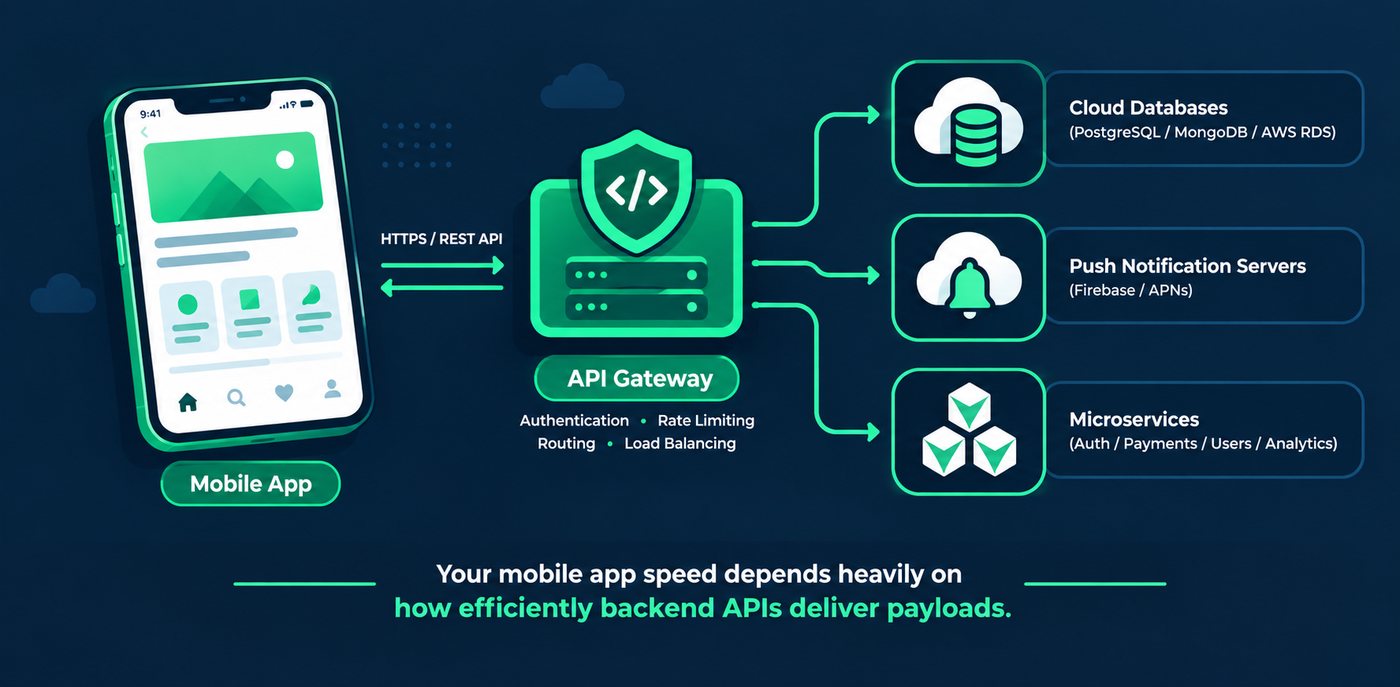
Figure 2: A typical mobile backend. The app talks to an API gateway, which fronts the databases, push notification servers and microservices.
If your product also needs a web dashboard or admin panel, make sure one team owns the backend end to end. It’s the kind of work we cover in our custom mobile app development service, and our enterprise mobile app guide goes further into architecture.
5. Ask How They Test: Real Devices, QA and Automation
They should test on real phones, and you should ask how many. Android alone runs on thousands of distinct device models, with different screen ratios, chipsets and manufacturer skins such as Samsung One UI, Xiaomi HyperOS and stock Android.
If an agency tests only on simulators and emulators (Xcode Simulator, Android Studio Emulator), your users will find the camera bugs, dropped notifications and broken layouts that simulators simply don’t catch. Good teams combine a physical device lab or a cloud platform such as AWS Device Farm or BrowserStack with a handful of real phones on someone’s desk, plus automated tests that run on every build.
What to ask: “Which physical devices do you test on before every release, and can I see a recent test report?”
6. Make Sure You Own the Code, the Accounts and the IP
You should, from day one. From the first sprint, code should be pushed regularly to a Git repository (GitHub, GitLab or Bitbucket) owned by your company account. You shouldn’t have to wait three months to see what you’ve paid for.
That gives you visibility into progress, commit history and test coverage. It also protects you if the relationship sours, because your intellectual property is already where it belongs. Two more things worth checking:
- Developer accounts. Your Apple Developer and Google Play accounts should be registered under your company, not the agency’s.
- The contract. It should clearly assign the IP in the finished work to you.
Red flag: The agency wants to host the code on its own private server and promises to “transfer it after final payment”. That’s a vendor lock-in risk, and it hands them all the leverage.
7. Compare Pricing Models and What a Mobile App Quote Should Include
A good quote covers everything it takes to ship the app and keep it running, not just developer hours. Quotes for the same feature list can land several times apart, and the usual reason is team composition. A very low quote often means one person doing everything, with no dedicated QA, security testing or design. A higher quote from an established agency typically pays for a project manager, designers, mobile and backend developers, QA testers and DevOps.
Also look at how they charge. Fixed price works when the scope is clear and unlikely to change. Time and materials suits products that will evolve as you learn, because you pay for effort as it happens. Many teams settle on milestone-based pricing, which sits in between. None is automatically better, but a vendor should be able to explain why they recommend one for your project.
Either way, a proper quote itemises the work. Use this as a checklist:
Line item | Why it matters |
|---|---|
Discovery and scoping | Turns your idea into a written scope, so every agency prices the same thing |
UX and UI design | Screens, flows and a design system the developers can build from |
Mobile development | iOS, Android or both, depending on the stack you chose |
Backend and APIs | The servers, database and integrations the app depends on |
QA and device testing | Manual and automated tests across real devices |
Security review | Authentication, data storage and API protection |
Store submission | Accounts, listings, screenshots, review responses and resubmissions |
Post-launch warranty | Bug fixes for an agreed period after release |
If two quotes for the same scope are far apart, don’t just pick the cheaper one. Ask that agency which line in this table is missing.
We’re deliberately not printing a single price here, because a number without a scope is meaningless. To see how the pieces add up, read how to compare MVP development quotes and our mobile app maintenance cost guide. And if your budget is tight, build an MVP first. Three core features done exceptionally well will beat twenty half-baked ones.
8. Get Post-Launch Support, Maintenance and OS Updates in Writing
Ask for it before you sign, because both platforms change every year and old code breaks. Apple ships a new major iOS version every autumn. Google has moved Android’s major release earlier: Android 16 arrived in June 2025, and Android 17 went stable in mid-June 2026, with a smaller update promised later in the year. These releases routinely change permissions, notification behaviour and layouts.
If your agency doesn’t offer post-launch maintenance, a perfectly good app can start misbehaving for users overnight after a system update. Ask for the support terms up front:
- How long is the bug-fix warranty after launch, and what does it cover? (A couple of months is common.)
- What does ongoing maintenance cost per month, including OS compatibility updates and security patches?
- How quickly will they respond to a critical bug, and who monitors crashes after release?
Don’t Skip Reviews, References and Industry Experience
The eight checks above test the engineering. This part tests the track record. Third-party review sites such as Clutch and GoodFirms are a decent starting point, but remember reviews can be curated, so treat them as a hint, not proof.
- Ask for two client references and actually call them. Good questions: Did they hit the deadlines? How did they handle surprises? Would you hire them again?
- Look for relevant experience. It’s not essential that they’ve built an app in your exact industry, but it shortens the learning curve, especially for regulated sectors.
- Ask who will really work on your project. The people in the sales pitch and the people writing the code are often different. Ask about seniority, team size and what happens if someone leaves.
Communication and Project Management: What Working Together Looks Like
A technically strong team can still be a nightmare to work with. Before you sign, find out how the project will actually run. Short sprints (usually one to two weeks) with a demo at the end of each are a healthy sign. So are a single point of contact, access to the task board, a clear process for changing scope, and enough working-hours overlap that questions don’t wait a full day for an answer.
Whether the team is local, nearshore or offshore matters less than how well they communicate. Offshore teams can lower cost, but they usually need stronger project management to stay aligned, so ask how they handle it.
Mobile App Development Company: Green Flags vs Red Flags
Here’s the whole article on one screen. Screenshot it before your next vendor call.
Green flags: what great agencies do | Red flags: what risky agencies do |
|---|---|
Share live App Store and Play Store links you can test | Show only Figma screenshots or demo videos |
Recommend a stack based on your app’s needs | Push one framework because it’s who’s free this month |
Include store submission and resubmission in the scope | Hand over a build file and leave submission to you |
Explain how they’ll keep APIs light and handle offline use | Talk only about screens and never mention the backend |
Test on real devices and share the reports | Test only on simulators and emulators |
Push code regularly to a repository you own | Hold the code on their server until the final invoice is paid |
Itemise the quote: design, development, QA, security, DevOps | Give one flat number with no breakdown |
Offer a clear post-launch warranty and OS-update plan | Charge hourly for every bug from day one after launch |
Does the Location of Your App Development Company Matter?
Less than people think. The team matters far more than the postcode, but location does shape cost, talent depth and how much your working hours overlap. If you’re looking at India, these are general tendencies, not rules:
City | Often known for | Worth keeping in mind |
|---|---|---|
Noida and Delhi NCR | Consumer apps, e-commerce and enterprise cross-platform builds, usually with a good balance of cost and quality | It’s a big market and quality varies a lot, so vet the individual team |
Bengaluru | Deep engineering talent, fintech and product-led startups, complex SDK and backend work | Rates are often higher, and hiring competition can mean more team churn |
Mumbai | Fintech, banking, media and OTT clients with strict security and compliance needs | Great if your product sits close to finance or media; less essential otherwise |
Full disclosure: we’re based in Noida, so weigh that accordingly. If you’re comparing the NCR hubs, our Noida vs Gurugram breakdown covers talent and overheads in more detail. Either way, decide on evidence (live apps, references, contract terms) and let geography break the tie.
Questions to Ask a Mobile App Development Company
Copy these into your notes. A good agency will enjoy answering them.
- Which three live apps can I download today?
- Can I speak to a past client?
- Which stack would you pick for my app, and why not the other one?
- Is App Store and Play Store submission in scope, and what happens if Apple rejects the app?
- How will you keep the API fast on a weak mobile network, and what happens when the user is offline?
- How many physical devices do you test on before a release?
- Will the code and the developer accounts be under my company’s name from day one?
- What exactly is in your quote, and what isn’t?
- Who exactly will work on my project, and how do we communicate day to day?
- What does post-launch support cost, and how do you handle each new iOS and Android release?
How We Work at Toadster
This checklist is also how we try to run our own projects. From day one, code goes to your private repository, in your name. We test on physical devices, handle App Store and Play Store submission end to end, and put post-launch support terms in writing before the build starts. We’d rather you ask us the hard questions early than discover the answers late.
You can judge the work yourself in our mobile app case studies. For the wider market picture, our mobile app development statistics report pulls the numbers together.
Want to put us through the checklist? Talk to our team about your mobile app project.
Final Thoughts: Choosing a Mobile App Development Partner
Choosing an app partner isn’t about finding the lowest hourly rate or the slickest pitch deck. It’s about finding a team that understands performance, store rules, security and long-term support, and is willing to put all of that in writing. Do the ten-minute test on their live apps, ask the questions above, and read the contract as if the app’s future depends on it. Because it does.
Sources and further reading
- Apple Newsroom: App Store fraud prevention and App Review in 2024
- MacRumors: Apple shares 2024 App Store data on rejections and removals
- Android Developers Blog: The future of Android App Bundles is here
- Android Authority: Android 17 stable release
- Apple App Store Review Guidelines
- Google Play Developer Content Policy