
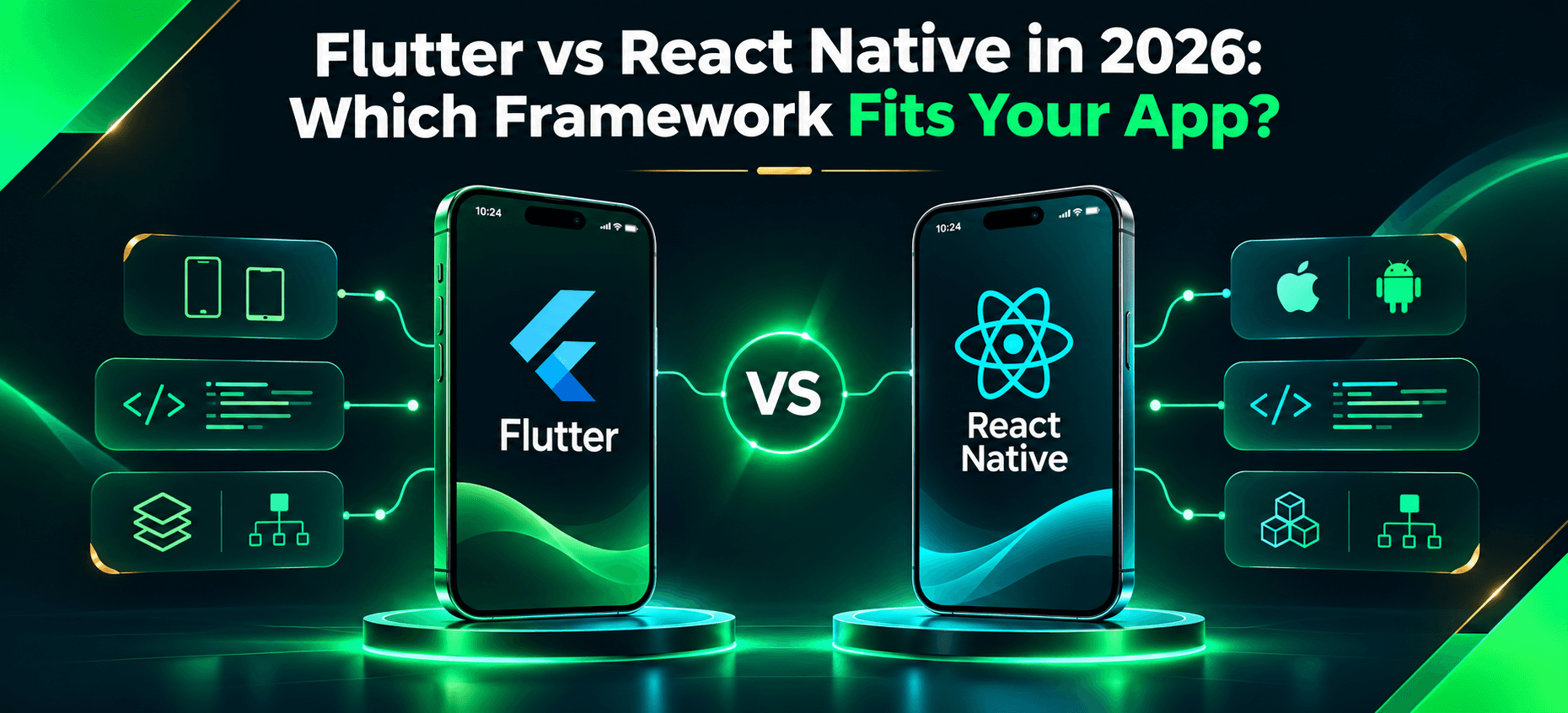
Flutter vs React Native in 2026: Which Framework Fits Your App?
Choosing between Flutter and React Native is not simply a question of which framework produces smoother animation or has more developers. For a business planning a mobile product, the choice influences recruitment, development speed, native integrations, release processes, maintenance, and the ability to change direction later.
Both frameworks let teams deliver iOS and Android applications using substantial shared code. Both can support sophisticated production applications. Neither automatically reduces development costs or guarantees better performance.
The useful question is: Which framework fits your product requirements, your engineering team's capabilities, and the costs you can support over the next several years? This guide compares the technical trade-offs in 2026, then applies them to realistic scenarios and a practical selection scorecard.
Flutter vs React Native: Quick answer
Choose Flutter when your product needs highly customized, visually consistent interfaces and your team can support Dart development. Choose React Native when you already have strong React and TypeScript expertise, value an established JavaScript-centered workflow, or want an approach built around platform-native views.
Neither choice eliminates native engineering. Device SDKs, permissions, accessibility, app-store releases, and platform-specific behavior still require testing. Specialized hardware or unusually demanding platform requirements may justify native Swift or Kotlin development instead.
Flutter vs React Native: Key differences at a glance
Decision factor | Flutter | React Native |
|---|---|---|
Language | Dart | JavaScript or TypeScript |
UI approach | Framework-controlled widget tree and rendering | React components rendered using native platform views |
Rendering | Flutter engine; Impeller where supported | Fabric in the New Architecture |
Team alignment | Existing Flutter/Dart capability | Existing React/TypeScript capability |
Visual design | Strong control of shared custom UI | Flexible interfaces with native platform behaviors |
Native integration | Plugins, platform channels, native code | TurboModules, native components, native code |
Iteration | Hot reload | Fast Refresh and ecosystem tools |
Updates | New binaries for native changes; assess any third-party code update service carefully | Expo Update can deliver eligible non-native changes; native changes need new binaries |
Maintenance | Dart packages, engine upgrades, plugins | JS dependencies, library compatibility, native architecture upgrades |
Typical fit | Highly branded cross-platform visual systems | React-oriented teams and native-view-based products |
These are architectural characteristics, not guaranteed results. Performance, delivery cost and accessibility depend on the actual application.
How Flutter and React Native architectures differ in 2026
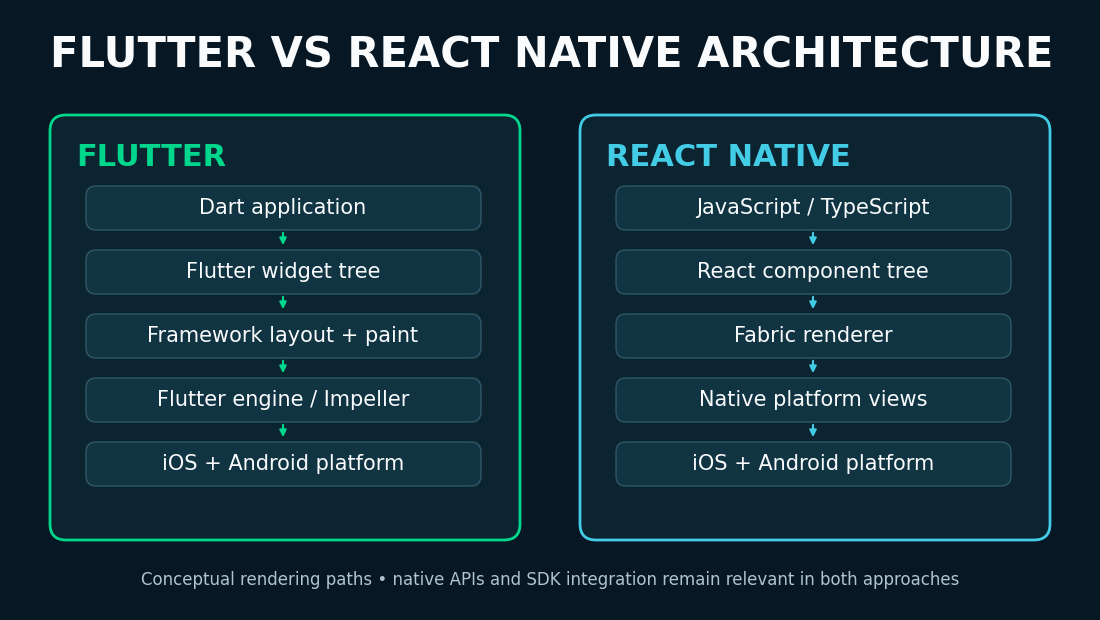
Flutter: A framework-managed rendering system
Flutter applications are primarily written in Dart. Flutter creates its own widget tree and rendering output rather than treating every visible element as a conventional operating-system UI control. Dart can be compiled ahead of time for release builds, while the Flutter engine handles layout and drawing.
Flutter's Impeller renderer is the only supported renderer on iOS. On Android API level 29 and newer it is enabled by default when supported; devices on lower Android versions or without the required Vulkan support can use a fallback renderer. Test on your actual target devices rather than assuming every installation shares an identical rendering configuration. See the official Impeller documentation.
This approach can help teams produce a consistent branded interface across platforms. It does not remove differences in accessibility semantics, notifications, keyboard behavior, permissions, background execution or device capabilities. Those still require platform-aware development and testing.
React Native: React development with native rendering
React Native uses React principles and JavaScript or TypeScript to build mobile applications using native platform components. Its architecture has evolved substantially since comparisons centered on the old asynchronous bridge.
React Native 0.82, released in October 2025, was the first release operating entirely on the New Architecture, centered on Fabric rendering, JavaScript Interface (JSI) interoperability and TurboModules. Subsequent 2026 releases continued to modernize that foundation:
Release | Date | Relevant change |
|---|---|---|
0.82 | October 2025 | New Architecture-only operation |
0.84 | February 2026 | Hermes V1 became the default JavaScript engine |
0.85 | April 2026 | New animation backend |
0.87 | August 2026 | Strict TypeScript API became the default |
0.88 | October 2026 | Web-based event dispatching by default; variable fonts and iOS SceneDelegate support |
These milestones are documented in the React Native release archive, including the 0.88 release notes. They make blanket claims about React Native always relying on the historical bridge misleading. They do not guarantee that every older third-party library or native SDK is compatible with the newest releases.
An existing React/TypeScript team may benefit from familiar programming concepts and selected tooling, but web UI components are not automatically transferable into React Native. Mobile layout, navigation, gestures, app lifecycle and device testing remain distinct disciplines.
Why the architectural difference matters
The real distinction is how each framework constructs UI, interoperates with native code and handles its rendering runtime. Both can perform well and both may require platform-specific work. A useful proof of concept should exercise the most difficult screen and native integration you expect to ship, not just a login screen.
For product teams, the most important framework choice usually comes after the workflow and integration constraints are understood. A related discussion of enterprise mobile planning mistakes before development explains why those constraints should be tested before committing to the mobile stack.
Flutter vs React Native performance: Which is faster?
There is no defensible universal winner. Performance depends on the application, hardware, rendering workload, memory use, network activity, native SDKs and implementation quality. A framework comparison is meaningful only when it measures representative user tasks.
Test startup responsiveness, scrolling and animations, memory during long sessions, battery consumption under background workloads, and crash or unresponsive-app rates. For production telemetry and practical quality measures, see Android vitals.
A reproducible performance experiment
Suppose a field-service app displays 2,000 locally available work orders, lets technicians edit records offline and synchronizes them after reconnecting. Implement comparable workflows using the same API contract, data sizes, images and target devices. Measure cold launch, list interaction, local save time, synchronization delay, memory behavior and energy use.
Test control | Recommended procedure |
|---|---|
Build type | Optimized release builds or representative profile builds |
Devices | Exactly the same physical devices, including lower-end models |
Dataset | Identical work orders, images, cache state and API responses |
Conditions | Comparable network, battery, background-load and thermal conditions |
Repetitions | Several runs; report median and variability, not only the best result |
Metrics | Startup latency, frame timings, memory, crash events and energy use |
Interpretation | Compare measured user outcomes, not one synthetic benchmark score |
Record framework versions, dependencies and test procedures so results can be repeated. Neither an optimized Flutter demo nor an under-tuned React Native prototype is fair evidence of universal superiority. No benchmark values are claimed here because this article did not run such an experiment.
UI design, native feel and accessibility
Flutter's rendering model can suit products with elaborate transitions, bespoke visual components and a shared design system. React Native's platform-view approach can suit interfaces that benefit from native conventions and teams accustomed to React. Both can deliver polished experiences, and neither automatically reproduces every platform convention or accessibility behavior.
Test screen-reader navigation, focus order, dynamic text sizes, contrast, touch targets and device navigation separately on iOS and Android. For regulated, public-service or enterprise products, make accessibility part of acceptance criteria rather than a last-minute visual check.
Developer experience, hiring and team productivity
Flutter requires Dart expertise, a grasp of its widget system and package ecosystem, and the ability to troubleshoot native behavior. React Native lets teams reuse React/TypeScript concepts, but mobile engineering still brings platform-specific SDKs, store releases, offline requirements and device testing.
Evaluate the team that will maintain the product, not an abstract community-size statistic. Ask whether it can diagnose performance problems, work with native integrations, recruit replacements, upgrade dependencies, and prevent a single specialist from becoming a bottleneck. A familiar language can reduce onboarding friction; it cannot remove mobile architecture complexity.
Native integrations and platform-specific features
Most production apps integrate with capabilities beyond a backend API: payments, biometrics, camera access, Bluetooth, push notifications, device storage, enterprise identity and background location. Flutter uses plugins and platform channels; React Native uses native modules and components, including TurboModules in the New Architecture.
Integration | Question to validate before choosing |
|---|---|
Payment provider | Is the required SDK supported with the intended purchase and refund flows? |
Bluetooth or industrial device | Do required protocols and background behaviors work on target hardware? |
Camera, barcode or document scan | Are frame rate, permissions and device compatibility sufficient? |
Enterprise SSO | Do token refresh and device-management policies work reliably? |
Background location | Can the feature operate within platform permission and battery restrictions? |
Offline database | Are encryption, migrations and synchronization semantics appropriate? |
A package listing is not proof of compatibility. Validate the highest-risk third-party integration in a small proof of concept before committing to full implementation.
For an engineering example of what that validation involves beyond selecting a UI framework, see reliable mobile-to-ERP integration design covering operation IDs, data ownership and synchronization failure recovery.
Flutter vs React Native security: What does the framework actually change?
Neither framework is universally more secure. The main security obligations are largely the same: securely storing tokens and sensitive local data, enforcing server-side authorization, protecting network traffic, validating certificates, handling authentication sessions, managing permissions and controlling what enters logs or crash reports.
Flutter and React Native have different dependency and native-integration ecosystems, so review package provenance, maintenance, security advisories and update paths for each. Sensitive information can be exposed through a poorly configured native SDK or an insecure backend irrespective of the framework language.
Use the OWASP Mobile Application Security Verification Standard (MASVS) to define testable requirements across storage, cryptography, authentication, network communication, platform interactions and code quality. A practical review should include the backend trust model and physical-device testing as well as the client application.
Flutter vs React Native development cost
Neither framework is automatically cheaper. Costs are driven by product scope, engineering experience, integration complexity, testing, security and maintenance. Comparing only the initial app build hides expenses that may arise after launch.
Illustrative three-year development and maintenance cost comparison
The example below compares selected implementation, integration, maintenance and upgrade expenses over an assumed three-year evaluation period. It excludes infrastructure, third-party subscriptions, analytics, customer support, app-store fees and other operational costs that may apply equally or differently to the two choices.
These are fictional planning assumptions, not vendor quotes, audited budgets or measured framework prices.
Selected cost component | Flutter scenario | React Native scenario |
|---|---|---|
Initial implementation | $80,000 | $75,000 |
Native integration work | $12,000 | $15,000 |
Maintenance during three years | $54,000 | $48,000 |
Upgrade and migration allowance | $9,000 | $12,000 |
Illustrative selected-cost total | $155,000 | $150,000 |
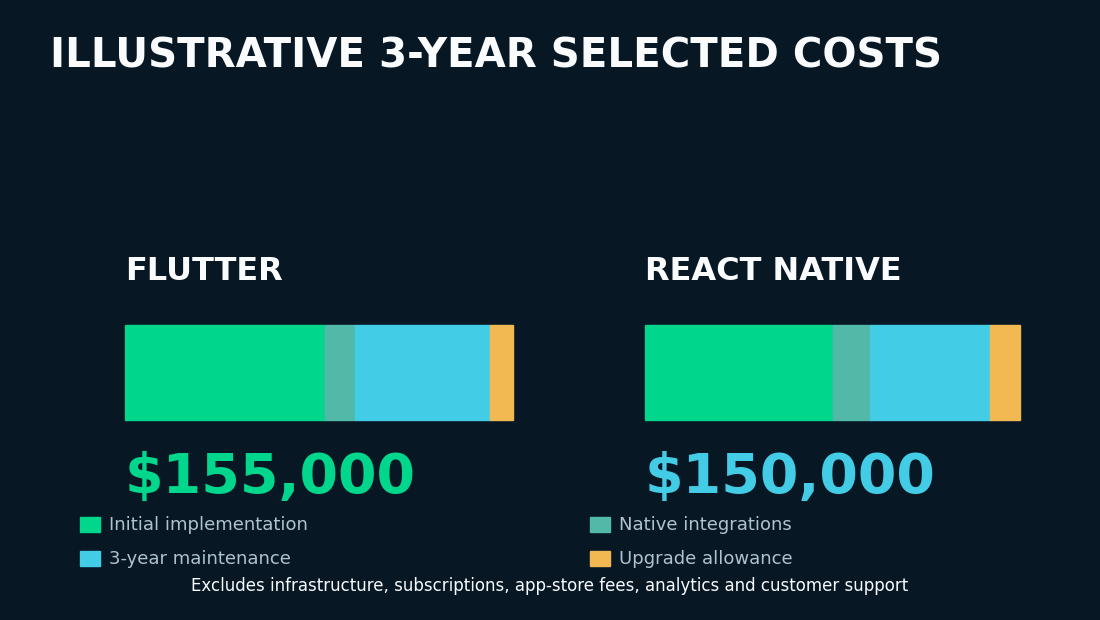
The arithmetic is exact for the stated assumptions, but the comparison does not represent complete total cost of ownership. A complete budget should add hosting, external APIs, subscriptions, testing infrastructure, support and other applicable operating costs.
Planning formula: Selected development and maintenance expenses = initial implementation + native integration + maintenance + upgrade allowance.
The decision can reverse when team expertise, custom UI demands or required SDKs change. Rather than treating a five-thousand-dollar hypothetical difference as meaningful market evidence, estimate your actual work packages and use the model to expose assumptions.
Long-term maintenance and release management
Both frameworks require security updates, operating-system compatibility testing, dependency upgrades, crash monitoring and release engineering. A framework with a convenient update workflow still needs rollback, version compatibility and quality checks.
React Native and Expo updates
Expo Update can distribute eligible JavaScript and asset changes to compatible React Native runtimes. It cannot make arbitrary new native code available inside an older installed binary. Native dependencies, permissions and incompatible runtime changes require a new app build and the relevant store process.
Flutter update considerations
Flutter typically distributes compiled mobile app changes through new platform binaries and app-store releases. Third-party code-push approaches may exist, but they should not be assumed equivalent to Expo Update or compatible with every build, native dependency or store policy. Evaluate any such service separately against security, rollback and distribution requirements.
The real comparison is which changes require a new native binary, how releases are validated, and how the app recovers from a problematic update. For both frameworks, document ownership of dependency upgrades and the supported release cadence before launch.
Offline functionality, Firebase and backend architecture
Offline success depends more on data architecture than the frontend framework. A reliable offline application must define local persistence, queued changes, retries, conflict resolution, authorization and recovery after interrupted synchronization.
For example, when a technician edits a customer record offline, the UI must say that the change is local. Upon reconnection, the system needs clear rules for accepting the change, reconciling conflicting edits and recovering from failure. Those rules cannot be selected by choosing Flutter or React Native alone.
This is also why framework selection alone cannot resolve the technical challenges of enterprise mobile app development: competing offline edits, existing systems and authorization rules require explicit backend policies.
Both ecosystems can integrate with relevant Firebase products. Firebase may accelerate authentication and other standard services, but the product team should still review security rules, ongoing costs, query limitations and migration requirements. Stable backend interfaces reduce unnecessary coupling to provider-specific SDKs.
For a broader discussion of enterprise integrations, see Toadster's enterprise mobile app development architecture guide.
Which framework fits different application types?
The following cases are illustrative, not descriptions of Toadster client projects.
Scenario 1: Subscription app with an existing React team
A startup needs iOS and Android apps, account management, subscriptions, notifications and analytics. Its engineering team already works in React and TypeScript. React Native is a reasonable starting preference because team familiarity may reduce onboarding costs. Validate subscription workflows, SDK support, release operations and representative UI performance before confirming the choice.
Scenario 2: Offline-first field-service application
The app needs camera capture, barcode scanning, local storage, enterprise authentication and reliable synchronization on industrial Android devices. Neither framework wins in advance. Test the actual scanner, database encryption, conflict resolution, background restrictions and recovery workflow on target hardware. The highest-risk requirements should determine feasibility.
Scenario 3: Highly branded mobile experience
A product requires custom components, coordinated transitions, animation-heavy screens and a shared visual language across platforms. Its team is comfortable with Dart. Flutter is a reasonable starting preference, subject to real-device performance and accessibility testing. Custom rendering control is useful, not proof of universally better UX.
When to rule out a framework before scoring
A weighted score must never conceal a critical blocker. Before assigning points, check non-negotiable requirements.
Potential blocker | What counts as a stop signal |
|---|---|
Proprietary SDK | Required vendor functionality cannot be implemented or supported reliably |
Industrial peripheral | Device protocol, permissions or background behavior fails on target hardware |
Accessibility | A mandatory user workflow cannot pass acceptance testing |
Distribution requirements | Required deployment or update model violates operational constraints |
Performance target | Representative release build misses a non-negotiable threshold after reasonable optimization |
Maintainability | Critical dependency is unsupported and there is no viable replacement or ownership plan |
If a requirement fails, solve it through a native integration, architecture change or different platform strategy before the framework enters the final comparison.
A weighted framework selection scorecard
After removing infeasible options, score remaining frameworks against the business's priorities. Assign weights adding to 100%, then use project evidence and prototype results to rate each option from 1 to 5.
The following ratings are illustrative judgments for a hypothetical React-experienced team, not independently measured product-performance scores.
Decision criterion | Weight | Flutter rating | React Native rating |
|---|---|---|---|
Existing team expertise | 25% | 2 | 5 |
Custom UI requirements | 20% | 5 | 4 |
Native integration fit | 20% | 4 | 4 |
Delivery and release operations | 15% | 3 | 4 |
Long-term maintainability | 20% | 4 | 4 |
Illustrative weighted decision score / 5 | 100% | 3.55 | 4.25 |
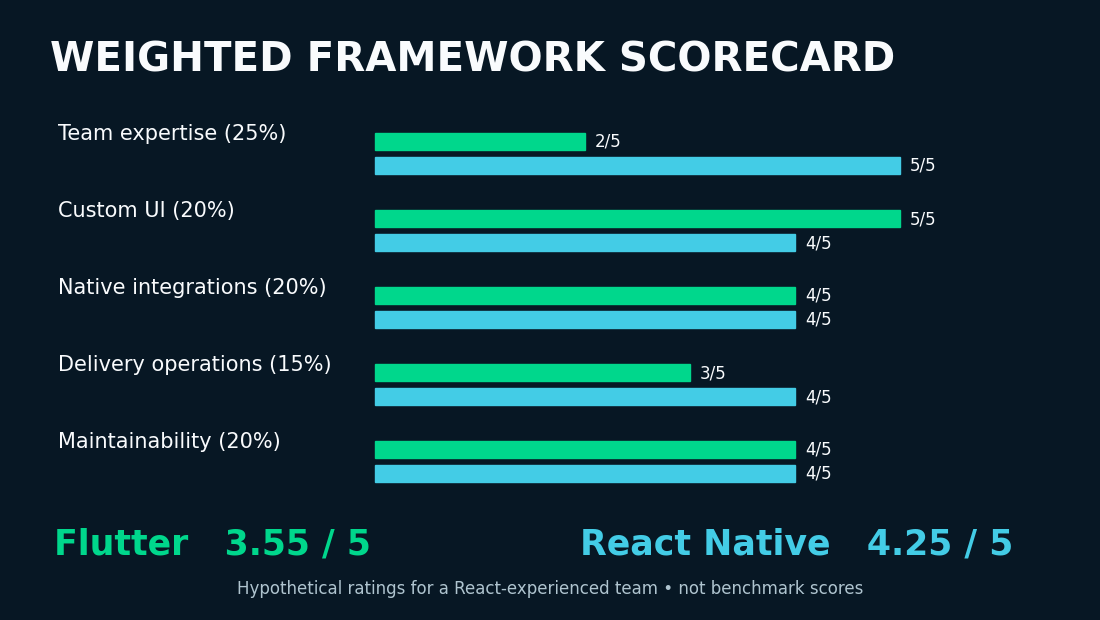
For this example, React Native scores higher primarily because of the team's established React expertise. A Dart-experienced organization or a product with more demanding custom UI needs could produce a different result.
A sensible team records evidence behind each score, varies important weights to test whether the result is robust, and recalculates after a proof of concept. Use the scorecard to make assumptions explicit, not to substitute arithmetic for engineering judgment.
When neither Flutter nor React Native is the best option
Native Swift or Kotlin development may make sense for specialized hardware, unusually demanding platform capabilities, advanced background execution or immediate access to specific operating-system APIs. A responsive web application may also be sufficient when device integration is limited and the main requirement is accessible forms and information.
The goal is not to prove a cross-platform framework can fit every application. It is to choose the least risky maintainable route to the product's requirements.
How to choose before development begins
- Document product requirements. List target users, devices, accessibility needs, integrations and release expectations.
- Test non-negotiable constraints. Validate proprietary SDKs, operating-system restrictions and security requirements before scoring.
- Assess your delivery team. Include long-term maintenance capability, not just initial velocity.
- Prototype the highest-risk workflows. Use representative devices and repeatable performance controls.
- Estimate selected development and ongoing costs. Include integrations, tests, upgrades, release operations and support.
Create a short architecture decision record capturing the choice, alternatives, assumptions, evidence and unresolved risks. For the full delivery lifecycle, see Toadster's custom software development process.
Conclusion: Choose for the product you will maintain
Flutter and React Native are both credible mobile-development options in 2026. The strongest selection process starts with non-negotiable requirements, tests uncertain integrations and performance, and evaluates the team's ability to maintain the product. Flutter may suit a specialized visual system and Dart-capable team; React Native may suit a React-oriented organization. Neither removes the need for sound architecture.
Businesses comparing implementation approaches can explore Toadster Technologies' mobile app development services to discuss project requirements, architecture, integrations and realistic delivery scope.