
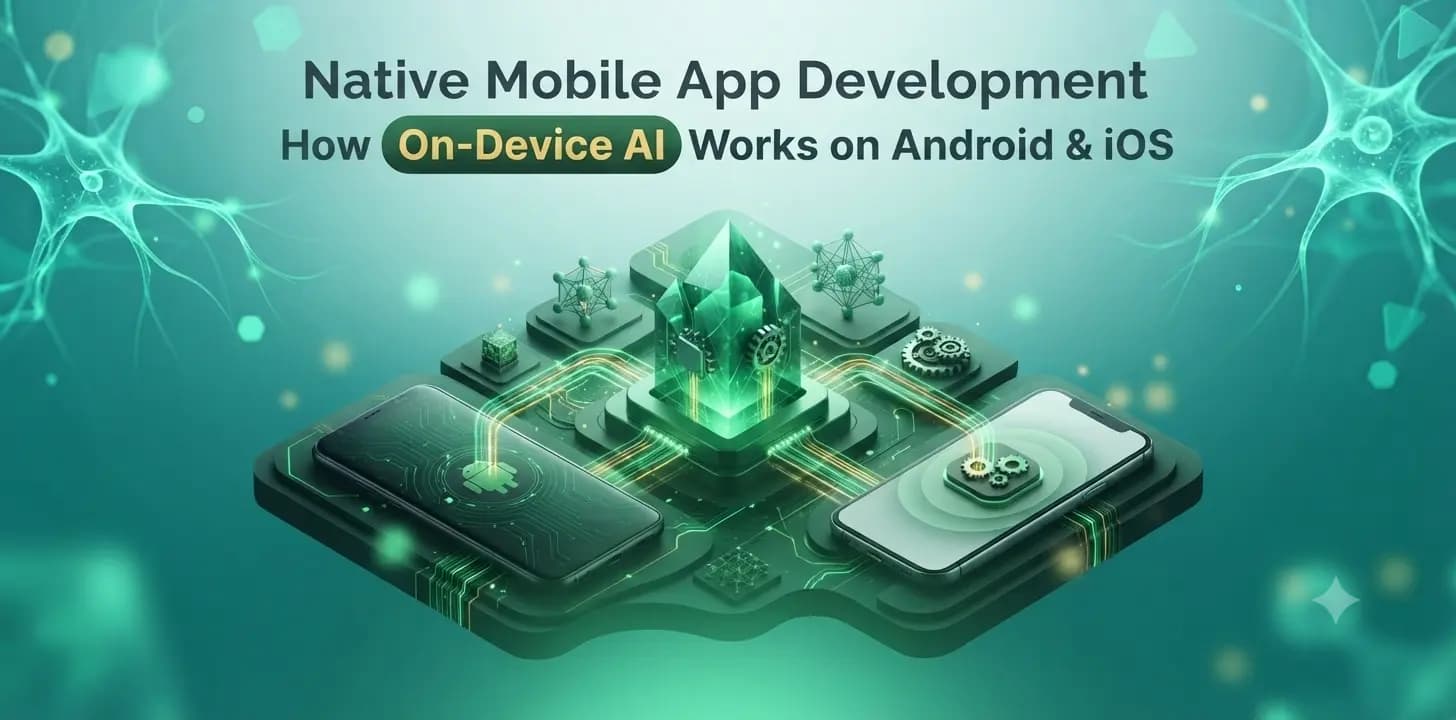
Native Mobile App Development: How On-Device AI Works on Android and iOS
AI features are now everywhere in mobile apps: smarter search, personalised recommendations, image recognition, voice processing, automated assistance. Adding one, though, takes more than connecting your app to a large language model or an external API.
Your team has to decide where the AI processing happens, how the app reaches the model, which data is allowed to leave the device, and how the feature behaves on different phones and unreliable networks. These questions shape the product long before anyone writes a line of model code.
This is where on-device AI becomes relevant to native mobile app development.
Instead of sending every request to a remote server, an app can run selected models directly on the user's smartphone. Android and iOS each offer their own frameworks for this, so developers can build intelligent features that work locally.
On-device processing isn't the right answer for every feature, though. Some tasks suit local inference. Others need cloud infrastructure, larger models or access to outside information.
To understand the broader native mobile app development workflow, it is useful to look at how user interactions, application logic, API requests and backend services work together.
This guide covers how on-device AI works in native Android and iOS apps, which technologies are available, and how to choose between on-device, cloud and hybrid architectures.
What Is On-Device AI in Native Mobile App Development?
On-device AI means running an AI or machine learning model directly on the device, instead of sending the input to a remote server.
In a typical cloud setup, the app collects the user's input, sends it to a backend or AI service, waits for the model's response and displays it. With on-device AI, the app can do some or all of that inference locally. The model uses whatever the device offers: CPU, GPU or a Neural Processing Unit (NPU).
Take a receipt-organising app. The cloud version uploads a photo to a server, runs it through a model and returns the extracted data. The on-device version can recognise the receipt, pull out the text and classify the expense on the phone itself.
The feature looks the same to the user. What changes is where the processing happens and how the app handles the data.
On-Device AI vs Cloud AI
Factor | On-device AI | Cloud AI |
|---|---|---|
Processing location | User's device | Remote server or cloud infrastructure |
Network dependency | Can work without an internet connection, depending on the feature | Usually requires network access |
Response time | Avoids network round trips, but local inference can still take time | Includes network latency and server processing |
Data handling | Inputs can remain on the device | Data may need to be transmitted to a service |
Model capability | Limited by the available model and device resources | Can use larger models and more computing resources |
Infrastructure cost | Uses device resources and may reduce server inference usage | Requires cloud infrastructure and inference capacity |
Device compatibility | Depends on hardware, operating system and model support | Less dependent on the user's device capabilities |
Neither approach wins outright.
On-device AI makes sense when an app needs offline functionality, local processing or less reliance on remote inference. Cloud AI is usually the better fit for heavy computation, large context requirements and apps that need centralised data.
Plenty of well-designed apps use both.
On-Device Machine Learning vs On-Device Generative AI
On-device AI isn't only about generative models. Traditional machine learning models can handle tasks such as:
- Identifying objects in images.
- Classifying documents and photographs.
- Detecting patterns in user activity.
- Recognising speech or classifying audio.
- Generating personalised recommendations.
On-device generative AI adds tasks like summarising text, rewriting content, extracting information and generating responses.
The distinction matters in practice. The model, the inference framework and the device requirements can be very different for a lightweight image classifier and a generative language model.
How On-Device AI Works in Native Mobile App Development
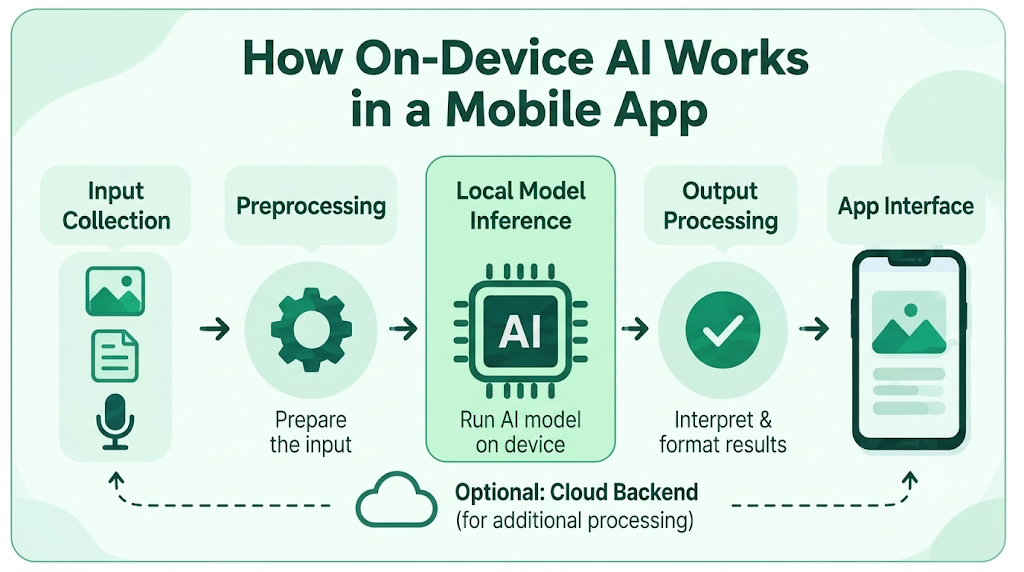
Getting a model into a mobile app means coordinating the user interface, application logic, model runtime and, where needed, backend services. A typical on-device workflow has five stages.
1. User Input and Data Collection
The app receives input from the user or the device. Depending on the feature, that could be:
- Text typed into a search field.
- An image captured through the camera.
- Audio recorded through the microphone.
- A document selected from device storage.
- Context the app already holds.
Collect only what the AI task actually needs, and put proper permission and consent controls in place.
2. Input Preprocessing
Raw input rarely goes straight into a model.
An image model may need resizing, normalisation or format conversion. A speech feature may need the audio segmented or converted. A text model may need a structured prompt or input validation. Preprocessing gets the data into the shape the model expects.
3. Local Model Inference
The prepared input goes to the model through the relevant inference framework. The framework loads the model, runs the required operations and returns an output. Depending on the platform and the model, execution may run on the CPU, GPU or dedicated AI hardware.
This is where the prediction, classification or generation actually happens.
4. Output Processing
Model output often needs more work before the app can use it.
An object detection model, for instance, returns labels and coordinates. The app then has to map those coordinates onto the camera preview or draw the detected objects in the interface. A generative model might return structured data that has to be validated first.
Don't assume every model response is correct, or safe to act on directly.
5. Application and Backend Integration
The app uses the output to finish the user-facing task. Some features can complete entirely on the device. Others send selected results to a backend for synchronisation, storage, analytics or further processing.
An expense app, for example, could extract receipt data locally and still sync the verified expense record to the user's account.
The architectural question that matters here is which operations must run locally and which need the backend.
Native Mobile App Development Architecture for On-Device AI
A production-ready AI feature is more than a model file dropped into an app. It needs an architecture that accounts for model execution, data handling, platform compatibility and failure scenarios. A practical way to think about it is five layers.
1. Application Layer
This is what users see and touch. It handles screens, input, permissions, application state and how AI-generated results are presented.
A camera-based shopping app would use this layer to capture a product photo and show whatever the model returns.
2. AI Model and Inference Layer
This layer manages model access and runs inference. It typically covers:
- Model loading and lifecycle management.
- Input preprocessing.
- Inference requests.
- Output interpretation.
- Model compatibility checks.
- Error handling.
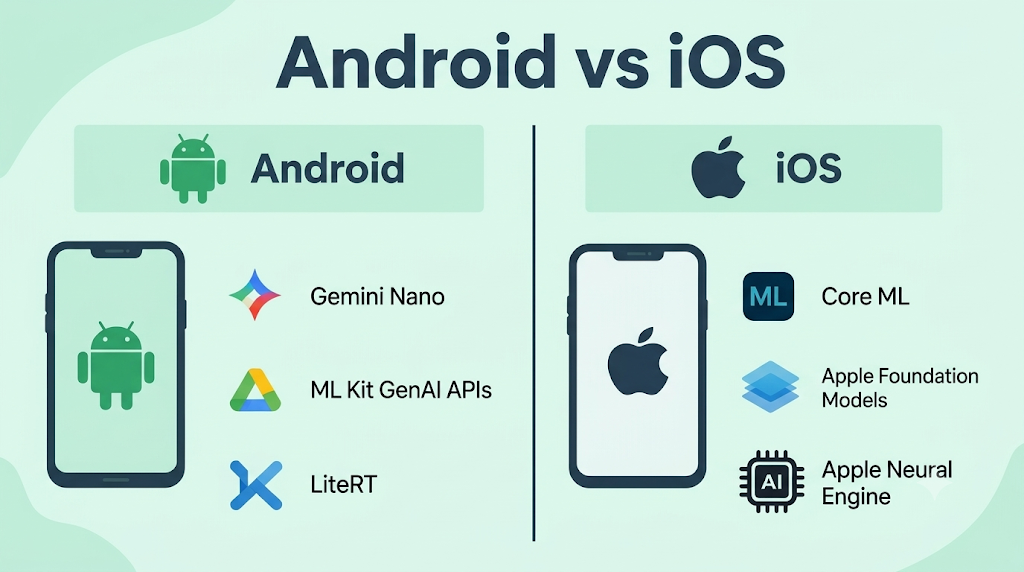
The framework depends on the platform and the model type. Android apps may use ML Kit or LiteRT. iOS apps can use Core ML, or the Foundation Models framework for supported generative tasks.
3. Platform Integration Layer
Native apps need to talk to platform-specific capabilities: camera APIs, audio input, device storage, background execution, hardware acceleration and operating system services.
This layer also keeps platform-specific details away from the app's wider business logic, which makes the codebase easier to live with.
4. Backend and Cloud Layer
Not every AI operation belongs on the device.
The backend still typically owns authentication, account data, business rules, synchronisation, centralised analytics and cloud-based AI requests. It can also act as a fallback when a device can't support a particular model, or when a task needs more computing power than a phone can offer.
5. Model Delivery and Update Layer
Models are software assets, and they need lifecycle management like any other. Your team needs a plan for:
- Delivering model files to supported devices.
- Updating models when better versions are available.
- Managing model compatibility.
- Controlling application download size.
- Rolling back problematic model releases.
- Monitoring inference failures and quality.
Treat model delivery as part of the architecture from the start. It makes the feature far easier to maintain after launch.
Beyond initial implementation, scalable mobile app architecture is equally important for managing model updates, device compatibility, backend integration and long-term application maintenance.
Android Native Mobile App Development: Technologies for On-Device AI
Android offers several routes for bringing machine learning and generative AI into native apps. The right one depends on the task, the model and the range of devices you need to support.
Gemini Nano and ML Kit GenAI APIs
Gemini Nano is Google's on-device foundation model for supported Android experiences. It runs through Android's AICore system service, which gives apps access to on-device inference and the device's available hardware.
Developers reach Gemini Nano through ML Kit's GenAI APIs. These are higher-level interfaces for supported generative tasks, including text summarisation, rewriting and other language operations. They suit features such as:
- Summarising user-generated content.
- Rewriting or proofreading text.
- Extracting information from text.
- Supporting selected conversational interactions.
- Processing supported inputs locally.
Availability is something to design for, not assume. Gemini Nano and ML Kit GenAI features don't exist on every Android device. Support depends on device configuration, model availability, API requirements and whether the needed model assets have been downloaded.
So check the status of the specific ML Kit feature at runtime, before you show or invoke an AI capability. The status will tell you whether the feature is unavailable, downloadable, downloading or ready to use.
If it's unavailable, give the user a sensible alternative. Depending on the product, that might be a cloud-based model, a simpler local feature, or a clear message that the device doesn't support the capability.
LiteRT for Custom Machine Learning Models
LiteRT is Google's framework for deploying machine learning models across supported platforms and devices. It's the one to look at when your team needs to integrate a custom or converted model, rather than relying only on prebuilt generative AI APIs.
LiteRT supports hardware acceleration through compatible CPU, GPU and NPU execution paths. Typical use cases include:
- Image classification.
- Object detection.
- Custom recommendation models.
- Audio and signal processing.
- Domain-specific machine learning.
Hardware acceleration doesn't happen automatically for every model on every device. You need to check model compatibility, supported operations and real execution performance. For a production app, benchmark on representative devices. There's no shortcut here.
Choosing the Right Android AI Technology
Requirement | Technology to evaluate |
|---|---|
Supported generative AI tasks | ML Kit GenAI APIs with Gemini Nano |
Custom machine learning models | LiteRT |
Image and camera-related processing | ML Kit, MediaPipe or suitable custom models |
Cloud-based generative AI | A backend or supported cloud AI integration |
These tools solve different problems and aren't interchangeable. Let the feature's input type, model requirements, device coverage and intended user experience drive the choice.
Handling Android Model Availability and Fallbacks
Before using an on-device AI feature, check that the required model is available on the user's device.
Say your app offers AI-powered article summarisation. You first need to confirm that the ML Kit summarisation feature is ready. If the model has to be downloaded, the app should manage that download and show a proper loading state.
If the feature isn't available, you have a few options:
- Route the request to a cloud-based AI service, where appropriate.
- Offer a simpler feature that doesn't need the model.
- Ask the user to try again once the model becomes available.
- Explain that their device doesn't support the capability.
One more point: a successful availability check doesn't guarantee inference will succeed. Resource constraints, service errors and other runtime conditions can still cause failures. A production app has to handle both unavailable models and failed inference. And any cloud fallback must respect the app's consent, privacy and data-handling requirements.
For more detail, see Google's ML Kit GenAI Summarization API documentation.
iOS Native Mobile App Development: Technologies for On-Device AI
Apple provides native frameworks for adding machine learning and generative AI to iOS apps. The two that matter most are Core ML and the Foundation Models framework. They're related, but they do different jobs.
Core ML for Machine Learning Models
Core ML is Apple's framework for integrating machine learning models into apps. It supports predictions from models that handle tasks such as image classification and object detection. Depending on the model and the device, it can use the CPU, GPU and Neural Engine.
Developers can get models by training them with Create ML, or by converting models from supported machine learning frameworks using Core ML Tools. Common uses include:
- Identifying objects in photographs.
- Classifying images and documents.
- Analysing visual information.
- Making predictions from structured input.
- Running specialised machine learning models locally.
Core ML is especially useful when your app needs a model built for a specific business task.
Apple Foundation Models Framework for Generative AI
The Foundation Models framework gives developers native Swift APIs for working with Apple's foundation models in supported apps. It covers language understanding, text generation, structured output and tool calling. Features you could build with it include:
- Summarising information.
- Extracting entities from text.
- Refining or rewriting content.
- Generating structured responses.
- Creating conversational experiences.
- Connecting model outputs with application tools.
One distinction is easy to miss. The framework gives access to both on-device and Private Cloud Compute models, and these are not the same execution environment.
SystemLanguageModel represents Apple's on-device foundation model. It can handle supported tasks locally on compatible devices where Apple Intelligence is available and the model is ready.
PrivateCloudComputeLanguageModel is different. It sends requests through Apple's Private Cloud Compute infrastructure, a server-based option for tasks that need more than the on-device model can offer, such as a larger context window or stronger reasoning.
Private Cloud Compute is built with Apple's privacy protections. It still involves remote processing and needs network connectivity, so it shouldn't be described as on-device inference.
Check the relevant model's availability at runtime as well. Device eligibility, region, operating system and model readiness all affect whether a request can be processed locally. If the model isn't available, the app needs an alternative experience.
Core ML vs Foundation Models
Area | Core ML | Foundation Models |
|---|---|---|
Primary purpose | Integrating machine learning models | Accessing foundation models for generative tasks |
Typical tasks | Classification, detection and prediction | Summarisation, generation, extraction and tool calling |
Model approach | Custom or converted ML models | Apple's supported foundation models and compatible model providers |
Integration | Core ML APIs | Native Swift APIs |
Execution options | Depends on the model and supported hardware | On-device SystemLanguageModel or supported Private Cloud Compute model |
Device requirements | Depend on the model and supported hardware | On-device Apple Foundation Models require supported Apple Intelligence devices |
The two frameworks can work side by side in the same app. Choose based on the AI capability you're building, not simply because the app runs on iOS.
Handling iOS Model Availability and Cloud Processing
If your app uses the Foundation Models framework, check whether the on-device model is available before you try to generate anything. Availability depends on device eligibility, Apple Intelligence support and model readiness. Even when the model starts out available, a request can still hit an error.
Plan for that. Provide loading states, handle generation failures, and offer a fallback when local inference can't go ahead.
Here's how a notes-summarising app might handle it:
1.Check whether the on-device Foundation Model is available.
2.Create a model session and submit the summarisation request once it's ready.
3.Handle any errors that occur during generation.
4.Offer an alternative if the local model isn't available.
If the feature needs stronger reasoning or a larger context window, look at Private Cloud Compute or another server-side model provider. That's a separate execution path. Choose it deliberately, with network availability and data-handling requirements in mind.
For implementation details, see Apple's documentation on Foundation Models, checking model availability and adding server-side intelligence with Private Cloud Compute.
On-Device vs Cloud vs Hybrid AI in Native Mobile App Development
The most important architectural decision for an AI-powered app is where each task should run. Judge the task itself. Don't start from a blanket preference for local or cloud.
When to Choose On-Device AI
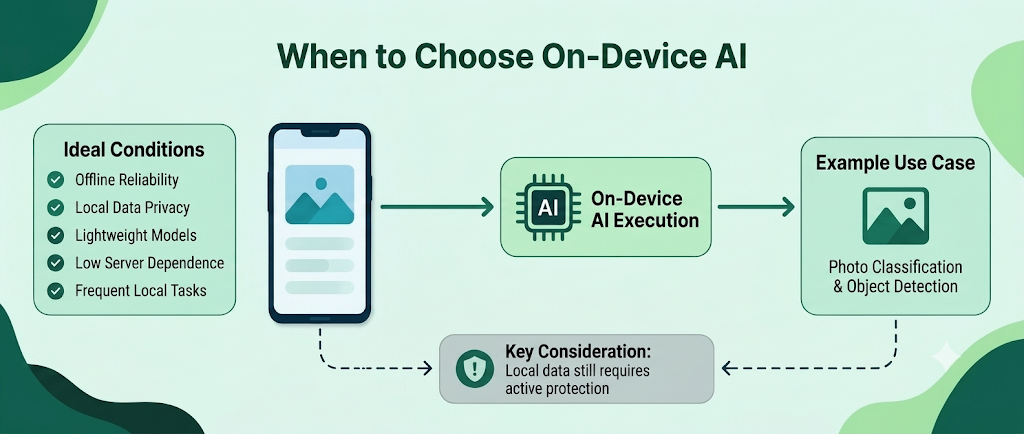
Consider on-device execution when:
- A feature has to work without a reliable internet connection.
- User data can be processed locally instead of being sent to an external service.
- A model small enough for the device's resources can handle the task.
- You want to reduce dependence on remote inference.
- The feature needs frequent local processing.
A photo app, for example, could classify images or identify objects with a local model, without uploading every photograph to a server.
Local execution still needs careful data protection, though. Keeping data on a device doesn't make an app secure by default.
These decisions also connect with offline-first mobile app architecture, where local data processing, synchronisation and network-independent functionality influence how applications are designed.
When to Choose Cloud AI
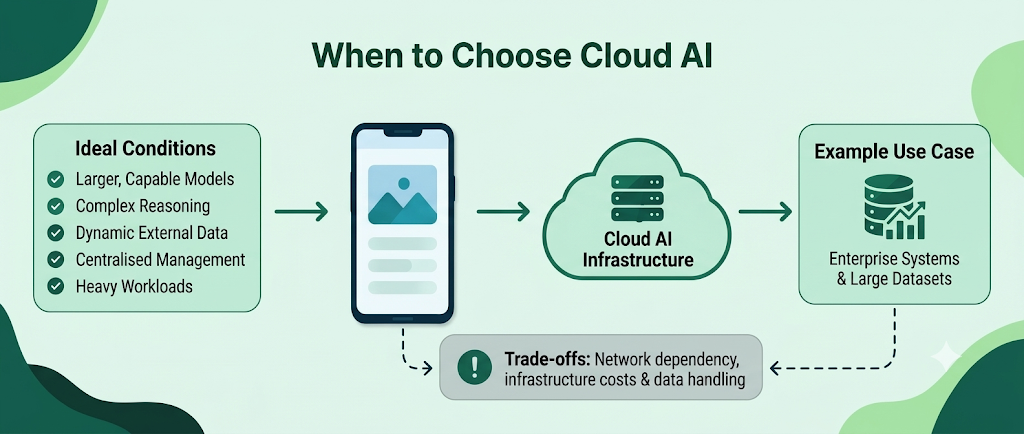
Cloud processing is usually the better fit when:
- The task needs a larger or more capable model.
- The app needs extensive context or complex reasoning.
- The feature depends on external information that changes often.
- Centralised processing and model management matter.
- Device hardware can't handle the workload.
A business app that analyses large datasets or pulls from several enterprise systems will probably need backend services and cloud AI infrastructure.
Cloud execution brings network dependency, infrastructure costs and extra data-handling responsibilities.
When to Choose Hybrid AI
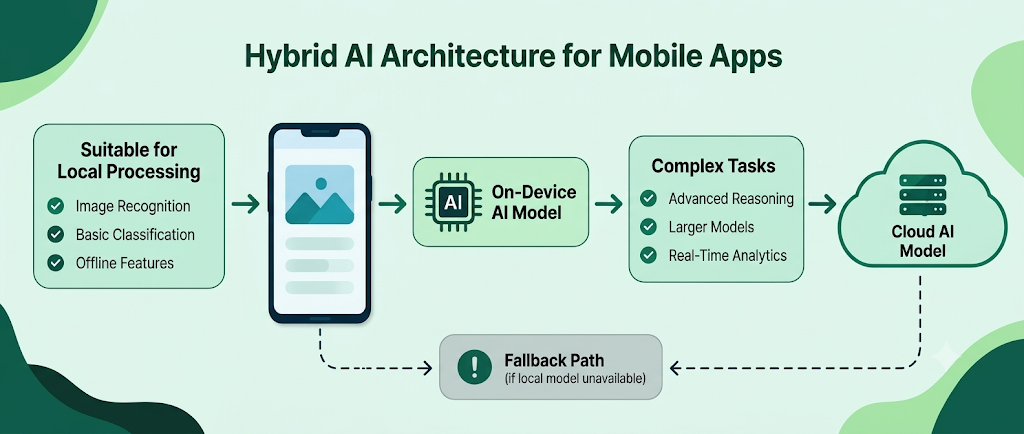
Hybrid AI mixes local and remote processing in one app. Instead of sending every request down a single path, the app decides where each task should run.
Picture a retail app with an AI shopping assistant:
1.The user captures a product image.
2.A local model identifies the product category or visible attributes.
3.The app searches locally stored product information where available.
4.A cloud service handles complex comparisons, current inventory queries or broader conversational requests.
5.The app shows the combined result.
Local inference handles what it's suited for, and the cloud picks up work that needs more capability or fresher information.
A hybrid design also needs clear fallback behaviour. If the local model isn't available, the app should decide whether to use a cloud alternative, offer a reduced feature or explain that the operation can't be completed right now.
Decision factor | On-device | Cloud | Hybrid |
|---|---|---|---|
Offline functionality | Strong potential | Limited | Partial |
Large model requirements | Device-dependent | More suitable | Flexible |
Local data processing | Strong potential | Requires data transfer for remote tasks | Depends on task routing |
Device compatibility | Important constraint | Less restrictive | Requires fallback planning |
Centralised model updates | More complex depending on delivery approach | Centralised | Mixed |
Architecture complexity | Moderate | Moderate | Often higher |
Hybrid isn't automatically the best option. It adds complexity in request routing, state management, error handling, security and testing. It pays off when different tasks in your app genuinely have different processing needs.
Practical Use Cases of On-Device AI in Native Mobile Applications
On-device AI is only worth as much as the real user problem it solves. Start with the feature and its requirements, not with a model.
1. Image Recognition and Visual Search
Retail, healthcare, travel and productivity apps can use image recognition to identify objects, classify photos or extract visual information. A shopping app could let users photograph a product and get an initial local classification before searching the catalogue.
2. Intelligent Document Processing
Finance and productivity apps can use local models to classify documents, extract key information and organise files. A receipt management app could identify a receipt, extract the text and prepare expense details before syncing them with a backend.
3. Text Processing and Personalisation
On-device language models can handle summarisation, text refinement, classification and other supported language tasks. A note-taking app could summarise selected content locally, and a productivity app could help users organise their writing.
4. Voice and Audio Features
Mobile apps can use speech and audio processing for transcription, sound classification and voice-driven interactions. The right implementation may combine native speech APIs, machine learning models and cloud services, depending on accuracy, language coverage and processing needs.
5. Personalised Recommendations
An app can use locally available information, such as user preferences or interaction history, to generate recommendations. That helps when recommendations must work offline, or when you'd rather process certain behavioural data on the device.
Recommendation quality still depends on the data available, the model design and how well the model is evaluated.
Challenges of On-Device AI in Native Mobile App Development
Running models locally creates technical issues you need to deal with before release.
Device Compatibility and Hardware Limitations
Devices differ in processing power, memory and AI acceleration hardware. A model that runs well on a recent flagship may perform poorly, or not run at all, on an older or lower-end phone. Define minimum device requirements and test across representative hardware.
Model Size and Application Download Size
AI models add to app size and storage needs. Larger models also take longer to download, load and run. Weigh model size, compression, quantisation and delivery strategy against the accuracy and performance the feature needs.
Battery Consumption and Thermal Constraints
Inference uses computing resources, and that can affect battery life, device temperature and overall app performance. Continuous inference, repeated image processing and real-time audio or video analysis are especially demanding. Measure power consumption under realistic usage. Isolated benchmark numbers won't tell you enough.
Model Updates and Maintenance
A model that performs well at launch may need improvement as user behaviour, data and product requirements change. You need a process for validating new versions, managing compatibility and tracking changes in output quality. Operating system updates and changes to platform AI frameworks can also affect how your app behaves.
Privacy and Security
On-device processing can cut down the information sent to external services. It doesn't remove every privacy or security risk. Apps still have to protect local data, secure model assets where appropriate, manage permissions and validate model outputs.
In a hybrid architecture, define exactly what is sent to the backend, why it's needed and how it's protected.
Testing and Model Quality
Traditional app testing doesn't cover AI-powered features. You need to evaluate app behaviour and model output quality. Testing should cover:
- Different supported device configurations.
- Model availability and loading failures.
- Low-memory conditions.
- Offline and unstable network scenarios.
- Incorrect or unexpected model outputs.
- Response times under realistic workloads.
- Battery and thermal behaviour.
- Model updates and compatibility changes.
For generative AI, also evaluate prompt behaviour, output consistency, safety and structured response validation.
How to Choose the Right Architecture for Native Mobile App Development
Begin with a clear picture of what the feature requires. A practical evaluation runs through six steps.
1. Define the AI Feature
Pin down exactly what the app needs the model to do. Image classification, text summarisation, conversational assistance and complex reasoning all have different model requirements. Don't treat AI as one single workload.
2. Evaluate Data Sensitivity
Work out whether the feature handles personal, financial, business or otherwise sensitive information. Then assess whether that data can be processed locally, and what, if anything, has to reach a backend or external AI provider.
3. Establish Device Requirements
Identify the minimum operating system versions, hardware capabilities, memory requirements and model availability you'll support. If a feature depends on a specific device capability, plan an alternative experience for unsupported devices.
4. Measure Performance Requirements
Set acceptable response times, resource consumption and user experience expectations. Then test the actual model on representative devices. A model's published benchmark won't necessarily tell you how it behaves inside a complete mobile app.
5. Decide What Needs Cloud Connectivity
Decide whether the feature needs external data, centralised business logic, larger models or remote services. If only some operations need the cloud, a hybrid architecture may fit.
6. Plan for Production Maintenance
Think about model delivery, updates, monitoring, testing and ongoing compatibility. The cost of an AI feature isn't just the initial build. It also includes the work of keeping model quality and app reliability steady over time.
Why Native Mobile App Development Matters for AI-Powered Applications
Native development gives engineering teams direct access to platform-specific APIs, operating system capabilities and hardware integration.
On Android, that includes AI technologies such as Gemini Nano and ML Kit GenAI APIs. On iOS, developers can work with Core ML and the Foundation Models framework. This platform-level access helps when an app needs:
- Integration with native camera and audio capabilities.
- Platform-specific machine learning frameworks.
- Access to supported hardware acceleration.
- Fine-grained control over app performance.
- Platform-specific privacy and permission handling.
- A user experience that follows Android or iOS conventions.
That said, going native doesn't automatically make an AI feature faster, more accurate or cheaper. Those results depend on model selection, implementation quality, hardware support and the workload itself.
If you're planning an AI-powered app, look at the whole architecture: the interface, the model runtime, backend integration and long-term maintenance.
For a broader look at platform-specific approaches, read our guide to native mobile app development for iOS and Android.
If your project needs platform-specific architecture, AI integration or custom application development, explore our mobile app development services.
Conclusion
On-device AI is widening what native mobile apps can do, because selected machine learning and generative AI tasks can now run directly on a smartphone.
On Android, Gemini Nano, ML Kit GenAI APIs and LiteRT offer different routes to local inference. On iOS, Core ML handles machine learning model integration, while the Foundation Models framework provides supported generative AI through on-device and Private Cloud Compute options.
Still, the framework isn't the most important decision. The real decision is where each AI task should run, and how the app behaves when a model or device capability isn't available.
On-device processing can support offline use and local data handling. Cloud AI gives you larger models and more computing power. Hybrid architectures can combine both, when your requirements justify the extra complexity.
If you're investing in native mobile app development, start with the user experience, assess the technical constraints, and pick an architecture you can keep maintaining as the app evolves.