
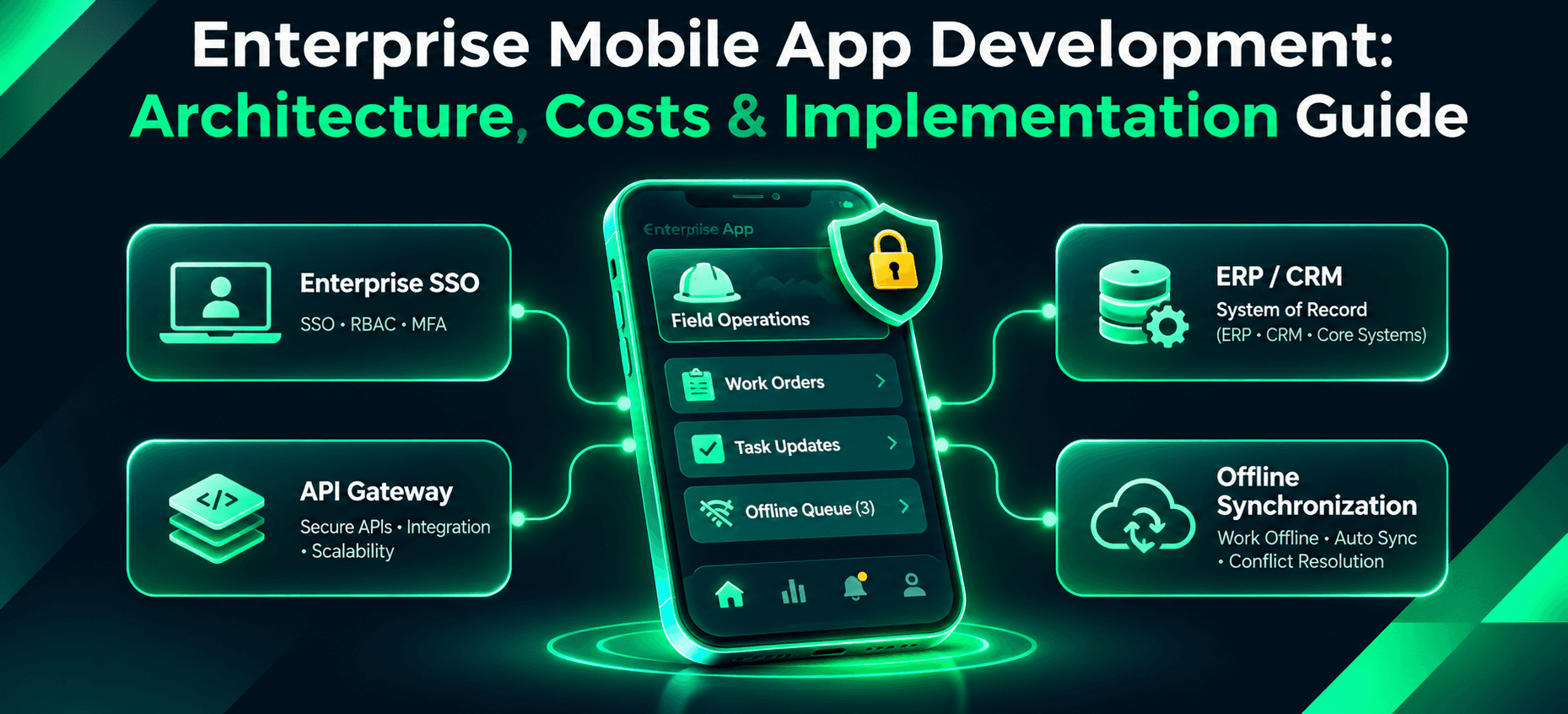
Enterprise Mobile App Development: Architecture, Costs & Implementation Guide
A technician finishes an inspection at a factory where the mobile signal is unreliable. The inspection must be saved, the work order updated, and the result reflected in the company's ERP without creating duplicates when connectivity returns. That everyday scenario captures the difficulty of enterprise mobile app development. Building a usable screen is only one part of the work. The application must coordinate identity, business rules, enterprise data, offline changes, security controls, and operational support.
This guide explains when a company needs a dedicated mobile application, how an enterprise app fits into ERP and CRM systems, how to design offline synchronization, and how to assess technology choices and budgets. We use a hypothetical manufacturing field-service application throughout. It is an illustrative design, not a Toadster client engagement or a claim about any deployed product.
What Is Enterprise Mobile App Development?
Enterprise mobile app development is the design, implementation, integration, and operation of mobile software that supports an organization's business processes. Unlike many consumer applications, enterprise apps often depend on existing identity providers, controlled employee permissions, internal systems of record, device policies, and audit requirements. A field service app, for example, may show work orders on a phone while the ERP remains authoritative for the job's status and the CRM retains customer details.
An enterprise application is not automatically more complex than a consumer product. Complexity comes from its actual workflows, integration boundaries, data sensitivity, device environment, and reliability needs. A simple approvals app connected to an existing platform may need little custom development; an offline maintenance tool integrated with an undocumented legacy ERP may require substantial engineering.
Typical enterprise mobile app types
Type | Example | System dependency |
|---|---|---|
Field workforce | Inspections, work orders, maintenance | ERP, asset management, inventory |
Internal operations | Approvals, purchasing, stock movement | ERP, identity provider |
Sales and partner | Quotes, visits, partner orders | CRM, pricing and order services |
Customer operations | Account servicing and service cases | CRM, customer identity, case management |
When Does a Business Actually Need an Enterprise Mobile App?
Start with the workflow, not the device. If employees use a desktop dashboard at a fixed desk, a responsive web application may be sufficient. If technicians work in basements or industrial sites without reliable connectivity, need camera and barcode functions, or must operate with managed company devices, a mobile application becomes more compelling. Likewise, a readily available ERP vendor application may already handle standard stock approvals without new custom software.
Before commissioning development, document the user, location, tasks, network conditions, supported devices, system of record, and reason the present workflow fails. Define a measurable baseline: average inspection completion time, errors in re-entry, work orders awaiting synchronization, or help-desk incidents. Without that baseline, even a polished app is difficult to evaluate.
Decision rule: Use a configured existing product when it covers the required process and controls. Consider a PWA for browser-friendly forms with limited device needs. Choose a custom mobile app when specialized device interaction, offline reliability, unusual integrations, or user experience requirements justify the extra ownership.
A related real Toadster project illustrates the difference between a mobile interface and a connected operating workflow. The Fleet Management: Web and Mobile Platform case study describes role-based web portals and two mobile apps for bookings, workshop estimates, job cards and status updates. It documents offline-first support, but should not be confused with the hypothetical factory inspection and ERP design used in this guide.
Enterprise Mobile App Architecture Explained
Our example is a manufacturing field-service application. A technician downloads assigned work orders, inspects equipment, captures photos and readings, and submits an inspection. The ERP owns the authoritative work order and asset record. The mobile client holds a limited encrypted working set, not an independent master copy of the ERP database.
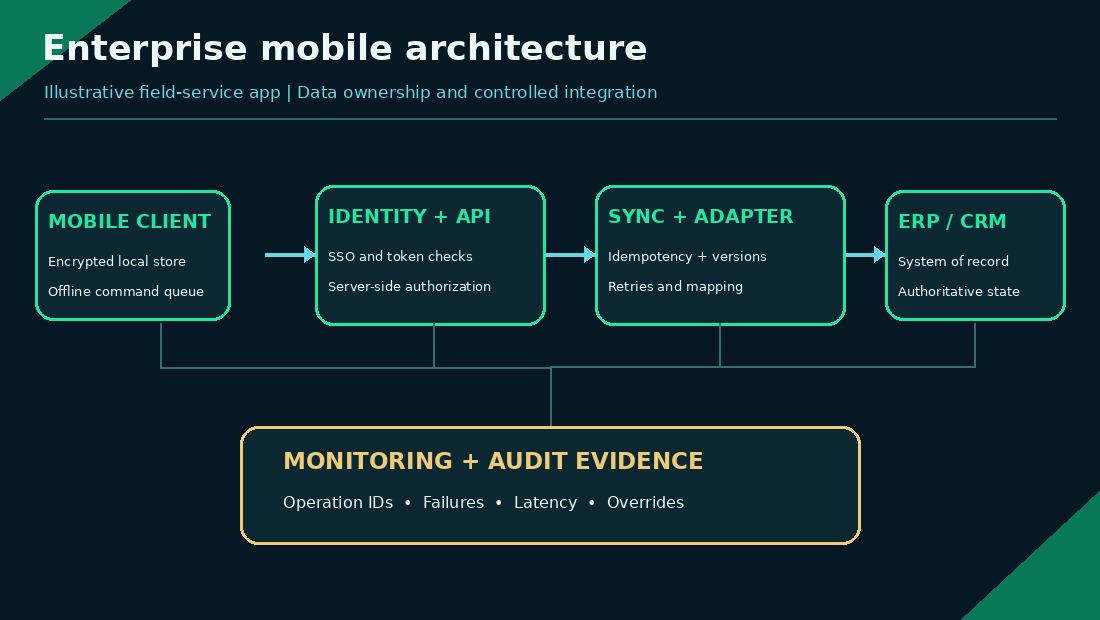
Figure 1. Conceptual enterprise field-service architecture.
A practical architecture separates five responsibilities:
1. Mobile client: Presents jobs and captures data. A local encrypted store holds permitted records for offline operation. The client maintains a durable queue of changes and displays synchronization status rather than pretending every action reached the server.
2. Enterprise identity and API access: The user signs in using an approved organizational identity provider and receives appropriately scoped credentials. The backend independently checks permissions for every relevant action, even if the mobile interface hides unauthorized controls.
3. Application and synchronization services: Backend services validate commands, assign stable identifiers, enforce idempotency, check record versions, and maintain audit events. They should not trust timestamps or role claims supplied by a phone.
4. ERP/CRM integration layer: Adapters translate between an app-facing domain model and ERP/CRM interfaces. The layer can enforce rate limits, handle retries, map identifiers, and isolate the app from changes in vendor-specific endpoints. A queue or outbox can decouple supported background changes from interactive requests where appropriate.
5. Systems of record and observability: ERP, CRM, and asset management systems retain their established ownership roles. Monitoring tracks failed synchronization, integration latency, duplicate-rejection events, and unresolved exceptions without exposing unnecessary sensitive data.
A modular backend is often enough for a first deployment. Selecting microservices merely because the app serves an enterprise can add network, coordination, and operational cost without solving a demonstrated problem. For related architectural trade-offs, see modular monolith vs microservices.
Integrating Enterprise Apps With ERP, CRM and Legacy Systems
An integration plan begins with data ownership. In our example, the ERP is the system of record for work-order state. The app is authorized to propose an inspection completion, but the backend must confirm that the work order exists, the employee has the required permissions, and the transition is allowed. A CRM might own the customer contact details, while a dedicated document service owns photographs and attachments.
Do not copy entire enterprise tables into the phone merely for convenience. Define the minimum data the user needs, the refresh interval, permitted local retention, and what should happen when access is revoked. Prefer supported APIs and documented integration contracts. For a legacy system without adequate APIs, an adapter or controlled integration service should be tested before promising that the mobile app can write back safely.
For a broader explanation of requirements discovery, integration feasibility and production delivery, see the custom software development process guide. The enterprise app still needs its own contract tests for ERP transitions, offline commands and identity checks.
A work-order update that survives a timeout
Suppose the technician submits a completed inspection. The client assigns the operation an idempotency key and sends the work-order ID, expected server version, validated inspection fields, and attachment references. The API records the operation transactionally. If it can commit a result, it returns a stable operation ID and authoritative version. If ERP integration is asynchronous, the mobile UI shows accepted for processing, not fully synchronized.
If the ERP connector times out, a controlled retry uses the same operation ID. The downstream service recognizes a repeated operation and avoids creating a second completion record. After bounded retries, the operation enters a monitored exception queue. An operator can reprocess it without losing the original evidence or inventing a new completion time.
This design makes failures explicit. It is better than allowing a spinner to disappear while leaving the technician uncertain whether the job was saved.
A successful write to the mobile application backend is not the same as a completed update in the ERP. When integration is asynchronous, the UI should continue displaying a pending or accepted-for-processing state until the authoritative system confirms the business transition. Correlation IDs and reconciliation checks help operations teams resolve transactions that were accepted locally but rejected downstream.
Building Offline-First Enterprise Applications
Offline-first means more than caching a page. The user should be able to carry out defined operations without connectivity and later reconcile them with the server. That requires a local data model, durable queued commands, synchronization rules, conflict handling, and a security policy for information stored on the device.
Consider a concrete conflict. At 10:00, a technician downloads work order W-204 at server version 8. At 10:30, another employee changes its priority and assignment, producing version 9. At 11:00, the offline technician marks the inspection complete based on version 8. When service returns, the client must not blindly overwrite version 9.
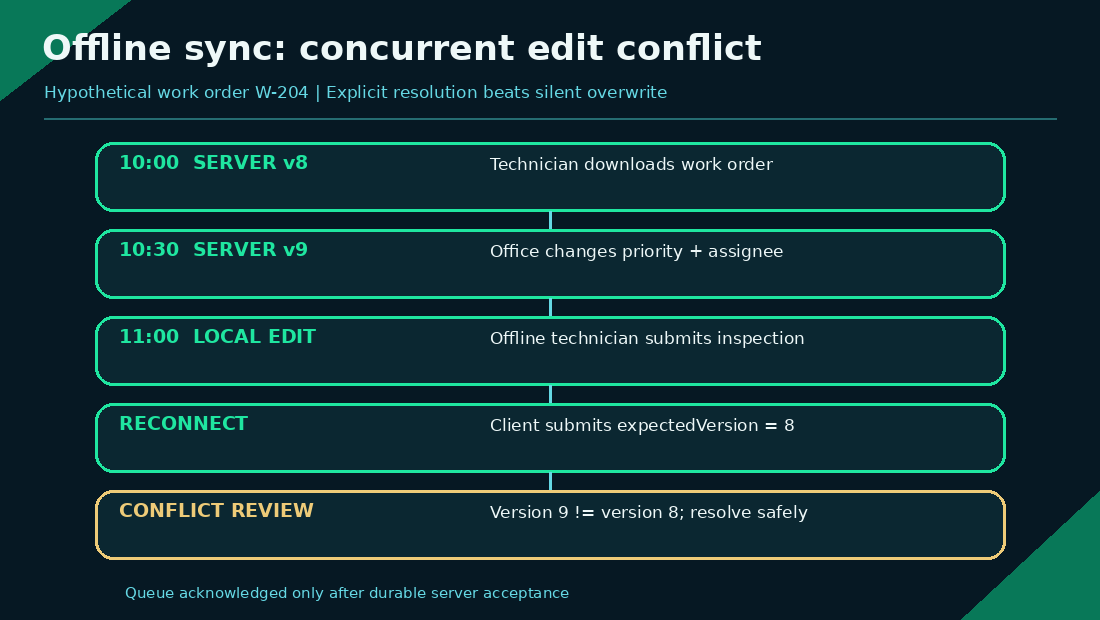
Figure 2. An offline edit must not silently overwrite a newer server version.
A practical sequence is: queue the local operation with a unique ID and expected version; reconnect and authenticate; submit pending changes; compare the expected and current server versions; apply a documented merge rule only when safe; otherwise surface a conflict for an authorized user to resolve; and acknowledge the queue item only after the server confirms durable acceptance. The app should retain unsent changes across restarts, within the approved retention and security limits.
Not every field needs the same conflict rule. Append-only inspection readings may be accepted as new events. A work-order assignment change may need server authority. Free-text notes can sometimes be merged; a safety approval must not be automatically merged when authority or sequence matters. Last write wins is a policy choice, not a universal answer.
Offline security needs equal attention. Store the smallest permitted dataset, protect local secrets using platform facilities, define expiration and wipe behavior, and test what happens when an employee loses access while the device is disconnected. Revocation cannot always reach a fully offline device immediately; reduce exposure through short permitted offline windows, access expiry, and server-side revalidation when it reconnects.
Background synchronization is subject to operating-system scheduling, power management and app lifecycle restrictions. A phone may reconnect without immediately running every queued job. The design must tolerate suspended apps, interrupted uploads and restarts; show whether an edit is saved locally, accepted by the backend or confirmed by the enterprise system; and provide a foreground retry path when a user needs an immediate result.
Platform-specific implementation should be tested against Android WorkManager task scheduling and the applicable iOS background-task rules. Neither platform guarantees that arbitrary work will run immediately upon reconnection. Apple background task documentation
Security, SSO, RBAC and Mobile Device Management
Enterprise security should be expressed as verifiable controls, not only a feature list. The OWASP Mobile Application Security Verification Standard provides groups of mobile requirements spanning storage, authentication, network communication, platform interaction, code and privacy. Its companion Mobile Application Security Testing Guide describes methods for assessing mobile applications. Neither establishes that an app is secure merely because its team references the standard.
For independent public-sector guidance, NIST SP 800-124 Revision 2 (2023) covers enterprise mobile-device lifecycle security, centralized management and both organization-owned and personally owned devices. It is a security guidance publication, not a study establishing an industry breach rate or a certification of this application.
Risk | Design control | Acceptance test |
|---|---|---|
Stolen or shared device | Limited local data, protected storage, session expiry | Attempt retrieval of cached business data after sign-out and policy expiry |
Broken authorization | Server-enforced RBAC or ABAC | Cross-role and cross-user API requests must be denied |
Intercepted traffic | Validated TLS connections and secure networking | Exercise proxy interception and certificate-validation failure cases |
Lost connectivity | Bounded offline permissions and revalidation | Reconnect after access revocation and confirm blocked writes |
Duplicate updates | Idempotency and version checks | Replay identical commands and verify one authoritative effect |
Untracked changes | Traceable operations and restricted audit access | Recover who initiated, accepted, reviewed, and reconciled a change |
Enterprise SSO can simplify centralized authentication, but sign-in alone does not establish authorization to access a particular customer's record or work order. Security tests must include direct API calls that bypass the visible UI.
MDM and MAM are not interchangeable. Mobile device management can administer enrolled devices and their configuration. Mobile application management can enforce policies on managed apps and business data, including supported bring-your-own-device scenarios. Microsoft Intune documentation explicitly describes app protection without full device enrollment. Whether equivalent controls are available depends on the app, platform, integration method, license, and organization policy. Test the actual intended combination rather than claiming every custom app supports every MAM feature.
Define ownership before choosing controls: IT must know which devices are corporate-owned, which are bring-your-own-device (BYOD), who can enroll or remove them, and how work data is selectively removed after a role change, device loss or employment exit. A corporate wipe may be inappropriate on a personal phone. Test selective app-data removal, session expiration, support access and privacy notices with the exact deployment configuration.
The NIST SP 1800-22 BYOD practice guide provides an example approach to managing enterprise security and employee privacy risks on personally owned mobile devices.
Low-Code vs Native vs Cross-Platform Enterprise Mobile Development
The right technology follows the workflow, integrations, supported devices, and operating model. A neutral comparison avoids assuming that custom code is always better.
Approach | Best fit | Main trade-off |
|---|---|---|
Configure existing enterprise product | Standard workflow already supported | Feature fit, licensing, customization limits |
Low-code platform | Forms, approvals, basic integrations | Platform restrictions, pricing, exit complexity |
Progressive web app | Browser-centric work on diverse devices | Device capabilities and offline limitations vary |
Cross-platform custom app | Shared iOS/Android experience with specific workflows | Native integration and framework compatibility still need testing |
Native iOS/Android app | Deep platform features, specialized devices or performance needs | Separate implementation and maintenance effort |
For our field-service example, test offline photo capture, encrypted persistence, background synchronization, barcode or peripheral integrations, and enterprise MAM requirements in a short technical prototype before selecting a framework. Flutter or React Native may be appropriate, but compatibility with a required native SDK must be verified; an attractive UI demonstration is insufficient.
Assess long-term portability too. If a low-code vendor's pricing changes, can the organization export data, workflow definitions, and business rules? If using a cross-platform stack, who maintains native integration bridges when OS releases change? Ownership includes the maintenance path, not just the first build.
For the trade-offs between platform-specific functionality and shared code, the existing mobile app development service overview describes Toadster's native and cross-platform capabilities. The technology decision in this guide still requires a device- and integration-specific prototype.
How Are Enterprise Mobile Apps Distributed and Updated?
Distribution is an architectural and operating decision. For organization-owned devices, IT may use an enterprise mobility management platform to assign approved apps, manage versions and enforce access policies. Android enterprises can publish private applications through managed Google Play. Apple offers private Custom Apps distribution to specified organizations through Apple Business Manager, subject to its current program requirements.
Before launch, confirm supported device enrollment modes, the minimum OS version, who approves releases and how critical updates reach employees. The managed Google Play private-app documentation explains Android-specific private distribution. Apple Custom Apps distribution documentation
Use staged releases, compatibility testing and a support runbook. A rollback may require reverting a backend feature flag or releasing a repaired mobile build, not simply downgrading an installed app. Data-schema migrations and offline queues need backward-compatible handling, especially while field devices remain disconnected during a rollout.
Enterprise Mobile App Development Process
An implementation plan should produce evidence at each gate rather than advancing because a demo looks impressive.
- Discovery and workflow mapping: Identify users, tasks, systems of record, offline conditions, baseline outcomes, constraints, and accountable owners.
- Integration feasibility: Confirm ERP/CRM access, authentication and data rights; prototype the highest-risk interface and failed-response behavior.
- Architecture and security design: Decide local data boundaries, sync protocol, role permissions, MDM/MAM assumptions, monitoring and recovery paths.
- Prototype and pilot: Test real representative devices, poor networks, camera behavior, data entry, and exception-handling with a small user group.
- Build and verification: Implement mobile, backend, integration and infrastructure work with automated tests and documented acceptance criteria.
- Controlled rollout: Release to a limited employee cohort, monitor crashes and failed sync, prepare rollback and provide support channels.
- Operational review: Compare baseline KPIs with actual outcomes, review incidents and adoption, and decide what to improve before wider deployment.
An organizational training plan matters. A technician who distrusts the offline status indicator may return to paper, even if the synchronization design is technically sound. Track successful job completions, user-reported confusion, unprocessed queue items and support requests, not simply the number of installations.
Enterprise Mobile App Development Costs in India
There is no dependable universal price for enterprise mobile app development. Costs vary with project scope, number of platforms, ERP accessibility, offline complexity, security controls, device estate, testing effort, and post-launch responsibilities. Published agency ranges use different assumptions, making direct comparisons unreliable.
The architecture guidance in this article applies across markets. The following budget is deliberately an India-based, INR-denominated illustration for readers comparing delivery options; it is not a published survey of Indian enterprise app rates and should not be generalized to companies in other markets.
A better method is to estimate workstreams explicitly. The following is a hypothetical India-based budgeting scenario for our field-service app, expressed in INR. It is not a Toadster quote, market survey, or prediction of a specific company's pricing. Assume a blended engineering/project rate of ₹2,000 per hour, used solely to demonstrate the arithmetic.
Implementation workstream | Illustrative effort | Calculation | Cost |
|---|---|---|---|
Discovery, workflows and UX | 180 hours | 180 × ₹2,000 | ₹3,60,000 |
Mobile client and local data | 620 hours | 620 × ₹2,000 | ₹12,40,000 |
API, SSO and role controls | 330 hours | 330 × ₹2,000 | ₹6,60,000 |
ERP adapter and data mapping | 460 hours | 460 × ₹2,000 | ₹9,20,000 |
Offline sync and conflict handling | 300 hours | 300 × ₹2,000 | ₹6,00,000 |
QA, device testing and security verification | 370 hours | 370 × ₹2,000 | ₹7,40,000 |
Rollout setup and training support | 140 hours | 140 × ₹2,000 | ₹2,80,000 |
Implementation subtotal | 2,400 hours | ₹48,00,000 | |
Illustrative contingency | 10% × ₹48,00,000 | ₹4,80,000 | |
Illustrative implementation budget | ₹52,80,000 |
The effort allocations are planning assumptions, not externally verified typical hours. Under the scenario's assumed six-month delivery window, 2,400 hours is roughly the total effort of more than two full-time people across six months, although actual staffing and parallel work would vary. It should not be interpreted as a guaranteed six-month timeline.
Separating operating costs from implementation
Suppose, separately, that ongoing hosting and monitoring cost ₹30,000/month, ERP/API subscriptions ₹15,000/month, support and improvements ₹80,000/month, and security/compatibility testing averages ₹25,000/month. The hypothetical monthly total is ₹1,50,000; twelve complete post-launch months cost ₹18,00,000. Thus initial implementation plus twelve full months of operation is ₹70,80,000 under these assumptions. That is not necessarily the amount spent in the first twelve calendar months after project kickoff.
The figures exclude device purchases, taxes, major new integrations, unusual license fees, additional compliance reviews, and business-side operating costs outside the example. Request proposals with identical assumptions, explicit integration exclusions, contingency policies, source-code ownership terms, operating support commitments and exit arrangements.
Budget separately for enterprise-platform licensing and access: ERP connector entitlements, additional API capacity, identity-provider seats, MDM/MAM licenses, testing environments and device purchases may be charged by third-party suppliers. Confirm those items against the actual contracts before comparing agency proposals or using the illustrative total.
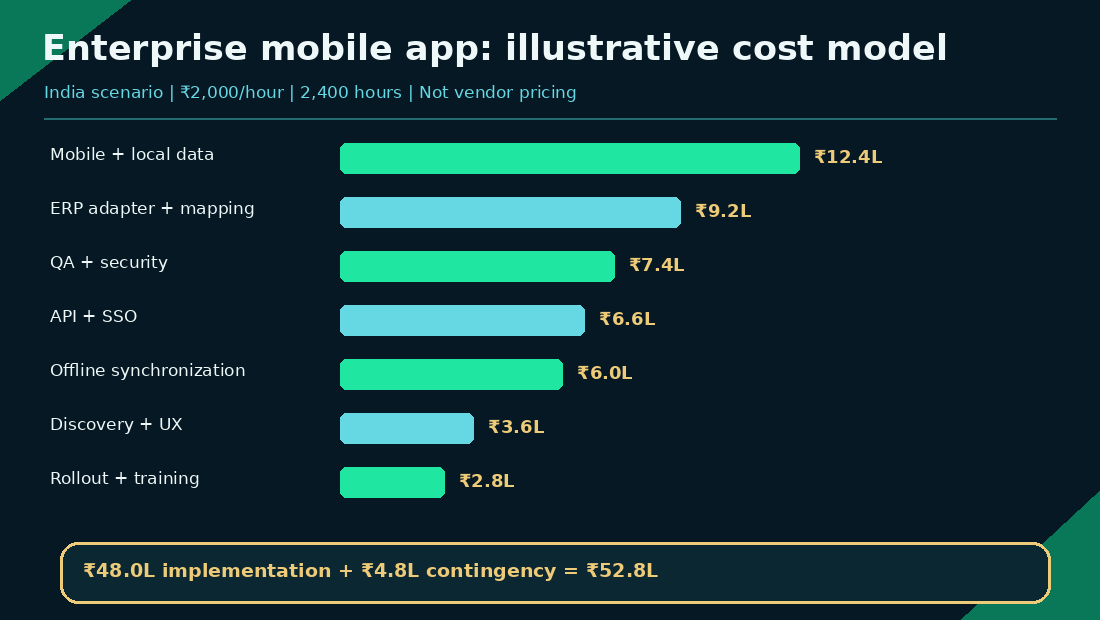
Figure 3. Illustrative INR costs, not market prices.
How to Test Enterprise Mobile Apps Before Deployment
A mobile app is not enterprise-ready because it works on a developer's phone. Production acceptance requires evidence for business function, integration resilience, offline reliability, security, device management and operating support.
Acceptance area | Practical release test | Evidence to retain |
|---|---|---|
ERP integration | Timeout, retry, malformed response, duplicate submission | Contract-test and failure-recovery results |
Offline synchronization | Simultaneous edits and recovery after app restart | Conflict decisions and queue trace |
Identity and authorization | Disabled user, wrong role, expired session | API authorization test outcomes |
Device matrix | Representative Android/iOS versions and hardware | Compatibility results and known exceptions |
Performance | Realistic job volume, large attachments, constrained network | Latency and resource measurements |
Security | OWASP-aligned mobile and API assessment | Findings, remediation and retest record |
Release and rollback | Staged rollout, failed upgrade, app-data migration | Rollback rehearsal and support runbook |
Adoption | Pilot staff complete realistic jobs without workarounds | Completion outcomes, feedback, training issues |
Set measurable thresholds before testing. Examples might include no duplicate work-order completions under repeated requests, reconciliation of all accepted offline commands during a defined pilot, and zero unresolved critical security findings at release. Exact acceptable limits depend on the business risk and must be approved by the relevant owners.
Common Enterprise Mobile App Development Mistakes
A recurring mistake is treating the mobile client as the authoritative store of enterprise records. Another is leaving ERP access until late in the project and learning too late that the vendor interface cannot support the promised workflow. Teams also underestimate offline conflicts, assume SSO solves all authorization, ignore shared-device behavior, and roll out across an organization without a recovery path.
Avoid these problems by proving the risky parts first. Test the hardest integration early; define ownership for each data object; choose conflict policies explicitly; isolate authorization from the UI; and give operations teams dashboards, escalation procedures and an accountable owner after deployment.
How to Choose an Enterprise Mobile App Development Partner
Ask potential vendors to walk through one actual failure sequence, not just a polished app portfolio. Can they explain which system owns the work order, what the mobile app stores locally, how a retry prevents duplicates, and how a revoked employee is handled? Request a sample architecture, interface assumptions, security test plan, device matrix, rollout plan, and model for ongoing support.
A credible development proposal should compare an existing platform or low-code option against custom software when relevant. Toadster's mobile app development services cover enterprise mobile workflows, while its software development services address the connected backend and integration work. Buyers should judge any provider by the actual implementation evidence and fit for their constraints.
Conclusion: Build for Operational Reliability
Enterprise mobile app development succeeds when a field worker's action stays dependable across disconnected devices, identity controls, integration failures and changes to core business systems. A well-designed interface matters, but the architecture behind it determines whether the application can be trusted in daily operations.
Start with one clearly owned workflow, test the ERP integration and offline edge cases early, compare delivery options without assuming custom code is necessary, and budget for ongoing operation as well as initial build. If your team is planning an enterprise field application or an ERP-connected mobile workflow, explore mobile app development services to discuss the architecture and implementation scope.
Planning an ERP-connected or offline-first mobile application?
Toadster Technologies supports mobile app engineering and the connected software services behind enterprise workflows. Discuss your mobile app development requirements with the team, including target devices, systems of record, offline operations and rollout constraints.