
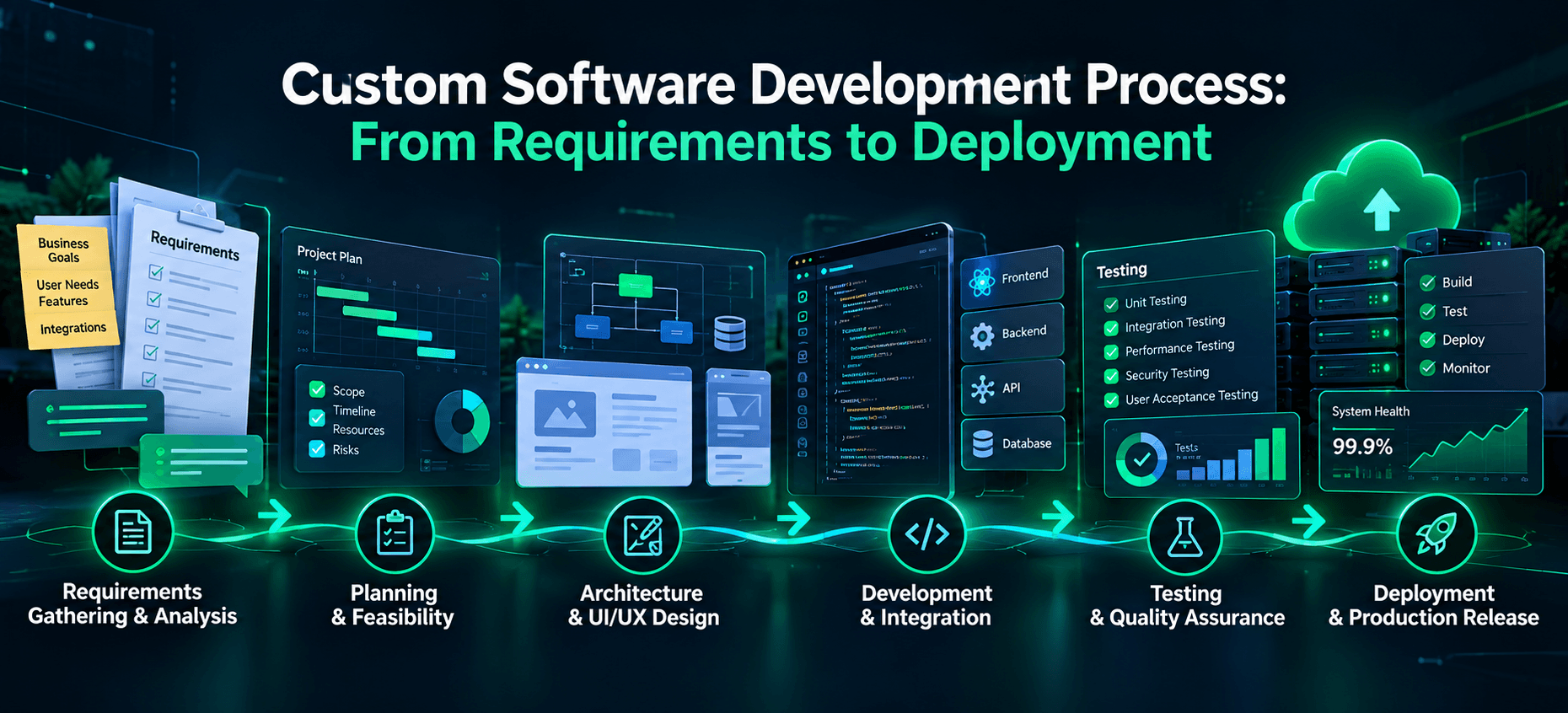
Custom Software Development Process: From Requirements to Deployment
A new software project often sounds straightforward at first: define what the business needs, build the application, and launch it. In practice, the difficult work happens between those steps. An ambiguous requirement can affect database design. A missed integration constraint can block a critical workflow. A release that passes basic functionality tests may still fail under real users or production conditions.
The custom software development process is the sequence of activities that turns a specific business problem into software that can be deployed, operated, and improved. It typically includes requirements analysis, feasibility and planning, design, implementation, testing, and deployment. These activities overlap in iterative projects, so teams revisit earlier decisions as they learn more.
This guide explains what happens at every stage, what teams should produce, and how the stages connect. To make the process concrete, we will follow a hypothetical operations portal for a business that currently manages orders and approvals through spreadsheets and email.
What Is the Custom Software Development Process?
The custom software development process is a structured approach to defining, designing, building, validating, and releasing an application created around particular users, workflows, integrations, and constraints. Unlike adopting an off-the-shelf product as-is, custom development requires explicit decisions about which behavior the system must support and how its quality will be assessed.
The process is related to the software development life cycle (SDLC), but it is not the same thing as a methodology. The SDLC describes the activities a software product needs. Agile, Waterfall, and hybrid approaches describe how teams organize, sequence, and review those activities. An Agile team still needs requirements, design, tests, and deployment controls; it may simply perform them in smaller increments.
A disciplined process does not guarantee a successful product. It creates opportunities to discover errors before they become more expensive to correct, document trade-offs, and verify that the delivered software solves the intended problem.
Custom Software Development Stages at a Glance
Stage | Main activity | Typical output |
|---|---|---|
1. Requirements | Define users, needs, constraints and acceptance criteria | Prioritized requirements and user journeys |
2. Planning | Assess feasibility, scope, dependencies and risks | Delivery plan and risk register |
3. Design | Design architecture, data, integrations and interactions | Architecture notes and prototypes |
4. Development | Implement and integrate software incrementally | Reviewed code and working builds |
5. Testing | Verify behavior, quality and readiness | Test evidence and resolved or accepted issues |
6. Deployment | Release, monitor and prepare recovery | Production release and runbook |
The table is an illustrative sequence. Security, documentation, feedback, and quality checks should run across the lifecycle, not appear only in one isolated stage.
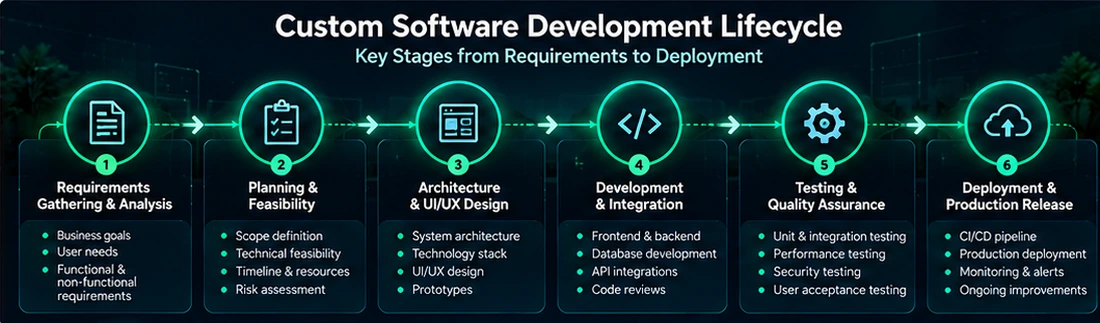
Figure 1. Custom Software Development Lifecycle.
Step 1: Requirements Gathering and Analysis
The starting point is the problem, not the programming language. A team needs to understand who will use the system, which workflows matter, how success will be measured, and which existing systems or policies the new application must respect.
Functional requirements describe actions or behavior, such as “a manager can approve a purchase request.” Non-functional requirements describe quality characteristics and constraints, such as access control, response-time expectations, availability, auditability, accessibility, and data retention. Both types influence later design and testing.
Consider our hypothetical operations portal. “Make approvals faster” is a business objective, but it is not sufficient as an implementation requirement. A more testable description would define who can submit a request, which manager can approve it, whether a request may be returned for revision, and what audit information must be recorded.
A useful acceptance criterion might read: “When an authorized manager approves a pending request, the system records the decision time and approver, changes its status, and notifies the requester.” A team should also define exceptions, such as what happens if the notification service is unavailable.
Typical outputs include stakeholder interviews, process maps, user stories or use cases, prioritized requirements, initial data definitions, and acceptance criteria. Requirements may evolve, but changes should be visible and assessed rather than silently introduced.
Step 2: Project Planning and Feasibility
Planning tests whether the proposed scope is realistic given technical dependencies, team capacity, budget constraints, and delivery objectives. Feasibility includes more than whether engineers can write the code. It also asks whether the necessary data, integration permissions, security approvals, infrastructure, and subject-matter expertise are available.
For the portal, the team might discover that order details must be imported from an existing ERP. That dependency needs early investigation: Does the ERP expose a supported API? Who approves access? How are errors handled when records differ? If these questions remain unanswered, any precise launch date is less reliable.
A practical plan identifies a minimum viable scope, major milestones, dependencies, risks, decision owners, and validation points. Estimation is usually more credible as a range with clearly stated assumptions than as an unexplained fixed number. Small proofs of concept can reduce uncertainty around unusually difficult integrations or technical constraints.
The goal is not to eliminate change. It is to distinguish agreed scope from new requests and explain how changes affect effort, schedule, or risk. Teams can use a backlog, change log, and regular review sessions to keep those decisions visible.
Step 3: Software Architecture and UI/UX Design
Architecture describes how the application is structured: its components, data boundaries, integrations, interfaces, deployment environment, and important quality attributes. UI/UX design describes how users navigate and interact with the product. The two should inform each other, because a seemingly simple interface may depend on complex access rules or data flows.
The operations portal might need modules for authentication, requests, approvals, reporting, and notifications. The design must clarify which module owns each responsibility, how the application connects to the ERP, and which events should be recorded for traceability.
A team should choose architecture based on requirements rather than trends. For example, a modular monolith can be appropriate when clear internal boundaries are needed without the operational complexity of separately deployed services. Microservices may become useful when business capabilities need independent deployments, scaling, or ownership. For a detailed comparison, see Toadster’s article on modular monolith vs microservices
Design artifacts may include wireframes, clickable prototypes, system diagrams, API contracts, data models, permission matrices, and documented trade-offs. The outputs should be detailed enough to guide implementation, but they can be revised as the team validates assumptions.
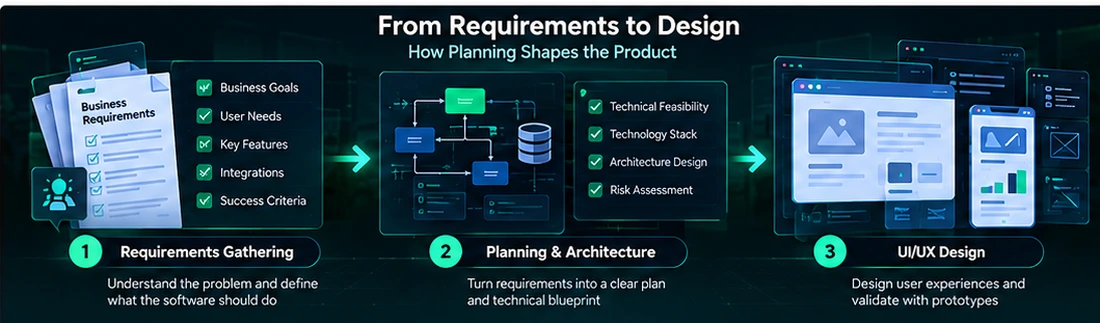
Figure 2. From Requirements to Software Design.
Step 4: Development and Integration
During implementation, engineers translate the agreed designs and prioritized requirements into working software. This includes frontend interfaces, backend logic, database operations, APIs, authentication and authorization, and integration with external systems.
For the portal, one increment might allow a user to create a request; another adds manager approvals; a later increment connects approved requests to the ERP. Delivering in small, reviewable slices makes it easier to detect misunderstandings than waiting until every feature is complete.
Version control, peer code review, automated builds, and repeatable development environments help teams coordinate changes. CI (continuous integration) typically runs checks when code is combined. CD can automate preparing or delivering releases, with the level of production automation depending on the project’s controls.
Implementation also requires handling failure cases. An ERP integration, for example, should not assume every request succeeds. The software may need retries, validation, logging, idempotency, or manual recovery depending on the nature of the operation. These behaviors should be defined and tested, not treated as edge cases after launch.
By the end of each working increment, stakeholders should be able to inspect actual functionality against agreed acceptance criteria, not just read a status update.
Step 5: Testing and Quality Assurance
Testing asks whether the software behaves as intended and whether it can be relied on under realistic conditions. Quality assurance is broader: it includes the process and controls used to prevent defects, evaluate risks, and make release decisions. Testing should occur throughout development, with additional system-level validation before deployment.
A balanced test approach commonly includes unit tests for individual components, integration tests for interactions between components, end-to-end tests for workflows, and user acceptance testing (UAT) with representative users. Depending on the system, teams may also need security, accessibility, performance, reliability, and recovery testing.
For our portal, UAT would not end at “the Approve button works.” It should verify that an unauthorized user cannot approve a request, that an approved request cannot be accidentally processed twice, and that failures in the ERP connection are visible and recoverable.
Security requires early attention. The US National Institute of Standards and Technology describes practices for integrating secure development into different SDLC models in its Secure Software Development Framework (SSDF)
For web applications and services, the OWASP Application Security Verification Standard (ASVS)
provides a structured set of security requirements that teams can tailor to the system. Neither reference means every application must apply every control identically; the selected requirements should reflect actual risk and context.
Release-readiness evidence can include test results, unresolved defect severity, security review outcomes, acceptance decisions, and operational checks. A release should not be declared ready merely because a test suite is green if critical user workflows or failure recovery remain unverified.
Step 6: Deployment and Production Release
Deployment moves a tested software version into an environment where intended users can access it. The activity may involve infrastructure configuration, database changes, secrets management, application packaging, feature flags, access provisioning, data migration, and release communication.
Development, staging, and production environments serve different purposes. A staging environment should resemble production closely enough to reveal major deployment or configuration problems, though exact parity may not always be feasible. Teams must plan carefully when data migrations or external integrations cannot be easily reversed.
For the operations portal, the release team might migrate selected historical request records, enable role-based access, configure monitoring, and launch first for one department. A phased rollout can make issues easier to contain, but it is not always suitable for tightly coupled changes or systems that require a synchronized cutover.
A release plan should identify the deployment steps, responsible personnel, smoke tests, alerting, communication channels, and rollback or recovery approach. Rollback is not always as simple as restoring old application code: irreversible database transformations or externally processed transactions may require a forward-fix or compensating process.
Deployment is successful only when users can perform essential workflows and the team can observe and respond to operational problems. The production release should have clear ownership after the initial launch.
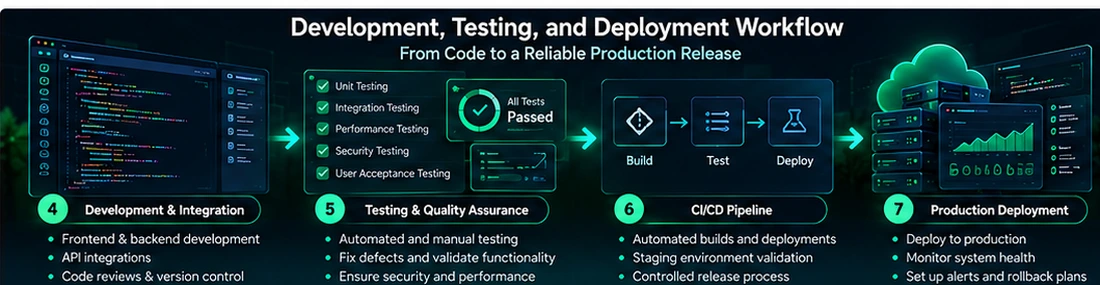
Figure 3. Development, Testing, and Deployment Workflow.
What Happens After Software Deployment?
Launch marks the beginning of production learning. Teams monitor errors, performance, capacity, security events, and user feedback. They also address defects, update dependencies, maintain backups, review access, and refine the product as business needs change.
In the portal example, early usage might reveal that managers need batch approvals or clearer exception messages. Those changes should be assessed as new requirements rather than confused with defects in features that met the original acceptance criteria.
Documentation matters after launch. Architecture notes, runbooks, API descriptions, known limitations, deployment steps, and ownership information reduce dependence on any one engineer. Maintenance planning should therefore be included in the original project discussion, even though the article’s main lifecycle ends at deployment.
How Development Methodologies Change the Workflow
The same core lifecycle activities can be organized differently. Waterfall-style delivery tends to emphasize sequential phases and formal approvals between them. Agile approaches deliver and review smaller increments, with requirements and design refined as feedback arrives. Hybrid models combine planned controls with iterative implementation.
Neither method is automatically superior. A project with stable requirements and formal regulatory gates may need more upfront documentation and approvals. A product exploring uncertain user needs may benefit from shorter feedback cycles. Many real projects combine both: they establish architecture and compliance constraints early while delivering user-facing features incrementally.
A useful selection question is not “Are we Agile?” but “How will we discover changes, validate work, document decisions, and control release risk?” Clear ownership and visible acceptance criteria matter under every methodology.
Common Challenges and How to Address Them
Challenge | Why it matters | Practical response |
|---|---|---|
Ambiguous requirements | Different stakeholders expect different behavior | Use examples, user journeys and testable acceptance criteria |
Unverified integrations | External systems can block critical workflows | Validate API access and failure behavior early |
Uncontrolled scope | Unreviewed changes affect delivery decisions | Prioritize a backlog and record material changes |
Weak test coverage | Defects appear late or in production | Test important workflows and failure cases continuously |
Security left until launch | Late fixes can require redesign | Define risk-driven controls during design and build |
Incomplete handover | Operations depend on undocumented knowledge | Create runbooks, access inventory and ownership plan |
These risks interact. A weak requirement can lead to a flawed design; the flaw may not be discovered until integration testing; and the subsequent fix can affect the release plan. The purpose of an organized process is to make these dependencies visible early.
A Practical Example: From an Approval Request to a Production Workflow
The following is a fictional illustration, not a Toadster client engagement.
Imagine a distributor whose employees send purchase requests through email and track approval status in separate spreadsheets. The goal is to create a secure internal portal with an audit trail and integration to an ERP.
- Requirements: Interview requesters and managers; define approval thresholds, roles, exceptions, notifications, and audit needs.
- Planning: Confirm ERP integration access, migration needs, minimum launch scope, decision owners, and uncertainties.
- Design: Prototype request and approval screens; define data model, identity rules, integration contracts, and logging.
- Development: Build request creation, approval, reporting, and ERP synchronization in reviewable increments.
- Testing: Verify unauthorized approvals are blocked, duplicate submissions are handled, and ERP outages can be recovered from.
- Deployment: Migrate approved data, configure monitoring, trial a controlled rollout, and establish support ownership.
The example shows why “requirements to deployment” is not a simple handoff between isolated teams. A single approval rule influences the interface, permissions, database structure, automated tests, and production audit trail. When each stage makes those connections explicit, the resulting system is easier to evaluate and maintain.
Conclusion: A Process That Connects Decisions to Working Software
Custom software is not built successfully by completing a checklist of disconnected phases. Each decision shapes later work: requirements guide design, design influences implementation, tests verify expected behavior, and deployment confirms whether the application can operate in the real environment.
A useful custom software development process makes these dependencies clear, keeps decisions reviewable, and treats security, quality, and maintenance as ongoing responsibilities. The sequence matters, but the connections between stages matter more.
For organizations preparing a new application or modernizing an existing one, explore Toadster Technologies’ software development services or discuss your requirements with our team.