
Why does Claude Code feel like a video game? Because it turns a vague, frustrating coding task into a series of visible moves: find the problem, ask for a change, check the result, and try again. The feedback arrives quickly enough to make an ordinary bug fix feel like a small quest. That can be motivating. It is not, by itself, proof that the resulting software is better.
You know the feeling when a task finally clicks. The failing test goes green. The bug that has been sitting in the backlog for days stops reproducing. Someone says, “Just one more fix,” and suddenly an hour has passed. That is the appeal people are describing when they compare Claude Code to a game. The comparison sounds funny, but it gets at something real about the way the work flows.
What matters, especially for a team shipping software to customers, is knowing where that momentum helps and where it can fool you.
The short version
- The hook: a clear goal, quick feedback, and visible progress make coding feel more rewarding.
- The useful part: Claude Code can inspect project context, propose edits, run commands, and help iterate on tests when configured to do so.
- The catch: a convincing result on screen is still a draft until a developer checks the diff, validates the behavior, and approves the change.
- The business lesson: measure delivery outcomes and reliability, not just how many prompts or lines of code were generated.
What is Claude Code, exactly?
Claude Code is an agentic coding tool from Anthropic. It can work with an existing codebase, read files, suggest and apply changes, and run development commands within configured permissions. It is available across the terminal and other supported development surfaces. Unlike a basic autocomplete feature that predicts the next line, it can work through a multi-step task with the developer directing and checking its actions. Anthropic outlines these capabilities in its official product documentation.
Picture a developer joining an unfamiliar project. Before writing anything, they need to learn where authentication lives, which test covers a particular route, and why a configuration flag behaves differently in staging. Claude Code can help investigate those questions. That is a different experience from receiving a code snippet in a chat window and manually fitting it into the repository.
It is also not an autonomous replacement for an engineering team. The quality of the work still depends on the task definition, the surrounding code, what the tool is allowed to do, and how carefully someone reviews the result.
Five reasons it feels more like a game than a coding assistant
1. There is a quest with a clear finish line
Good games do not start with “improve everything.” They give you an objective. A coding task works the same way. “Fix the checkout tax calculation when a coupon is applied” is a much stronger starting point than “make the checkout better.” The first has a visible outcome and a way to test it. The second can expand in every direction.
2. The repository becomes a map
In a game, you explore a world to find the right path. In a codebase, you trace routes, functions, dependencies, tests, and old assumptions. Claude Code can make that exploration less intimidating by helping locate relevant files and explain how they connect. You still need to verify that the explanation matches the actual implementation.
3. Feedback is almost immediate
A build succeeds or fails. A test passes or throws an error. A diff shows what changed. Each result gives the developer new information. That is the closest thing to a game mechanic here: action, response, adjustment. Anthropic’s best-practices guide explicitly encourages giving Claude a way to verify its work rather than treating plausible output as the finish line.
4. Small wins keep the momentum going
One failing test turns green. A helper function becomes easier to read. An edge case gets documented. Those are modest improvements, but each one removes uncertainty. The danger is that the pleasant rhythm can keep you editing after the original problem is already solved. More changes are not necessarily better changes.
5. You can rewind, but not every action is reversible
Games have checkpoints. Claude Code also documents checkpointing and rewind features for tracked file edits. That is useful when a coding experiment goes in the wrong direction. But a checkpoint is not a substitute for version control, backups, or approval of external actions. Changes to a live database, a deployed environment, or third-party systems need separate safeguards.
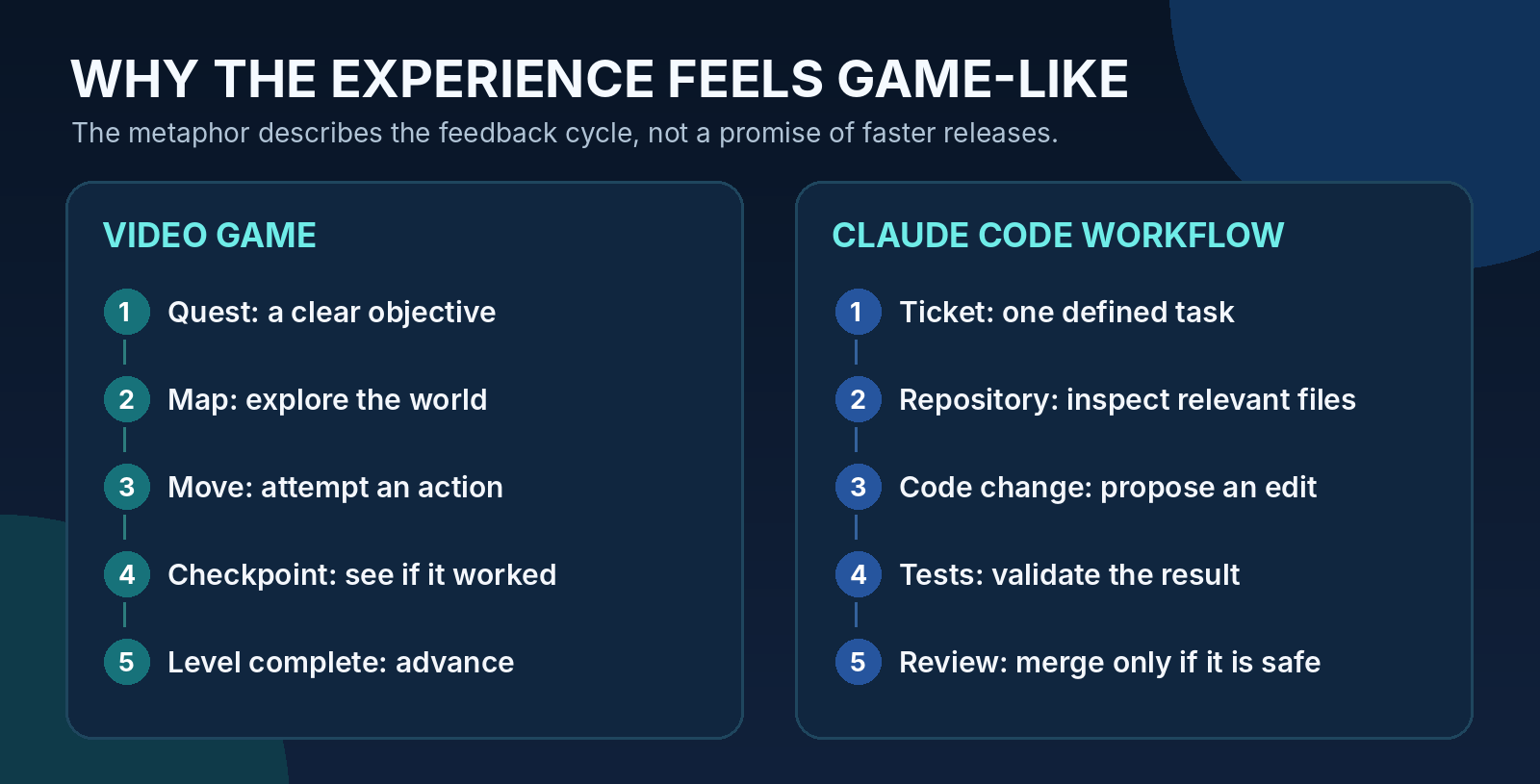
Figure 1. How the game metaphor maps to a real development task.
A practical example: fixing one checkout bug
Here is an illustrative scenario, not a claimed client case study or a measured product benchmark. A developer is working on an e-commerce application. A discount code works on the product page, but the final checkout total is wrong when shipping and tax are recalculated. The temptation is to ask Claude Code to “fix checkout.” A better approach gives it a narrow job.
EXAMPLE PROMPT FOR A SCOPED INVESTIGATION
Inspect the checkout total calculation and the tests that cover discount codes. Explain the likely cause of the mismatch. Do not edit files yet. Suggest the smallest fix, identify the affected tests, and call out any assumptions about tax or shipping rules.
This is where the tool becomes useful. The developer can ask for a map of the problem before requesting a patch. Once the likely cause is clear, they can approve a small change rather than opening the door to a broad rewrite.
A disciplined sequence might look like this:
- Inspect: Find the total-calculation function and the relevant test cases.
- Plan: Write down the expected behavior and the edge cases before changing code.
- Implement: Make the smallest relevant edit. Keep unrelated cleanup outside the task.
- Verify: Run focused tests, then the wider checks required by the repository.
- Review: Have a person inspect the diff and confirm that the tax and discount rules are correct.
The satisfying part is seeing the test change from red to green. The professional part is checking that it went green for the right reason. A tool can make that cycle smoother without becoming the person accountable for it.
If you want a more hands-on starting point, see Toadster’s existing practical guide to building software with Claude Code. It covers structured prompts, debugging, code review, and how the tool fits into a working development environment.
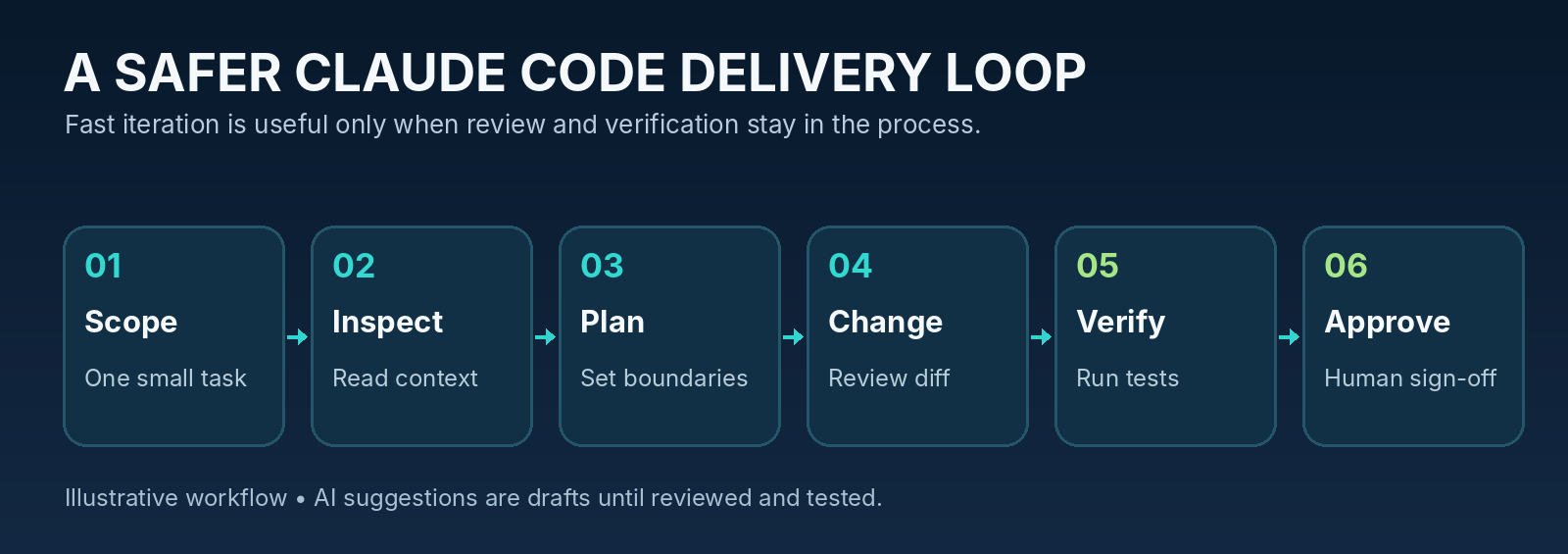
Figure 2. A six-stage workflow that keeps human approval and verification in the loop.
Why that rhythm can help developers, and where it can mislead them
Much of software work is not glamorous. A developer might spend the morning finding a configuration mismatch, then another hour writing test fixtures, and the afternoon explaining an edge case to a teammate. There is value in making those transitions less tedious. Faster exploration and shorter iterations can leave more room for architecture, product judgment, and customer problems.
But the feeling of progress is not the same as progress. A large generated diff can look impressive while introducing unnecessary complexity. A passing unit test can miss a broken integration. A polished explanation can still misunderstand a business rule. And a tool that seems helpful on a small bug may require far more careful controls when it can touch infrastructure or sensitive data.
The right question is not “Did it feel fast?” It is “Did we solve the intended problem, and can we trust what changed?”
Does Claude Code actually make teams more productive?
It can help with tasks such as exploring unfamiliar code, drafting repetitive logic, creating tests, troubleshooting failures, and preparing documentation. Anthropic lists these as common developer use cases. Whether those gains show up in a particular team, however, depends on the project, the developers, the quality bar, and how the work is reviewed. A single anecdote should not be treated as a universal productivity number.
Our broader article on AI in software development discusses where AI coding tools help and where real-world engineering still gets messy. For a Claude Code pilot, the sensible approach is to measure what actually improves rather than assume every automated task translates into a faster release.
Start with one repeatable category of work and track a before-and-after baseline. Useful questions include:
- How long does a change take to move from code committed to deployed?
- Are developers spending less time on repetitive investigation and test setup?
- Are review comments, regressions, or rework increasing?
- Do deployments remain stable, and how quickly does the team recover when one fails?
For the broader delivery picture, DORA’s software delivery metrics distinguish throughput from instability. Their framework includes change lead time, deployment frequency, failed-deployment recovery time, change fail rate, and deployment rework rate. These metrics are more useful than celebrating prompt counts or raw lines of generated code.
The guardrails matter more than the leaderboard
When an AI coding session is going well, it is easy to approve the next suggestion without looking closely. That is exactly when the rules need to be boring and consistent. A good team does not relax review requirements because the tool seems confident.
Keep secrets and sensitive data out of casual prompts
Credentials, production tokens, customer records, and confidential source material should be handled under your organization’s approved data policies. Decide which repositories and environments the tool may access before a pilot starts. Anthropic documents permission controls and security considerations; the right configuration depends on your environment and risk tolerance.
Make the smallest useful change
A narrow patch is easier to review, test, reverse, and explain. Ask the tool to identify the target files, state assumptions, and flag unrelated changes. If the proposal touches authentication, payments, privacy, or infrastructure, the bar for review should be higher.
Treat tests as evidence, not a magic shield
Unit tests are helpful, but they only check what they were written to check. Integration behavior, performance, accessibility, and security need appropriate additional verification. The job is not finished because one green message appears in the terminal.
Keep ownership clear
The developer and engineering lead still own architecture decisions, pull request reviews, deployment readiness, and incidents. The team’s workflow should make that responsibility visible. Anthropic’s security documentation is a useful reference for permission configuration, but organizations still need their own policies and controls.
How to run a small pilot without disrupting the team
You do not need to introduce Claude Code across every repository at once. A two-week experiment on one low-risk class of tasks is easier to learn from than a company-wide mandate. Choose work with clear acceptance criteria and established tests, such as documentation updates, test maintenance, or isolated bug fixes.
- Before the pilot: Set a baseline for turnaround time, review workload, and defects. Agree on data and permission boundaries.
- During the pilot: Record what was attempted, what was accepted, what needed rework, and which checks caught problems.
- After the pilot: Compare the results with the baseline and ask developers whether the workflow reduced friction or merely moved effort into review.
Teams already using an iterative Agile development framework can include the experiment in a sprint review or retrospective. The point is to learn quickly without confusing enthusiasm with evidence.
What this means for founders and engineering managers
You do not have to write code to ask useful questions about AI-assisted development. When a vendor or internal team says it builds faster with coding agents, ask what changed in the workflow. Can it show a scoped ticket? Does every AI-generated change receive a review? What tests run before release? How is customer data protected? What happens when the tool makes a plausible but incorrect suggestion?
Good answers are usually specific and slightly unexciting. You will hear about test environments, acceptance criteria, pull requests, access controls, and incident response. That is a far better sign than a dramatic claim about writing thousands of lines in an afternoon.
If you are evaluating external engineering support, Toadster Technologies offers software development resources and AI development services. The right discussion is about how a team protects quality while improving delivery, not which tool looks most impressive in a demo.
The real win is knowing when to stop playing
There is nothing wrong with enjoying a tool. Software development has plenty of repetitive, frustrating work, and it is refreshing when technology makes a hard problem feel approachable. The video-game comparison is memorable because the feedback loop is real: explore, attempt, check, improve.
Just remember that shipping software is not a high-score contest. A clean fix, a well-reviewed change, and a release that behaves as expected are worth more than an endless streak of prompts. The best session may be the one where you get the answer, close the terminal, and move on.