
Native Mobile App Development with Kotlin Multiplatform: A Practical Architecture Guide
Two apps, one pricing rule. Someone changes it on Android on Monday, someone else changes it on iOS on Thursday, and for three days customers see different totals. That's the everyday cost of running separate native apps. You get full control over each platform's experience, features and performance, and in return you build, change and test the same business logic twice.
Kotlin Multiplatform (KMP) goes after that duplication directly. You share the code that has no reason to differ between platforms and keep native interfaces and platform-specific features for everything else.
A typical setup: data models, networking, validation and business rules in shared Kotlin, Jetpack Compose screens on Android, SwiftUI screens on iOS. How much you share depends on your architecture, your performance needs and how far each platform pulls in its own direction.
One misconception is worth killing now. KMP doesn't ask you to replace two native apps with a single codebase. You can add code sharing slowly, one module at a time, and for most teams that's the sensible way to do it.
If you're still working out the fundamentals, start with our guide to building native applications for iOS and Android. This piece picks up from there and covers what selective code sharing adds: how KMP works, how to structure an app around it, what should stay native, and when it's the wrong call.
What Is Kotlin Multiplatform in Native Mobile App Development?
Kotlin Multiplatform is an open-source technology from JetBrains for sharing Kotlin code across platforms, Android and iOS being the pair most teams care about. Instead of building each feature twice, you move the functionality that behaves the same on both platforms into shared modules.
Think of an e-commerce app. Product and customer models, API calls and response handling, cart calculations, pricing rules, input validation, authentication state, order processing and sync rules are all things both apps need, and none of them is really platform-specific. They can live in shared Kotlin, as long as the dependencies they use support your target platforms. Each app then talks to that shared code across its own platform boundary.
What shouldn't be shared? Anything built on operating-system APIs, platform SDKs or genuinely different UX requirements. Leave those as separate implementations. Forcing them into common code is how shared modules turn into a mess.
This is why KMP suits businesses that already have native apps in production. They want less duplicated work, and a rewrite isn't on the table. The official Kotlin Multiplatform documentation describes the same path: share a few isolated components first, then widen reuse as your needs change.
Kotlin Multiplatform vs Kotlin/Native vs Compose Multiplatform
People use these names interchangeably. They shouldn't.
Technology | What it does | Role in mobile application development |
|---|---|---|
Kotlin Multiplatform (KMP) | Enables Kotlin code sharing across platforms | Shares business logic, networking, data handling and other compatible components |
Kotlin/Native | Compiles Kotlin code into native binaries | Enables Kotlin code to run on native targets such as iOS |
Compose Multiplatform | A declarative UI framework for sharing interfaces | Allows teams to implement shared UI across supported platforms |
Jetpack Compose | Google's modern declarative UI toolkit for Android | Builds Android application interfaces |
SwiftUI | Apple's declarative UI framework | Builds interfaces for iOS and other Apple platforms |
Kotlin Multiplatform is the code-sharing technology. Kotlin/Native provides the compilation technology for native targets, while Compose Multiplatform is an optional approach to sharing UI.
So picking KMP doesn't mean picking a shared UI. A KMP app can share its logic and still use SwiftUI on iOS and Jetpack Compose on Android. Or the team can bring in Compose Multiplatform and share some of the interface, or all of it. For more on each piece, see the official documentation for Kotlin/Native, Compose Multiplatform, Jetpack Compose and SwiftUI.
How Does Kotlin Multiplatform Work?
A KMP project splits code by the platforms it has to run on: common source sets for reusable code, platform-specific source sets for anything tied to one operating system. The shared Kotlin is compiled for every configured target and dropped into the matching app. On Android it's generally compiled for the JVM target and consumed as a Gradle module or library. On iOS, Kotlin/Native compiles it for Apple targets, and the resulting framework goes into the Xcode project.
The result is two platform apps, each using the shared pieces it needs. It's not one app forced to look and behave the same everywhere.
1. Shared code in the common source set
commonMain holds production code that compiles for every target set up to use it. Anything that doesn't touch platform-specific APIs belongs here.
A banking transfer is a good example. Before it's submitted, the app checks that the amount is valid, the recipient details meet business requirements, the transaction stays under configured limits, and the user has permission to start it. If those rules need to behave identically on both platforms, write them once. Both apps then run the same validated logic, and nobody has to wonder whether the iPhone rounds differently.
2. Platform-specific source sets
Some things can't be shared, so accept that early. Biometric authentication, camera and photo library access, push notifications, Bluetooth and NFC, secure storage, background execution, native navigation and accessibility behaviour all depend on the operating system and usually need their own Android and iOS implementations. KMP gives them a home in platform-specific source sets, where they connect to the shared logic.
3. Connecting shared and platform-specific functionality
When common code needs something that differs by platform, Kotlin gives you expect and actual declarations. The expect declaration says what each platform must provide, and the matching actual supplies it. If a shared module needs a device-specific identifier, for instance, the common side defines the abstraction and Android and iOS fill in the behaviour. Dependency injection and similar patterns work too, and the right one depends on your architecture. Whichever you choose, the goal is the same: keep operating-system dependencies contained so they don't leak through the shared module.
More implementation detail is in the Kotlin documentation on sharing code between platforms.
Recommended Architecture for Native Mobile App Development with Kotlin Multiplatform
The decision that matters most in a KMP project is which layers to share. For many business apps, the best starting point is sharing the domain and data-layer code that suits it and keeping the presentation layers native.
Here's a representative layout:
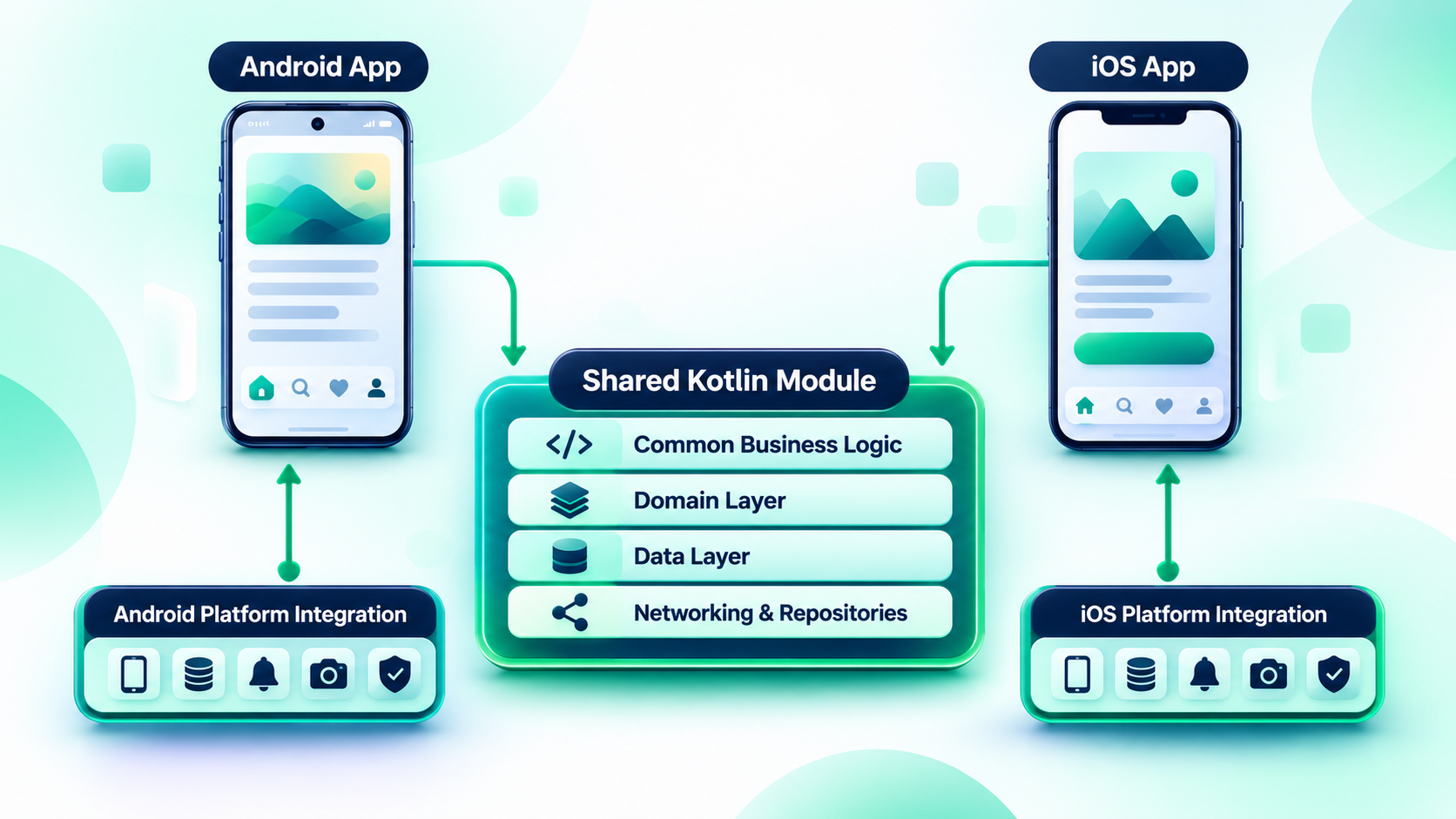
Both apps integrate with the shared module, and the platform-specific code handles operating-system dependencies. Take it as a starting point, not a rulebook. Plenty of projects keep repository implementations, database access or other services outside the shared module because their dependencies make that easier.
1. Presentation layer: Retain native UI when platform fidelity matters
This is the layer users touch. With native interfaces, Android developers build with Jetpack Compose or the Android View system, iOS developers use SwiftUI or UIKit, and each platform keeps its own navigation and interaction conventions. Both consume the logic and data the KMP module exposes.
It's the right call for apps with heavy platform-specific interaction, detailed UI customization or close ties to native components. A healthcare app could share appointment rules, patient data handling and API communication while keeping two native interfaces.
You will still maintain two presentation layers. KMP shrinks the duplication in what you share and does nothing for what you don't.
2. Domain layer: Share business rules and application logic
If you share only one layer, make it this one. Eligibility and pricing calculations, transaction validation, order processing, permissions, data transformation and workflows should give the same result on an iPhone as on an Android phone, so there's no good reason to write them twice. You also get to test the same business rules independently of any screen.
3. Data layer: Share networking and data handling where appropriate
The data layer covers how the app retrieves, stores and transforms information. A KMP module can hold API clients, serialization and models, repository interfaces and implementations, caching, sync rules, and database access where the chosen library supports your targets. An inventory app, for example, could share networking and repository logic and show the results on separate native screens.
Check library support before you commit, because not every database library or third-party SDK works on every target. Do that before moving anything into shared code, not after.
A practical networking example: Ktor with platform-specific engines
Ktor is the usual pick for shared networking. The common module holds the client configuration, request handling and API logic, and each platform supplies its engine: OkHttp from androidMain, Darwin from iosMain. commonMain keeps the serialization and the API-facing code. The app shares its networking interface without making both platforms run the same underlying implementation.
Check the dependency setup against the Ktor and Kotlin versions your project actually uses. The Android Developers KMP setup guide includes an example of platform-specific networking dependencies.
4. Platform integration layer: Keep operating-system dependencies explicit
Keep platform integrations isolated, and don't squeeze them into the common module. Android uses its own APIs for notifications, permissions and device services, and iOS uses Apple's frameworks.
Authentication shows the split well. Authentication state and business rules can be shared wherever behaviour is consistent. Token handling and API request logic can often be shared too, depending on your security architecture and library compatibility. Biometrics, Keychain and Android Keystore are platform-specific, full stop. OAuth and third-party authentication SDKs depend on what the SDK supports.
Our advice is to share the authentication workflow and the app-level state, and leave the actual security features to the platform. Biometric prompts and secure storage should go through Android's biometric APIs and Apple's LocalAuthentication and Keychain services. A generic cross-platform replacement bought for the sake of code reuse is a bad trade.
A practical example: An e-commerce mobile application
Back to the e-commerce app. Product and order models, cart calculations, pricing and discount rules, and API communication all go in the shared Kotlin module, with the usual check that your libraries support both targets. Repository and data transformation logic can join them where the dependencies allow. Database persistence is shared only if the database you chose supports both targets, and otherwise each platform keeps its own.
The product listing interface can be native on each side, or shared if that suits you. Apple Pay and other platform-specific payment integrations, push notification handling and navigation stay native.
The result: no duplicate pricing logic, and no loss of platform polish. If a component only gets harder to integrate once it's shared, don't share it.
Native UI vs Shared UI: Which KMP Approach Should You Choose?
You can share application logic and keep native interfaces, or share both logic and UI with Compose Multiplatform. Neither is better by default. It comes down to the experience you want, the codebase you already have and what your engineers can support.
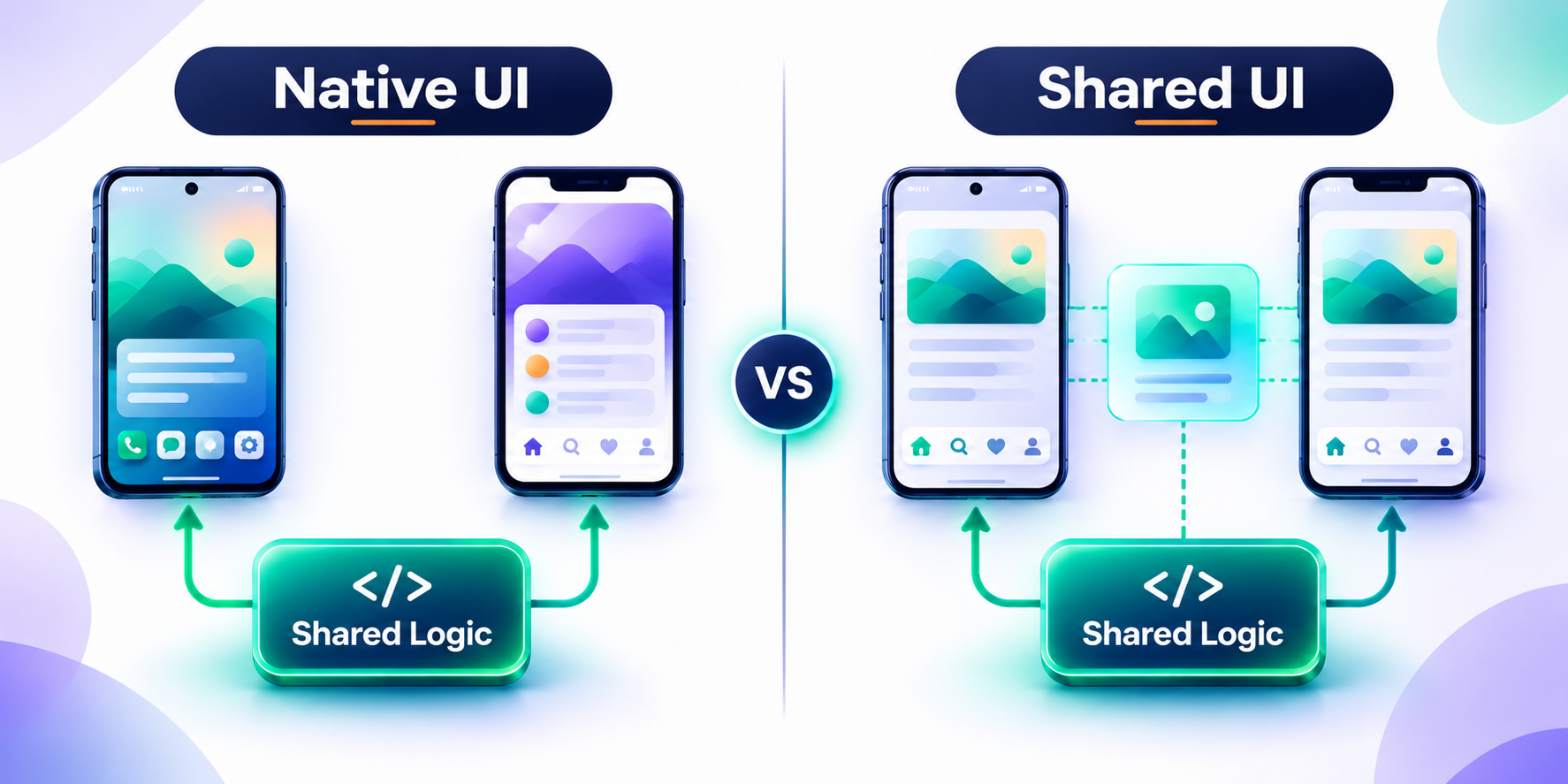
Business logic is shared either way. The differences are in the UI:
Decision factor | KMP with native UI | KMP with Compose Multiplatform |
|---|---|---|
User interface | Separate platform interfaces | Shared UI code |
Android interface | Jetpack Compose or Views | Compose Multiplatform on Android |
iOS interface | SwiftUI or UIKit | Compose Multiplatform, with native interoperability available |
UI maintenance | Two presentation layers | More shared presentation code |
Existing native applications | Can be introduced without replacing the UI | Can be adopted incrementally, including individual screens |
Design consistency | Requires coordination between platforms | More common UI implementation |
Platform-specific interaction | Direct access to native UI patterns | Requires deliberate platform adaptation and testing |
When should you retain native UI?
Keep native UI when the app relies on platform-specific interactions, when iOS and Android have different design or navigation requirements, or when your existing interfaces are already mature. It's also the better choice if the product uses specialized native SDKs or device capabilities, or if the business just wants to share logic without a UI migration. A fintech app can share transaction validation, account data handling and business rules while keeping native payment flows and platform-specific authentication screens. The main gain there is less duplicated business and data-layer work.
When should you consider Compose Multiplatform?
Look at it when the product needs a consistent interface across platforms, when design systems and interaction patterns are mostly shared, and when the team wants to cut duplicated UI work. You'll also need engineers with the Kotlin and Compose expertise to maintain shared UI, and you should have validated the native integrations you rely on.
According to the official platform support documentation, Compose Multiplatform is currently stable for Android, iOS and desktop. Web support via Kotlin/Wasm is at a different maturity level, so check the status of every target you plan to use.
You can also mix approaches, sharing selected screens or components and keeping native interfaces where you need closer integration.
Two kinds of iOS integration get confused here, so it helps to separate them.
- Integrating shared Kotlin logic: The iOS app consumes APIs exposed by the Kotlin framework, so you need a clear Kotlin-to-Swift boundary. How Kotlin declarations appear in Swift depends on the integration and interoperability approach you choose, and not every Kotlin API gets a neat, idiomatic Swift equivalent.
- Embedding shared Compose UI: Compose Multiplatform offers interoperability options for placing shared interface components inside existing UIKit or SwiftUI apps. That's a separate UI integration task with its own implementation and testing.
Kotlin's Swift interoperability documentation covers Swift export and its current limitations. It's still evolving, so don't treat it as a drop-in replacement for every established framework-integration approach.
Adopting KMP doesn't have to be all or nothing.
How to Adopt Kotlin Multiplatform in an Existing Native App
You don't have to rewrite anything to start. Gradual adoption is almost always the better route, because you can introduce shared functionality without touching existing interfaces and platform integrations. The aim is to find duplicated code you can share without destabilizing apps that already work.
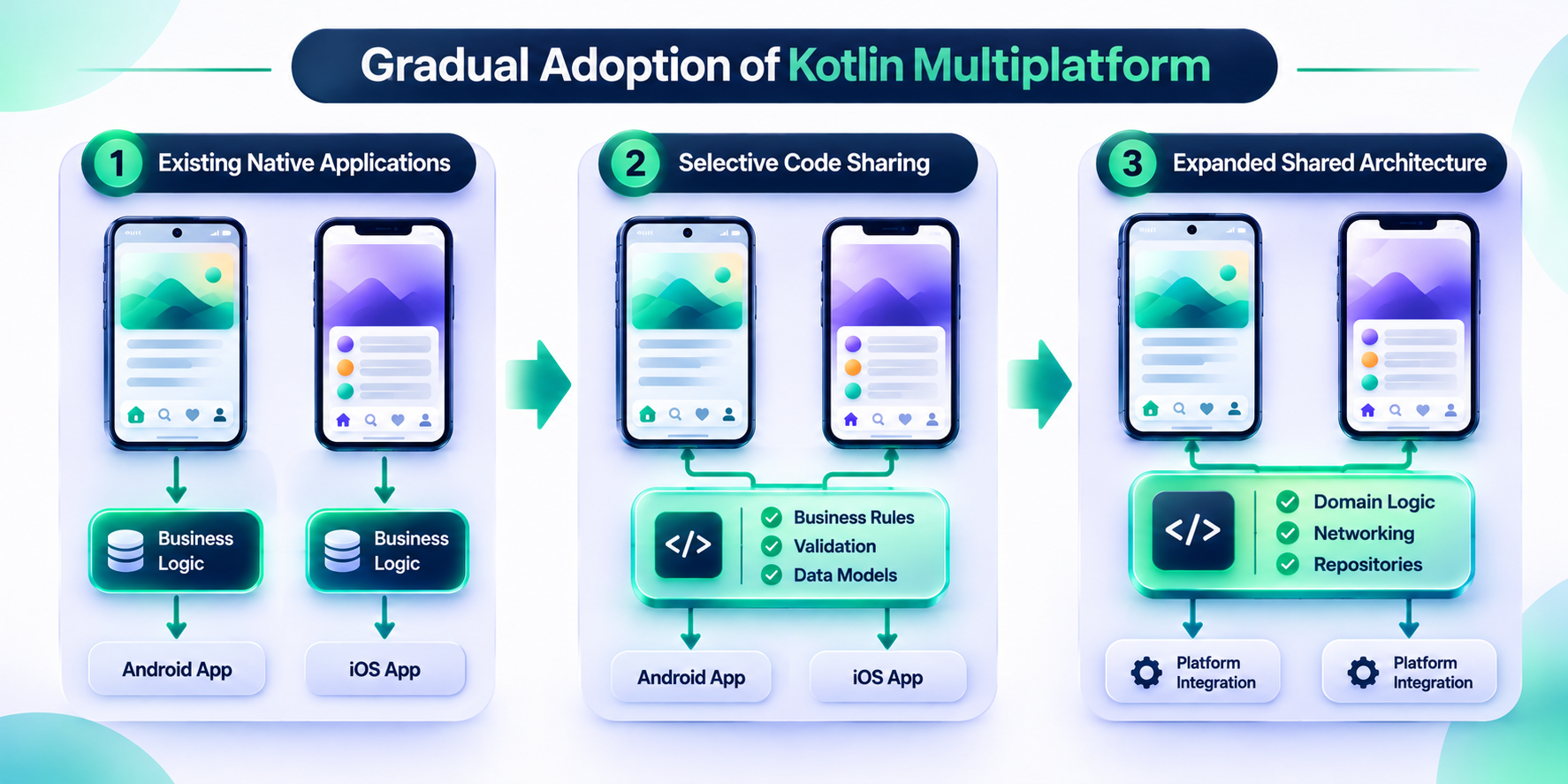
Step 1: Review the existing applications
Read both codebases and look for business rules implemented separately on each platform, repeated API and data-handling logic, and features that behave inconsistently. Note platform-specific SDKs and libraries, and how each app is architected and tested. What you're after is the difference between code that genuinely behaves the same and code that only looks alike, because two similar implementations can have different platform requirements.
Step 2: Identify a suitable first module
Don't migrate everything at once. Pick something small and well defined, like input validation, pricing calculations, data models, API response mapping or a business-rules module. Our pick would be validation or pricing. A good first module has clear inputs and outputs, few platform dependencies and enough business value to justify the effort. Moving a common pricing calculation into shared Kotlin shows you quickly whether your architecture, testing and builds can handle more.
Step 3: Set up the shared module
Create the module and configure your Android and iOS targets. Verify Kotlin and Gradle compatibility, Android and Xcode build requirements, and library support for your targets. Work out how the iOS app will consume the shared code and how dependencies and platform-specific implementations will be managed. The Android Developers Kotlin Multiplatform setup guide is an official starting point for a project that shares code and keeps native UI.
Step 4: Integrate shared code with both applications
On Android, the shared module is generally consumed through the Gradle project. On iOS, the Kotlin code is built for the relevant Apple targets and exposed to the Xcode app through your framework integration. The iOS app also needs a defined boundary for calling shared Kotlin APIs from Swift. Before calling it done, review how the generated framework exposes types, functions, errors and asynchronous operations.
Leave the existing UIs alone for now. If something breaks, you want to know it came from the shared module.
Step 5: Test behaviour on both platforms
Run the shared and platform-specific tests, and confirm both apps return the expected results for the same business inputs. Then cover platform integrations, error handling, dependency compatibility, data persistence, lifecycle behaviour and performance on real devices. A shared module can pass every common test and still fail when it meets iOS integration or a native SDK, so test the whole flow.
Step 6: Expand sharing based on evidence
Once the first module is stable, look at what else could go in. Don't migrate code just to raise the percentage of shared Kotlin. A platform-specific implementation is sometimes easier to maintain than an abstraction with little real reuse. Let results decide: less duplicate code, consistent business behaviour, manageable integration work and release processes you can maintain.
Testing, Performance and Maintaining a Kotlin Multiplatform Application
Sharing code changes how you test. It doesn't remove the need for platform-specific QA. A reliable KMP project pairs shared tests with Android and iOS integration testing, and measures performance on the app's real workloads instead of assuming sharing makes anything faster.
Shared code testing
Common tests validate platform-independent behaviour: business rules and calculations, input validation, data transformations, repository behaviour, error handling, and serialization and mapping. Both apps rely on the same verified implementation, so each rule only needs testing once.
Platform-specific testing
Test operating-system dependencies on their own platform. That means native navigation and lifecycle behaviour, biometrics, permissions, notifications, secure storage, camera and other hardware, and each app's startup and release behaviour. The two operating systems also handle background work, lifecycle events and device capabilities differently, so allow for that.
A practical KMP testing matrix
Think of it as six layers, each with its own home:
Test category | What to validate | Where to test |
|---|---|---|
Shared unit tests | Business rules, validation, calculations and data transformations | commonTest and supported common test targets |
Android-specific tests | Android adapters, platform APIs and Android integration behaviour | Android unit and instrumentation tests |
iOS-specific tests | iOS adapters, framework integration and Apple API behaviour | iOS test targets and Xcode test environment |
UI tests | Navigation, accessibility, interaction and rendering | Android and iOS separately; shared UI targets where applicable |
End-to-end tests | Complete workflows involving APIs, persistence and platform services | Representative Android and iOS devices or test environments |
Regression tests | Existing functionality after shared-module changes | Both application test suites |
The exact setup depends on your targets and tooling. The rule is simple: test shared logic once, and verify platform behaviour on each platform.
Performance considerations when using Kotlin Multiplatform
KMP won't make an app faster than separately built native apps, Flutter or React Native on its own. Performance depends on the code you share, your libraries, platform integration, architecture and UI. A shared validation function doesn't change how the screen around it performs, and native UI doesn't guarantee every shared data-layer operation is efficient.
So benchmark the heavy workflows before release, on representative devices with realistic data volumes, and compare against your current baseline if you have one. Look at startup time, including initialization of shared modules and dependencies. Check memory during normal use and during heavy workflows. Time large data transformations such as parsing, serialization and calculations, along with database reads, writes, caching and sync on the storage you chose. Test network-heavy flows under realistic conditions, check scrolling, navigation and animation on both platforms, and run camera, media, Bluetooth and other hardware features through their real platform implementations.
The point is to find actual bottlenecks in your implementation, not to guess at a framework's performance.
Continuous integration and release management
Your CI pipeline should build and test the shared module and both apps, and validate the iOS integration and the Android build independently. Keep an eye on compatibility between Kotlin, Gradle, the Android Gradle Plugin, Xcode, third-party multiplatform libraries and platform SDK versions.
KMP doesn't give you one release process for both platforms. Android and iOS still have their own signing, packaging, review and distribution requirements, and ongoing maintenance still means updating platform SDKs, watching dependency compatibility and testing against new OS releases. Budget for it. Our guide to mobile app maintenance costs is a useful reference for long-term support planning.
Benefits and Limitations of Kotlin Multiplatform
How much KMP helps depends on the architecture and how well it's executed, so it's fair to look at the gains and the responsibilities together.
Benefits of Kotlin Multiplatform
The headline benefit is less duplication. When both apps use one implementation of the business rules, nobody maintains two versions, and that frees time for platform-specific work. Behaviour stays consistent for the same reason, since shared validation, calculations and data handling lower the risk of the platforms drifting apart.
You can adopt it gradually, one module at a time, without replacing your architecture or migrating every feature before you see value. Native integration is still available, so apps keep native APIs and interfaces where they need them. And the UI strategy is yours to choose: separate native interfaces, shared UI through Compose Multiplatform, or a mix. Choosing KMP doesn't dictate it.
Limitations and considerations
A shared module needs planning. Someone has to decide what belongs in common source sets and what needs platform-specific implementations, and poor boundaries bring needless abstractions and extra maintenance.
Library support is uneven. A dependency your Android app uses may not exist for iOS, so check compatibility and alternatives before moving it into a shared module.
iOS still needs Apple-platform knowledge. Even with shared logic, you're dealing with Xcode, Apple's build and distribution process, and the job of exposing Kotlin APIs to Swift properly.
Native UI means two interfaces. If you keep SwiftUI or UIKit on iOS and Jetpack Compose or Views on Android, both presentation layers still need building, testing and maintaining. Cross-platform code doesn't make signing, packaging, testing and distribution identical either.
Finally, the business case depends on how much code you can actually share. If most of an app is platform-specific, the shared module won't offer much, and a migration can add complexity when the team shares code that would have been simpler to leave native.
Kotlin Multiplatform vs Native Development vs Flutter and React Native
KMP is one of several ways to build for iOS and Android, but it shouldn't be judged as if it followed the same architecture as Flutter or React Native. It doesn't. Separate native development keeps platform-specific implementations. KMP shares selected Kotlin code and keeps native implementations where needed. Flutter and React Native each have their own model for sharing application code and building cross-platform interfaces.
Factor | Separate native development | Kotlin Multiplatform | Flutter | React Native |
|---|---|---|---|---|
Main languages | Swift and Kotlin | Kotlin for shared code, with platform-specific code as needed | Dart | JavaScript or TypeScript |
Code sharing | Limited by default | Selective sharing of logic and optionally UI | Shared application code and UI | Shared application code and UI |
Native UI option | Yes | Yes | Uses Flutter's UI framework, with native integrations | Uses React Native's component model and native platform integrations |
Platform-specific integration | Direct | Supported through platform-specific code and APIs | Supported through plugins and platform channels | Supported through native modules and platform APIs |
Existing native app adoption | Native continuation | Gradual module-level adoption | Possible through add-to-app integration | Possible through integration into existing native applications |
Main consideration | Separate implementation and maintenance | Architecture and shared-module boundaries | Dart and Flutter ecosystem fit | JavaScript/TypeScript and native-module compatibility |
Go with separate native development if the product needs extensive platform-specific functionality, highly tailored interfaces or direct control over each platform. Go with KMP if you want to share Kotlin business logic and data handling and keep native UI, or if you need a gradual path out of existing native apps. Flutter fits when a shared UI and a Dart-based approach suit the product and the team, and React Native fits when JavaScript or TypeScript skills are your strength and the native integrations you need are supported.
None of these wins everywhere. Before you commit, build a prototype around your hardest workflow. It'll tell you more than any feature table. For a closer look at two shared-UI approaches, see Toadster's guide to Flutter vs React Native in 2026, and read about when Flutter mobile app development is appropriate if shared-UI options are on your list.
When Should a Business Choose Kotlin Multiplatform?
When you maintain, or plan to build, Android and iOS apps with a lot of shared business logic. It's an especially good fit when both apps implement similar workflows, the team wants less duplicated data and business-layer code, you already have Kotlin or Android expertise, existing native apps need a gradual modernization path, and the product needs native interfaces alongside shared logic. Your engineers also have to be able to maintain the shared module and the platform-specific integrations. An enterprise app might use shared Kotlin for authentication workflows, business rules, data handling and API communication, and keep platform-specific interfaces and device integrations.
It's a weaker fit for small apps with little duplicated logic, and for products that rely almost entirely on platform-specific features. Skip it, or at least pause, if your team has no Kotlin expertise and can't absorb the learning and integration work, if required third-party SDKs don't support your targets, or if you need a shared UI and aren't ready to adopt and maintain Compose Multiplatform.
Before deciding, assess your codebase, feature requirements, native dependencies, engineering skills and long-term maintenance model. For larger projects, weigh all of this against broader enterprise mobile application architecture and implementation requirements.
Planning a Kotlin Multiplatform Mobile App Development Project
Start with the architecture decision. Creating a shared module comes later. Before development begins, the business and engineering teams should agree on a handful of things.
First, platform requirements: which devices, OS versions and native capabilities the app must support. That shapes target configuration, platform integrations and dependency choices. Next, code-sharing scope. Decide which business rules, data models and networking functions are worth sharing, look for duplicated functionality with clear boundaries, and don't try to share every component.
The UI strategy comes next: native interfaces, shared UI through Compose Multiplatform, or a mix, decided on user experience requirements, the existing architecture and the team's capabilities. Alongside it, confirm that the SDKs, libraries and backend integrations you need exist for both targets. That matters most for specialist payment, security, analytics or device SDKs.
Then be honest about the team. Do you have the Kotlin, Android, iOS and architecture skills to build and maintain this? Sharing code doesn't remove the need for platform knowledge. Agree on how you'll validate shared logic, native integrations, performance and release workflows, covering both common and platform-specific behaviour. And decide who owns Kotlin upgrades, platform SDK changes, dependency updates and future features.
Settling these early helps you avoid a common mistake: adopting a cross-platform technology before checking that it fits the product's real architecture.
If you're weighing an implementation partner, look past framework familiarity. A good team can explain how it will handle native integrations, shared-code boundaries, testing and long-term support. Toadster's mobile app development services cover the planning and engineering side of building mobile apps around business requirements, and the right architecture should come from the product's features, platform needs and delivery constraints.
Conclusion
Kotlin Multiplatform lets mobile teams share code between Android and iOS without giving up native development. Its best use probably isn't replacing two apps with one codebase. It's finding the parts of those apps that should behave the same, sharing them, and leaving platform-specific code alone wherever it earns its place.
For most businesses, the practical way in is to share business logic and the suitable data-layer pieces first, then decide whether to share more or adopt Compose Multiplatform. The right architecture still comes down to your requirements, your existing codebase, your native integrations and what you can maintain long term. Start with a carefully scoped prototype and a clear sharing plan, and don't treat maximum code reuse as the goal.