
MCP vs RAG: Choosing the Right Framework for AI Development
If you have spent any time in AI architecture discussions recently, two acronyms keep coming up. RAG and MCP. Sometimes positioned as alternatives. Sometimes described as complements. Occasionally used interchangeably by people who are not entirely sure what either one does.
The confusion is understandable. Both RAG and MCP answer a version of the same question: how do you give an AI model access to information and capabilities beyond what it was trained on? But they answer that question in fundamentally different ways, for fundamentally different use cases.
Getting this wrong is expensive. Building a RAG pipeline when you actually need MCP tool connectivity means you have a system that knows things but cannot do anything. Building an MCP integration when you actually need semantic retrieval means you have a system that can act but cannot reason accurately over your internal knowledge. Many teams build both and wire them together poorly, which compounds both problems.
This article is about understanding what each framework actually does, where each one belongs, and how to think about combining them when your application genuinely needs both.
Quick answer: RAG gives an AI model access to relevant knowledge at query time by retrieving documents from a vector database and injecting them into the model's context. MCP connects AI models and agents to external tools, APIs, and live systems so they can take actions rather than just retrieve information. The choice between them depends on whether your application needs to know things or do things. In many production systems, the honest answer is both.
The Problem Both Are Trying to Solve
Before getting into how they differ, it is worth understanding what they share.
Large language models are trained on data up to a cutoff date. After that, they know nothing new. They also know nothing private. Your internal documentation, your product knowledge base, your customer records, your proprietary research, none of it exists in the model's world unless you put it there at inference time.
On top of that, models cannot act. A base LLM can tell you what it thinks you should do. It cannot actually do it. It cannot check your live inventory, update a customer record, send an email, query your database, or trigger a workflow. It produces text. What happens with that text is up to whoever or whatever is downstream.
RAG and MCP both address this gap between what a model knows and what it can access. They just address different parts of it.
RAG addresses the knowledge gap. MCP addresses the action gap.
Understanding that distinction is the foundation of everything else in this article.
What RAG Is and What It Actually Does
RAG stands for Retrieval Augmented Generation. The name is fairly descriptive once you know what each word means in this context.
The retrieval part is the key one. Before the model generates a response, the system retrieves relevant information from an external knowledge base and injects it into the model's context. The model then generates its response based on both the original query and the retrieved content.
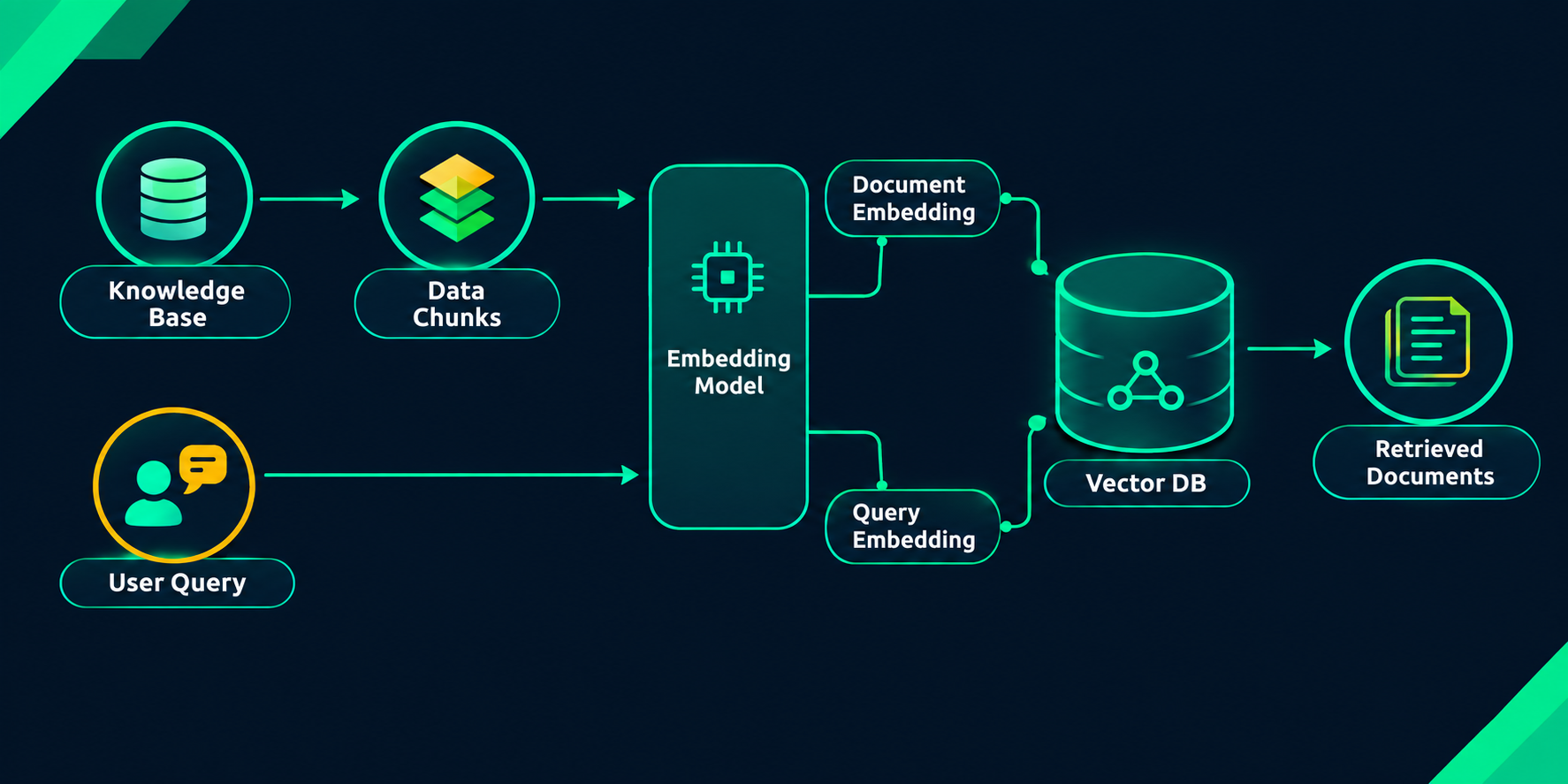
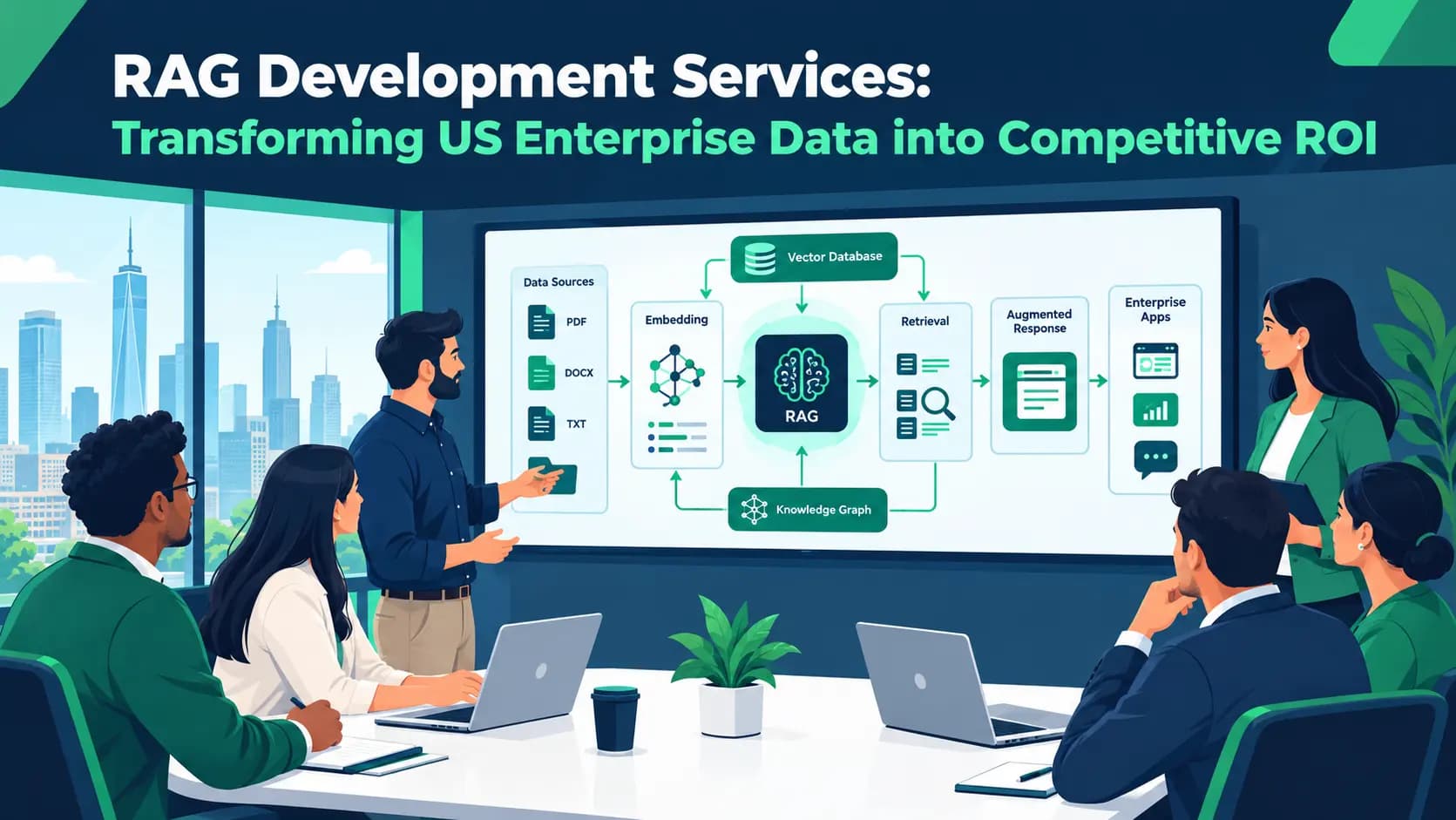
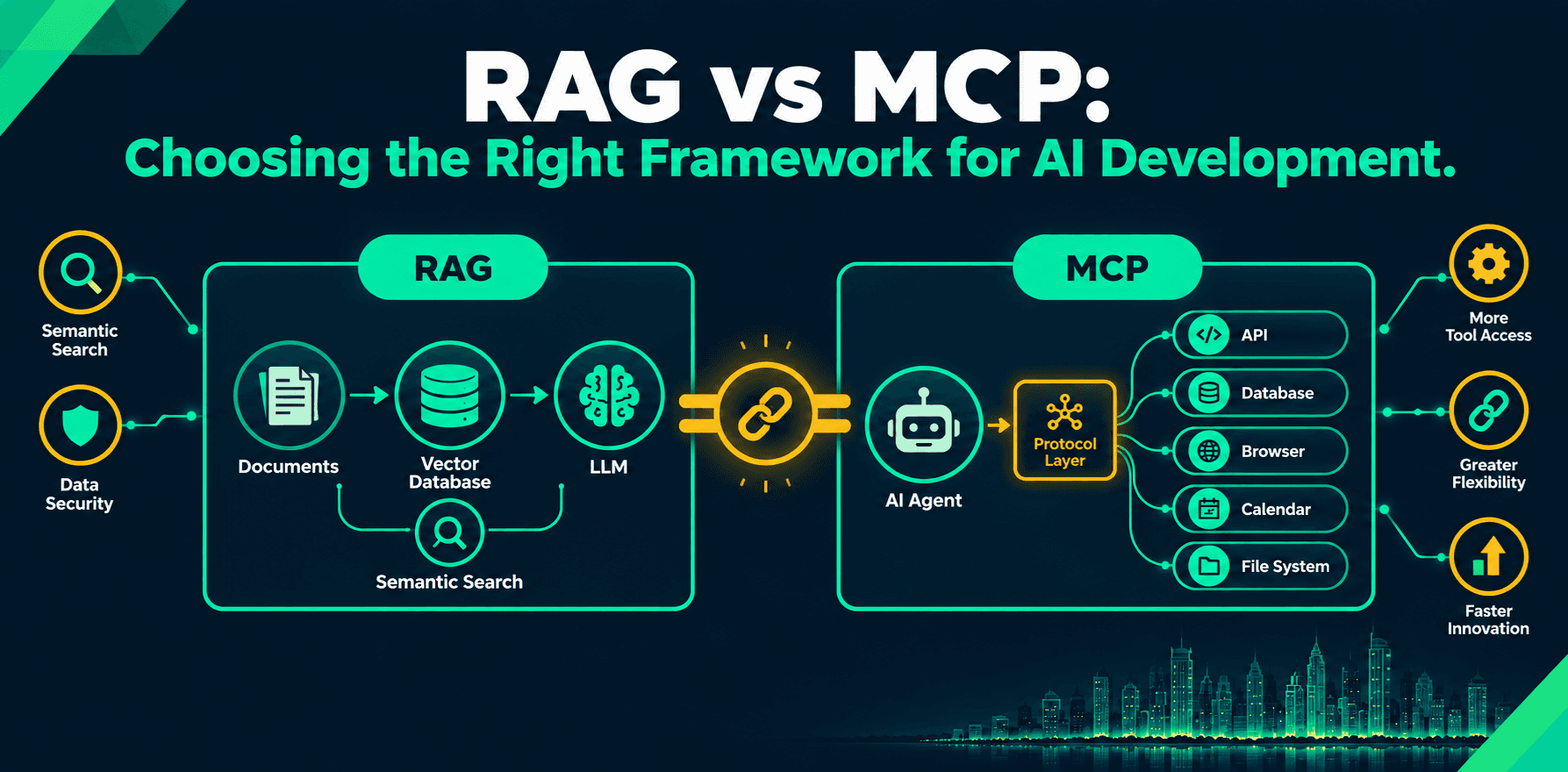
The pipeline looks like this in practice. Your documents, whether that is product documentation, internal policies, knowledge base articles, research papers, or any corpus relevant to the application, are broken into smaller chunks and converted into vector embeddings. These embeddings capture the semantic meaning of the content rather than just the literal words. They are stored in a vector database.
When a user submits a query, the system converts that query into an embedding and runs a semantic search against the vector database. The chunks whose embeddings are most similar to the query embedding come back as results. Those chunks get injected into the model's context window alongside the original query. The model generates a response grounded in the retrieved content.
The practical effect is significant. Instead of a model guessing or hallucinating when asked specific questions about your business, it has the relevant content right there in its context and can reason over it directly.
This is why RAG has become the default architecture for enterprise knowledge applications. Customer support tools that need accurate product knowledge. Internal Q&A systems over large document libraries. Legal and compliance tools that need to surface specific policy content. Research assistants that synthesize information across large corpora.
Where RAG genuinely works well:
- Applications where answer quality depends on specific, curated internal knowledge
- Systems that need to surface accurate, up-to-date information from large document sets
- Use cases where the model's general training knowledge is insufficient or unreliable for the specific domain
- Any situation where you need to ground model responses in authoritative source material
Where RAG runs into limits:
RAG is a retrieval mechanism. It gives the model information to reason over. It does not give the model the ability to take actions, call live APIs, update records, check real-time data, or interact with external systems. If the application needs to do something rather than know something, RAG alone gets you halfway there at best.
For a deeper look at how RAG is being applied in enterprise contexts and what a well-structured pipeline delivers at scale, the patterns across different sectors illustrate where the architecture genuinely earns its complexity.
What MCP Is and Why It Exists
Model Context Protocol is a specification introduced by Anthropic that standardizes how AI models and agents connect to external tools and data sources.
Before MCP, connecting an AI agent to an external system meant building a custom integration for each tool. You wanted the agent to query your database? Custom connector. Search the web? Custom integration. Pull data from your CRM? Custom implementation. Every new tool meant new code, new maintenance overhead, and new edge cases to debug. In an enterprise environment with dozens of internal systems, this compounds quickly.
MCP addresses this by introducing a standard protocol layer. An MCP server exposes a set of tools, resources, and capabilities. An MCP client, which lives inside the AI host application, connects to the server and can discover and use those tools without requiring custom integration code for each one. The protocol handles the communication layer between the model and the external system.
The analogy that actually captures it: MCP is something like a USB standard for AI tool connectivity. Instead of building a different connector for every device, you build to the standard and anything that implements the standard works with anything else that implements it.
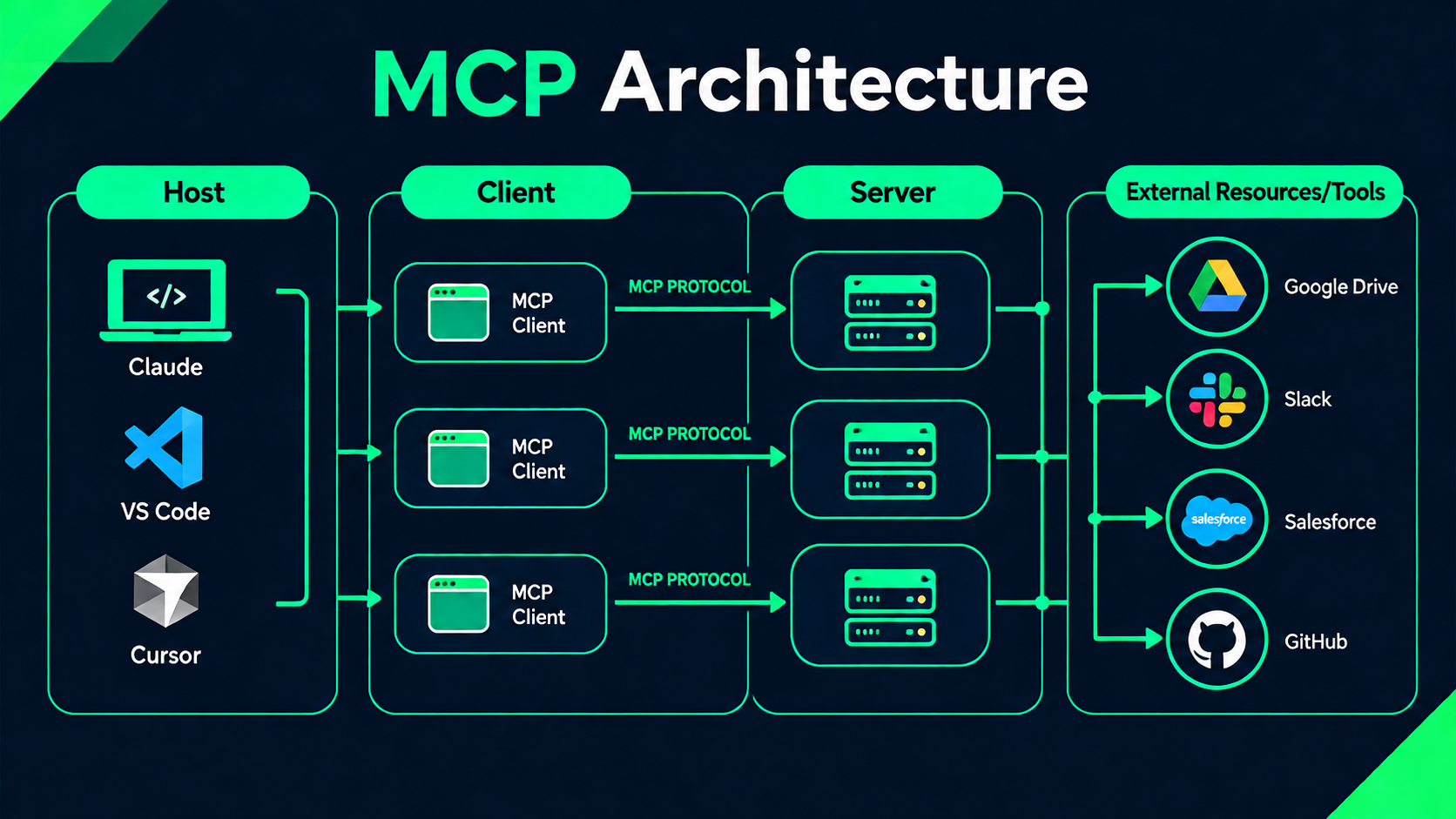
The three main components:
MCP hosts are the AI applications or agents that need to access external capabilities. A custom-built AI agent, an AI coding assistant, or an enterprise AI platform are all examples of MCP hosts.
MCP clients are built into the host application and manage the connection to MCP servers, handling the protocol communication layer.
MCP servers are lightweight services that expose specific capabilities. A team might build an MCP server that exposes their internal database, their project management tool, their calendar system, or their CRM. Any MCP-compatible agent can then connect to that server and use those capabilities without additional integration work.
Where MCP genuinely works well:
- AI agents that need to coordinate across multiple external systems
- Applications requiring real-time data that changes too frequently to live in a static knowledge base
- Workflows where the AI needs to take actions as part of completing a task
- Teams building on models that support MCP natively
- Enterprise environments where multiple internal tools need to be accessible to AI agents without custom integration work for each
Where MCP runs into limits:
MCP handles tool connectivity and action execution. It does not solve the knowledge retrieval problem. Connecting an agent to your internal systems via MCP does not give it semantic search over a large document corpus. It does not let it find the most relevant chunk from ten thousand policy documents in response to a nuanced query. For that, you still need RAG.
The Actual Difference Between RAG and MCP
The comparison that matters is not which is better. It is what each one does and what problem it was designed to solve.
RAG gives the model something to know. MCP gives the model something to do.
RAG is about knowledge retrieval. When a user asks a question, the system finds the most relevant content from your knowledge base and puts it in front of the model so the response is grounded in accurate, specific information rather than general training data.
MCP is about action capability. When an agent needs to complete a task that involves external systems, MCP provides the standardized connectivity layer so the agent can call tools, read live data, and take actions without custom integration code for each system it touches.
Both give the model access to something it would not otherwise have. The nature of that access is completely different.
When to Use RAG
The signal that you need RAG is straightforward: users are asking questions and the accuracy of the answers depends on specific knowledge that the base model does not have and cannot reliably infer.
Your internal product documentation. Your company's policies. Your proprietary research. Your historical case data. The model was not trained on any of it. Without a retrieval layer, it will either guess or refuse. With RAG, it can answer accurately from the right source material.
RAG is also the right architecture when the knowledge base is large enough that fitting all of it into a context window is impractical. A company with ten years of support documentation does not want to paste all of it into every query. RAG retrieves the relevant portion dynamically.
The signal that RAG alone is not enough: the application also needs to act. Check a live system. Trigger a workflow. Retrieve data that changes daily or hourly. For that, RAG needs a companion.
When to Use MCP
The signal that you need MCP is equally clear: the AI application needs to do something, not just answer something.
An agent that should check whether a product is in stock before answering a customer question needs live data access, not retrieved documents. An agent that should schedule a follow-up meeting needs to call a calendar tool. An agent that should update a customer record after a support interaction needs write access to a CRM.
MCP provides the connectivity layer for all of this through a standard protocol rather than custom integration code.
The signal that MCP alone is not enough: the agent also needs to reason over a large, specific knowledge base. Tool connectivity does not give the agent semantic search. Connecting to your database via MCP lets the agent query structured data. It does not let it find the most relevant policy document in response to a nuanced question. For that, you still need RAG.
For a broader view of how agentic AI is evolving in 2026 and what that means for the architecture decisions teams are making right now, the shift toward multi-tool, multi-step agent workflows changes what a complete architecture needs to include.
When You Need Both
This is where most serious production applications end up.
An AI agent that can act but cannot reason accurately over your internal knowledge base is half a system. An AI that answers questions well from your documents but cannot access live data or take actions is the other half. For applications that genuinely need both, RAG and MCP are not alternatives. They are layers.
A practical example that illustrates this clearly. An enterprise AI assistant for a sales team might need to:
Answer questions about products, pricing, and standard terms accurately. That requires RAG over internal documentation. Check live inventory or CRM status before committing to an answer. That requires an MCP tool call to the relevant system. Draft and schedule follow-up communications. That requires MCP connectivity to email and calendar tools. Surface relevant case studies or proposals from a large document library. That requires RAG retrieval again.
None of these requirements conflict with each other. They need different components working together. The RAG layer handles knowledge retrieval. The MCP layer handles tool connectivity and action execution. The agent coordinates between them based on what the current task requires.
Building an AI agent that combines these layers well requires thinking through the architecture before writing any code. The retrieval design, the tool permission model, and the way the agent decides when to retrieve versus when to act all need to be considered together from the start rather than bolted together after the fact.
A Real Example: Jarvis
Toadster's Jarvis project is a concrete illustration of how RAG fits into a production AI system.
Jarvis required the ability to surface relevant, accurate information from a specific knowledge base in response to user queries. The retrieval requirement, grounding the model's responses in curated internal knowledge rather than relying on general training data, is exactly the problem RAG is designed to solve. The vector retrieval layer allowed the system to find and inject the most relevant content at query time, producing responses that were specific, accurate, and grounded in the right source material rather than approximations from general training.
As agentic requirements grow alongside retrieval ones in systems like this, the architecture naturally extends to incorporate MCP-style tool connectivity for the action-taking layer, keeping the two concerns cleanly separated while allowing them to work together.
Mistakes Worth Avoiding
A few patterns come up repeatedly when teams are making these architecture decisions for the first time.
Treating RAG as a search engine. RAG is not just search with an LLM on top. The retrieval step surfaces relevant content, but the model still needs to reason over it usefully. Poorly chunked documents, weak embeddings, or low-quality retrieval produces confident-sounding but wrong answers. The retrieval quality matters as much as the model quality.
Treating MCP as a complete agent architecture. MCP handles connectivity. It does not handle agent reasoning, memory, planning, escalation logic, or oversight. Connecting an agent to ten tools via MCP does not make it a well-designed agent. The tool connectivity is one layer. The agent architecture that decides when and how to use those tools is another, equally important layer.
Building custom tool integrations when MCP already exists. Teams that build bespoke integrations for every external tool create maintenance overhead that grows with every new tool added. Where MCP servers can be built for internal systems, the standardized protocol layer reduces that overhead significantly and makes the system easier to extend.
Skipping retrieval quality evaluation. The most common RAG failure is not technical. It is deploying a system without checking whether the retrieved chunks are actually relevant and accurate for the queries the system will face in production. Retrieval quality needs to be measured and iterated on before users ever touch the system.
How Toadster Approaches This
Toadster's RAG development work focuses on retrieval pipelines that are accurate, maintainable, and designed around the specific knowledge architecture of the application rather than a generic template applied to every project.
That means thinking carefully about chunking strategy, embedding model selection, vector database design, retrieval evaluation methodology, and how the retrieval layer connects cleanly to the rest of the application stack. For applications that also require agentic capabilities, building agentic AI systems that integrate retrieval and tool connectivity into a coherent architecture means treating both as first-class design requirements rather than separate workstreams that get connected at the end.
The right architecture depends on what the application actually needs to do. If you are working through that question and want a technical perspective on which components make sense for your specific use case, talk to the team.
FAQ
Does RAG work with any LLM or only specific models?
RAG is model-agnostic at the retrieval layer. The vector search and document retrieval happen before the model is involved, so in principle you can pair a RAG pipeline with any LLM that accepts a context window. In practice, the quality of RAG outputs varies significantly depending on how well the model reasons over retrieved content. Models that follow instructions precisely and handle long contexts reliably tend to produce better RAG responses than models that drift or ignore retrieved chunks when generating answers.
How does a vector database work and do I need to build one from scratch?
A vector database stores document chunks as numerical representations called embeddings, which capture the semantic meaning of the text rather than just the literal words. When a query comes in, it is converted into the same embedding format and the database returns the chunks whose embeddings are mathematically closest to the query embedding. You do not need to build one from scratch. Established options like Pinecone, Weaviate, Qdrant, and pgvector handle this infrastructure. The more consequential decisions are which embedding model you use, how you chunk your documents, and how you evaluate whether the retrieval is actually surfacing the right content.
What happens when the retrieved documents contain conflicting information?
This is one of the more underappreciated failure modes in RAG systems. When the retrieval layer surfaces chunks that contradict each other, the model has to arbitrate between them, and it does not always do this reliably or transparently. A well-designed RAG system addresses this through careful knowledge base curation, deduplication during ingestion, metadata filtering that allows the retrieval layer to prefer authoritative or recent sources, and evaluation processes that specifically test for conflicting retrieval scenarios before the system goes anywhere near production.
Is MCP secure for enterprise use and how do you control what the agent can access?
MCP does not define security controls itself. Security is the responsibility of the MCP server implementation and the host application. In an enterprise context this means implementing authentication between the MCP client and server, scoping tool permissions so the agent can only access what it actually needs, logging all tool calls for audit purposes, and building approval gates for high-consequence actions. An MCP server that exposes internal systems should be treated with the same security discipline as any other integration in the stack.
How do you keep a RAG knowledge base accurate as documents change over time?
This is the operational challenge most teams underestimate during the planning phase. Documents get updated, policies change, products are deprecated. A RAG system with a stale knowledge base will surface outdated information with the same confidence as current information, which is arguably worse than no retrieval at all. Good knowledge base hygiene requires a defined ingestion pipeline that picks up document changes automatically or on a regular schedule, timestamp metadata the retrieval layer can use to prefer recent content, and a periodic audit process that identifies and removes outdated or superseded chunks before they cause problems.
What is the difference between MCP and traditional API integration for AI agents?
A traditional API integration for an AI agent requires custom code to connect the agent to each external system, handle authentication, parse responses, and manage errors. Every new tool means new integration work and new maintenance surface area. MCP standardizes this by defining a common protocol that both the agent and the external tool implement. Once a system has an MCP server, any MCP-compatible agent can connect to it without additional custom integration. The practical benefit is significantly reduced development and maintenance overhead when an agent needs to work across multiple tools, which is the typical situation in any real enterprise deployment.
FAQ
Do I need RAG, MCP, or both for my AI application?
It depends on what your application needs to do. If it needs to answer questions accurately from internal documents, you need RAG. If it needs to take actions across external tools and live systems, you need MCP. If it needs to do both, which most serious production applications do, you need both working together as separate layers in the same architecture.
Will RAG stop my AI from hallucinating?
RAG significantly reduces hallucination on knowledge-specific questions by grounding the model's response in retrieved source material. But it does not eliminate hallucination entirely. If the retrieval layer surfaces the wrong chunks, the model will reason confidently over incorrect content. Retrieval quality is as important as model quality. A well-built RAG system with poor chunking or weak embeddings can produce worse results than no RAG at all.
How often does the RAG knowledge base need to be updated?
As often as your source documents change. A stale knowledge base is one of the most common RAG failure modes in production. If a policy changes and the knowledge base is not updated, the system will surface the old policy with full confidence. Good RAG systems have automated ingestion pipelines that pick up document changes on a defined schedule rather than relying on manual updates.
Is MCP ready for production enterprise use?
MCP is production-ready for teams building on models that support it natively, and the ecosystem of MCP servers is growing quickly. The protocol itself is stable. What requires careful design is the security and permission layer around it. MCP does not enforce access controls by default. Enterprise deployments need authentication between client and server, scoped tool permissions, and audit logging built into the MCP server implementation.
What makes a RAG pipeline fail in production?
Usually one of three things. Poor chunking strategy that breaks documents in ways that lose context. Weak or mismatched embeddings that retrieve semantically irrelevant content. And no retrieval evaluation before launch, meaning the team discovers the system surfaces wrong or outdated content only after users hit it. Most RAG failures are retrieval quality problems, not model problems.
How long does it take to build a production RAG system?
A basic RAG proof of concept can be running in days. A production-grade system with proper chunking, embedding model selection, retrieval evaluation, knowledge base hygiene, monitoring, and integration into the broader application stack takes weeks to months depending on the size of the knowledge base, the complexity of the queries it needs to handle, and how rigorously the retrieval quality is tested before launch.